

Key Takeaways
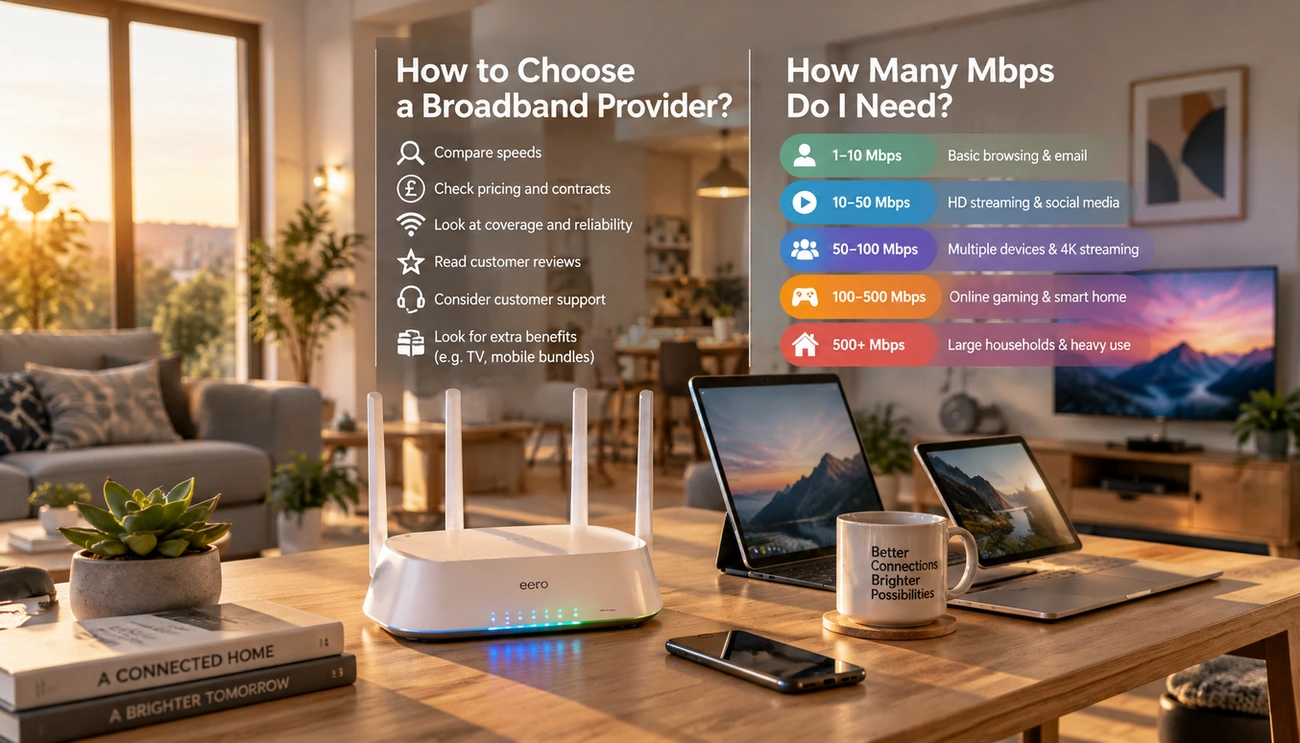
- A good internet speed for most UK households is 50-100 Mbps, while larger households may need 150 Mbps or more.
- Factors affecting internet performance include router quality, connection method, and distance from the router.
- Multiple users conducting high-demand activities like streaming or gaming require higher speeds, often 25-50 Mbps per person.
- Check broadband provider reliability and availability based on your postcode to ensure adequate service.
- Watch for mid-contract price increases and consider upgrading speeds during your contract for better value.
What is a good internet speed when your family is streaming 4K content, gaming online, and working from home at once? The answer isn’t straightforward.
Here’s the reality: a good download speed for most UK homes is 50–100 Mbps.
But larger households or 4K fans may prefer 150 Mbps or more. Download speeds of at least 100 Mbps are considered fast enough to handle nearly any online activity.
Choosing the right broadband speed depends on your household size, usage habits, and connected devices. We’ll help you understand the internet speed you need in this guide. We’ll also show you how to choose the best broadband provider for your needs.
Understanding Your Internet Speed Requirements
Understanding your online activities helps you determine what internet speed you need. General browsing and email just need 1 Mbps, while streaming standard definition video needs 3-4 Mbps. High definition streaming jumps to 5-8 Mbps. 4K Ultra HD content just needs 25 Mbps per device. Video conferencing uses 1-6 Mbps depending on quality, and online gaming requires 3-4 Mbps.
The FCC raised its broadband measure in 2024 to 100 Mbps download and 20 Mbps upload speeds. This change reflects what modern households just need. Working from home requires 5-25 Mbps, but those figures represent single-device usage.
Internet consumption is cumulative. Multiple people streaming, gaming, or working at the same time means you’ll need to account for concurrent activities. A rule of thumb suggests calculating 25-50 Mbps per person in your household. A household with two 4K streams, a video call and online gaming could require 70-100 Mbps or more.
The average UK household now gets around 20 GB of traffic per day, up from 14 GB in 2023. Research shows the average home has 17 connected devices, and some surveys reach beyond 20 devices. Your broadband speed must support active use and background updates. It must also handle smart home devices and cloud backups at the same time.
Factors That Affect Your Internet Performance
Your router and connection method create the gap between what you pay for and what you receive. Wi-Fi delivers slower speeds than advertised, whilst Ethernet connections achieve near-advertised performance. Tests revealed download speeds of around 126 Mbps over Wi-Fi compared to 395 Mbps via Ethernet on a 400 Mbps plan. Ethernet cables Cat5e support speeds up to 1 Gbps, whilst Cat6a and Cat7 handle 10 Gbps or more.
Router age limits your broadband speed. Routers supporting only outdated wireless standards like 802.11n cap speeds around 150 Mbps even on faster plans. Most experts recommend replacing routers every two to three years if many devices connect. For light use, replace them every five years. Routers more than five years old lack modern features and wireless standards.
Physical placement matters. Distance from your router weakens signals, with throughput decreasing by one-third when you double the distance. Thick walls and metal surfaces block signals. Microwaves, cordless phones, and baby monitors interfere with Wi-Fi, especially on the 2.4 GHz frequency.
Network congestion slows speeds during peak hours between 7 and 11 PM on weekdays. Cable internet shares bandwidth throughout neighbourhoods and creates slowdowns when everyone streams at once. Fibre connections avoid this issue through dedicated lines.
Selecting the Best Broadband Provider for Your Needs
You need to check availability at your specific address to reveal which broadband options you can access. Enter your postcode into comparison tools to find providers serving your location. Coverage varies between streets, even within the same neighbourhood.
Multiple networks deliver broadband across the UK. Openreach reaches around 63% of homes with full fibre. Virgin Media covers about 63% through its own network. CityFibre serves roughly 30% of UK premises, and smaller alternative networks focus on specific cities or rural areas. Providers like Sky and Vodafone partner with both Openreach and CityFibre, expanding their coverage footprint.
Reliability is different between providers. Utility Warehouse guides with 93% of customers reporting zero outages, followed by BT at 81% and TalkTalk at 77%. Community Fibre saw 31% of users experiencing outages.
Watch for mid-contract price increases. Ofcom now requires providers to state price rises in pounds and pence before sign-up. Some providers avoid mid-contract hikes, making them better value over typical two-year terms despite higher original costs.
You can upgrade speeds during your contract. Most providers allow mid-contract upgrades without cancellation fees, though you’ll start a new contract period at adjusted pricing.
Conclusion
You now know how to choose the right internet speed and broadband provider for your household. Start by calculating your needs based on concurrent device usage and activities. Most UK homes thrive with 50-100 Mbps. Larger households benefit from 150 Mbps or more.
Check availability at your postcode and compare reliability ratings. Watch for mid-contract price increases. The right broadband choice balances speed and value for your requirements.
Related links