


Estimated reading time: 14 minutes
Takeaways
- Choosing the best broadband provider London can be challenging due to the postcode lottery affecting availability and speed options.
- Understanding network types like Openreach, Virgin Media, and alt-nets such as Community Fibre is essential for optimal connections.
- Consider your household’s internet usage to avoid overspending on unnecessary speeds; 1,000Mbps might be overkill for many.
- Look for symmetrical upload speeds, especially if you work from home, as alt-nets often provide this advantage.
- Utilize the One-Touch Switch system for seamless provider changes without downtime, ensuring reliable internet access.
Contents
- Summary
- Why Your London Postcode Dictates Your Provider: The Openreach vs. Alt-net Divide
- Finding Your Speed Sweet Spot: Why 1,000Mbps Might Be Overkill for Your Flat
- The ‘Big Four’ in London: Reviewing BT, Sky, Virgin, and TalkTalk
- The London Specials: Why Community Fibre and Hyperoptic Often Win
- Avoiding the ‘Mid-Contract Sting’: Hidden Costs and Social Tariffs
- The ‘Zero Downtime’ Switching Guide: Moving Providers Without the Stress
- Your 3-Step Action Plan for a Faster London Home
- Frequently Asked Questions
Living in a major tech capital shouldn’t mean staring at a spinning loading wheel during a Zoom call from your Zone 2 flat. According to Ofcom data, many Londoners suffer from patchy connections despite paying premium prices. Searching for the Best Broadband Provider London often reveals a confusing landscape where the term “Superfast” is usually just clever marketing for outdated copper wires.
Finding your ideal connection actually depends on the infamous “postcode lottery.” Industry reports show that two flats sitting on the exact same Islington street can have vastly different options from UK broadband providers (often grouped as “broadband providers uk” on comparison sites). While your neighbour enjoys lightning-fast speeds perfect for 4K streaming, you might be stuck with a sluggish connection simply because different companies own the cables under your respective pavements.
Navigating this maze of internet suppliers uk requires understanding the three main network types operating across the city. You will choose between the traditional Openreach infrastructure, Virgin Media’s independent lines, or a growing wave of “Alt-nets”—alternative networks building hyper-fast, localised fibre connections directly to London properties. Understanding these distinct pathways is the secret to finally fixing your home Wi-Fi.
Summary
London broadband is a postcode lottery: your speeds and providers depend on whether your address has FTTP on Openreach, Virgin Media’s cable, or alt-nets like Community Fibre/Hyperoptic. Check availability first, then pick a right-sized speed tier and look for symmetrical uploads if you work from home. Alt-nets often deliver better value, symmetric speeds, and price-locks; among big brands, Virgin leads on downloads while Sky is strong on service over Openreach. Avoid mid-contract CPI+3.9% hikes, consider social tariffs, and use One-Touch Switch with a short dual-running period to change providers without downtime.

Why Your London Postcode Dictates Your Provider: The Openreach vs. Alt-net Divide
Living in a Victorian conversion shouldn’t mean constant buffering, but your connection type matters more than a provider’s brand. Many Londoners rely on FTTC (Fibre to the Cabinet). This acts like a fast motorway that suddenly becomes a bumpy gravel road of old copper wires for the final stretch to your door. For a flawless connection, you need FTTP (Fibre to the Premises). This is true full fibre—a smooth glass motorway running straight into your home.
Because full fibre coverage in London postcodes varies, finding the best UK broadband ISP depends entirely on the physical infrastructure hiding under your street:
- Openreach (Sky, BT): The traditional network, currently upgrading from copper to true fibre.
- Virgin Media: Operates separate cables boasting fast downloads, but generally slower uploads.
- London Alt-nets (Community Fibre, Hyperoptic): When weighing Openreach vs independent fibre networks, these dedicated building connections often provide “Symmetrical Speeds.” This means your upload speed is just as fast as your download speed, keeping your work-from-home Zoom calls completely glitch-free.
Before locking into a standard deal with a broadband provider London, always check your postcode directly on alt-net websites to see if your apartment block has been wired up. While you compare, assemble a quick list of broadband providers uk so you can check pricing, contract terms, and availability side by side. Once you know which physical cables actually reach your doorstep, the next step is figuring out how much speed you really need to pay for without overspending.
Finding Your Speed Sweet Spot: Why 1,000Mbps Might Be Overkill for Your Flat
Providers constantly push 1,000Mbps (Gigabit) packages, but paying for top-tier speeds you can’t actually use is a common London pitfall. Think of your bandwidth as a water pipe. A wider pipe allows more data to flow at once, filling multiple buckets (devices) simultaneously. If you only stream Netflix, paying for an industrial-sized pipe won’t make your movie play any faster—it just wastes money.
Matching your package to your household’s device count prevents this overspending. You also need low latency (ping)—the tiny delay that causes glitches in fast-paced online games. Use this realistic breakdown to find your sweet spot:
- 1-2 People (50-100Mbps): Perfect for general browsing, smart TVs, and video calls.
- 3-4 People (150-300Mbps): Ideal for busy flatshares running multiple 4K streams simultaneously.
- Heavy Gamers (500Mbps+): Only necessary for massive game downloads or heavily connected smart homes.
Answering the common question of ‘who is the best internet service provider in my area’ means checking if they offer symmetrical upload speeds for remote work, ensuring large cloud backups won’t freeze your flatmate’s Zoom presentation. By cross-referencing these speed tiers with the best broadband reviews and broader broadband reviews, you can confidently navigate the market for broadband provider London.
The ‘Big Four’ in London: Reviewing BT, Sky, Virgin, and TalkTalk
Among the massive broadband companies uk residents recognise, the market splits into two distinct camps. Virgin Media operates an independent cable network, historically offering faster top speeds. Meanwhile, BT, Sky, and TalkTalk all share the same underlying Openreach infrastructure. Switching between these three hoping for a dramatic speed boost often disappoints, because you are essentially renting the exact same physical connection with a different company’s logo on your monthly bill.
If you’re chasing the best broadband ISP UK for raw speed, Virgin often leads on downloads, while Openreach-based brands can excel on stability and value depending on your street.
Blazing speeds mean nothing if your internet drops during a work call and nobody answers the phone. To locate the best broadband customer service, ignore the flashy marketing and check the Ofcom Quality of Service reports. This official watchdog data measures actual fault handling, revealing that Sky consistently ranks near the top for quick complaint resolutions, while TalkTalk often struggles to keep up. Trusting these objective broadband provider reviews ensures you aren’t left stranded during frustrating local outages.
Thick walls in Victorian flats introduce another massive hurdle: urban signal interference and mesh Wi-Fi solutions are the modern answer to this headache. Standard single routers fail to push signals through dense brick or compete with the dozens of overlapping networks broadcast by your neighbours. Mesh technology fixes these frustrating dead zones by placing multiple smart hubs around your home, bouncing a seamless, uninterrupted signal right into your kitchen or loft.
While national giants provide convenient TV bundles, they aren’t your only choice. London’s density means smaller challengers have quietly laid their own superior fibre networks right under our streets. Bypassing the mainstream names is often the secret to unlocking cheaper, highly reliable internet for a broadband provider london.
The London Specials: Why Community Fibre and Hyperoptic Often Win
Tucked beneath the streets of specific London boroughs, a quiet broadband revolution is happening. Hyper-local providers—often called “alt-nets”—are bypassing traditional national infrastructure entirely to lay their own dedicated fibre cables. By focusing exclusively on dense urban areas rather than the whole country, these independent networks offer the cheapest fibre deals in the capital without sacrificing reliability or customer support.
Compared with many broadband suppliers in the UK, these alt-nets focus on urban density and pass the savings on to residents.
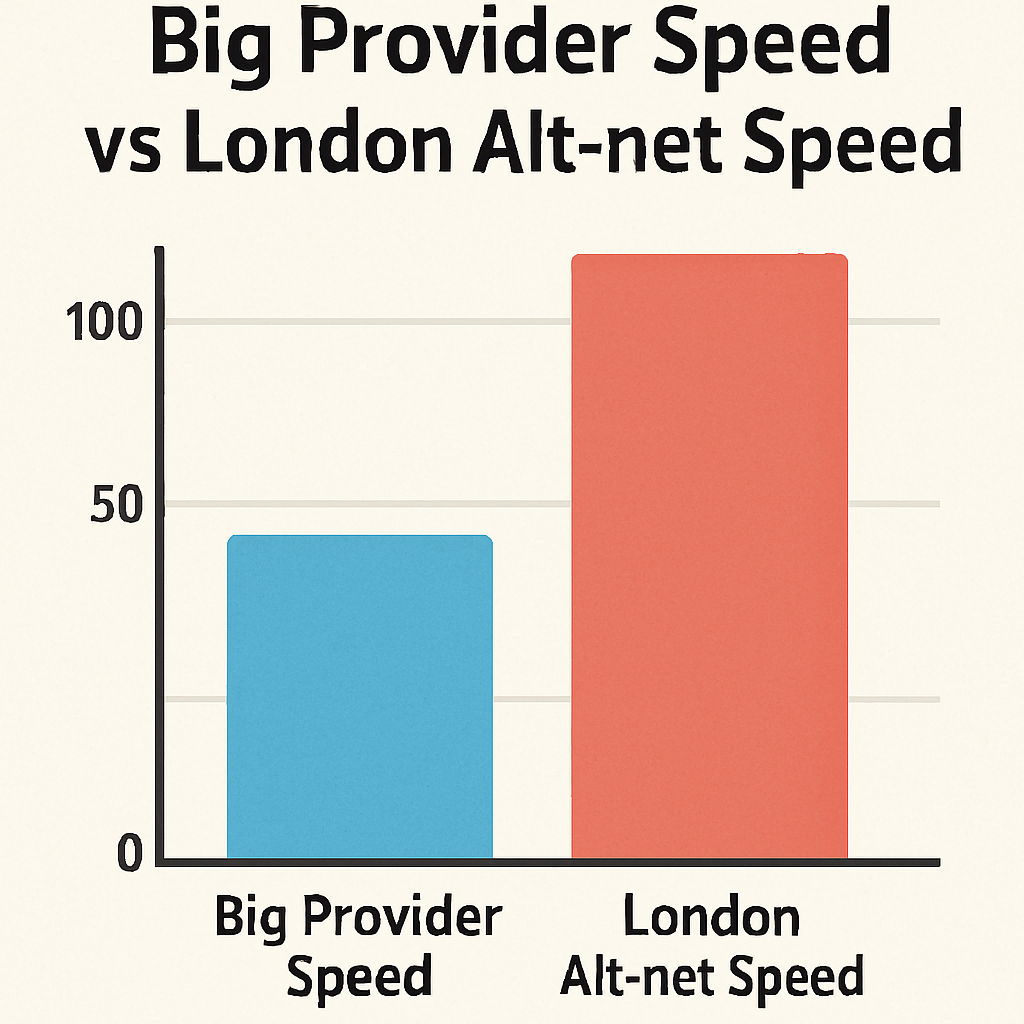
What makes these challengers so attractive isn’t just their symmetric speeds, which guarantee your uploads are just as fast as your downloads for flawless remote working. It’s their refreshing approach to billing. Many alt-nets provide strict Price-Lock Guarantees. This means the monthly fee you agree to on day one remains identical throughout your entire contract, completely shielding you from nasty surprise bill hikes.
When comparing London altnet providers, two heavyweights consistently dominate the conversation for high-rise flats and Victorian conversions alike:
- Community Fibre: Regularly tops Community Fibre vs Hyperoptic reviews for sheer value, though their physical network is strictly limited to certain London boroughs.
- Hyperoptic: Specialises in pre-wiring large apartment complexes, frequently offering highly flexible one-month rolling contracts with zero installation fees.
Before getting too excited, remember to check your exact postcode, because these hyper-local networks are literally laid street-by-street. If your specific building isn’t connected yet, you might still have to rely on mainstream giants to get online. Unfortunately, sticking with national brands often requires navigating tricky contractual fine print for a broadband provider london.
Avoiding the ‘Mid-Contract Sting’: Hidden Costs and Social Tariffs
Signing up for a cheap deal feels great until April arrives. Mainstream providers usually include annual price adjustments in their contracts, tying hikes to the CPI (Consumer Price Index)—a measure of inflation—plus an extra 3.9%. Avoiding high mid-contract price rises requires vigilance. Master the ‘Cancellation Window’ hack: if your provider increases prices beyond what was stated in your agreed terms, Ofcom rules grant you a 30-day window to switch penalty-free.
Heavily discounted packages exist but remain largely hidden by the big brands. These social tariffs for low-income households can save eligible Londoners up to £200 annually, and checking independent broadband reviews reveals the most reliable options available today:
- Community Fibre Essential: £12.50/month (35Mbps) for a wide range of benefit claimants.
- BT Home Essentials: £15/month (36Mbps) for Universal Credit or Pension Credit recipients.
- Virgin Media Essential: £12.50/month (15Mbps) exclusively for Universal Credit claimants.
Protecting your budget is merely the first step. Once you’ve secured a fair, price-locked contract, your biggest fear is likely losing your connection while changing companies. Fortunately, the transition is completely seamless.
The ‘Zero Downtime’ Switching Guide: Moving Providers Without the Stress
Mastering the process of switching internet providers without downtime used to involve stressful gaps in service, leaving many Londoners relying on mobile hotspots during work calls. Thankfully, the new “One-Touch Switch” system eliminates this anxiety entirely. You simply order your new package, and that provider legally handles the entire breakup with your current supplier behind the scenes.
Before triggering this seamless transition, mapping your specific local options is crucial. Learning exactly how to check fibre optic availability by postcode prevents delays, as London’s digital infrastructure changes dramatically between neighbouring streets. Once you secure a match, you will likely wonder: how long does broadband installation take? For a standard apartment, an engineer generally completes the physical setup and gets you online in under two hours.
To guarantee absolute uninterrupted access, request a short “dual-running period” when booking your upgrade. This temporary overlap keeps your old connection active for a few days after the new router arrives, acting as a vital safety net just in case building access issues stall your engineer. With these protective measures firmly in place, you are ready to execute an action plan for a faster London home.
Your 3-Step Action Plan for a Faster London Home
Navigating the maze of London internet doesn’t have to mean settling for buffering Netflix or overpaying out of habit. You now have the tools to bypass confusing marketing and pinpoint the best broadband provider London has to offer for your exact street. It’s time to stop paying the silent “loyalty tax” to major names.
Before browsing another list of UK broadband options, complete this switching checklist before finding broadband provider london:
- Check your postcode: Run a 30-second search specifically for London alt-nets.
- Audit your usage: Count your active devices and buy the speed you actually need to stop overpaying.
- Negotiate: Use independent broadband reviews and local alt-net pricing as leverage with your current provider.
Start with that quick postcode check today to see immediate results. Once you harness the power of local full-fibre competition in your borough, you can ensure a reliable connection that properly supports your home and work needs.
Frequently Asked Questions
Question: Why does my London postcode determine which broadband providers and speeds I can get?
Because different companies own different physical cables beneath your street and even your building, availability varies address by address. Openreach (used by BT, Sky, TalkTalk) is still part copper in many areas (FTTC), which slows the “last stretch,” while Virgin Media runs its own separate cable network. Alt-nets like Community Fibre and Hyperoptic install full fibre directly into specific buildings (FTTP), often with symmetric upload/download speeds. Two flats on the same road can therefore have completely different options and performance depending on who has wired that exact property.
Question: Do I really need 1,000Mbps in a London flat, and how do I choose the right speed?
Gigabit is often overkill. Match speed to how many people and devices you have, and consider upload needs and latency. As a rule of thumb:
- 1–2 people: 50–100Mbps for browsing, smart TVs, video calls
- 3–4 people: 150–300Mbps for multiple 4K streams
- Heavy gamers/smart homes: 500Mbps+ for large downloads and many devices
- If you work from home, look for symmetric uploads (alt-nets excel here) so cloud backups and Zoom calls don’t clash.
Question: Among BT, Sky, Virgin, and TalkTalk, who’s “best” in London?
It depends on your street and priorities. Virgin often leads on raw download speed thanks to its own network. BT, Sky, and TalkTalk share Openreach, so switching among them rarely changes your line speed; differences show up more in price and service. Ofcom’s Quality of Service reports consistently put Sky near the top for resolving issues, while TalkTalk often lags. Also remember Wi‑Fi matters: thick Victorian walls can defeat a single router—mesh systems help eliminate in‑flat dead zones.
Question: What are London “alt-nets” like Community Fibre and Hyperoptic, and why might they be better?
Alt-nets are independent, hyper‑local full‑fibre networks built building‑by‑building in dense areas. They often offer:
- Symmetrical speeds (fast uploads and downloads) ideal for remote work
- Strong value and price‑lock guarantees (no CPI+3.9% surprises mid‑contract)
- Flexible terms (e.g., Hyperoptic’s rolling contracts, zero install fees in many pre‑wired blocks)
- Community Fibre often wins on price/value where available; Hyperoptic shines in large apartment buildings. Always check your exact postcode, as coverage is street‑ and building‑specific.
Question: How do I protect my budget and switch without downtime?
Watch for CPI+3.9% mid‑contract rises from big brands. If increases exceed what your contract allows, Ofcom gives you a 30‑day penalty‑free cancellation window. If you’re eligible, consider social tariffs to cut costs: Community Fibre Essential (~£12.50/35Mbps), BT Home Essentials (~£15/36Mbps), and Virgin Media Essential (~£12.50/15Mbps). When changing providers, the One‑Touch Switch system means your new provider handles the entire handover. Ask for a short dual‑running period to overlap services, and expect typical apartment installations to complete in under two hours.
Question: How do I quickly check which networks actually reach my exact flat?
Start with postcode lookups, then drill down to your specific building. Check hyper‑local alt‑nets first (Community Fibre, Hyperoptic), because their coverage is building‑by‑building. Next, see if Virgin Media’s separate cable network serves your address. Finally, check Openreach availability (via BT/Sky/TalkTalk) and confirm whether it’s FTTP (full fibre) or FTTC (part‑copper). Once you know what physically reaches your door, compare speed tiers, uploads (look for symmetric if you WFH), contract terms, and price‑locks. This order avoids overpaying for copper when full fibre might be quietly available in your block.
Question: What’s the real‑world difference between FTTC, FTTP, and Virgin’s cable?
FTTC (Openreach) is “fibre to the cabinet,” then old copper for the last stretch—like a motorway that turns into gravel near your home, limiting speed and stability. FTTP (Openreach or alt‑nets) is true full fibre into your premises—the “glass motorway” end‑to‑end—delivering higher, more consistent speeds. Virgin uses its own cable network, typically excellent for downloads but usually slower on uploads than full‑fibre alt‑nets, which often offer symmetrical speeds. For remote work and cloud tasks, FTTP with symmetric uploads is the most future‑proof.
Question: My speeds look fine on paper, but video calls still glitch. Will a faster package fix it?
Not necessarily. Many London flats have thick walls and heavy Wi‑Fi congestion, so the bottleneck is often in‑home wireless, not the line. Mesh Wi‑Fi systems solve dead zones by using multiple hubs to blanket your flat, which is far more effective than a single router. Also check upload speed and latency: asymmetrical lines can choke when backups or large files saturate uploads. If you work from home, prioritise symmetric full fibre and add mesh to stabilise coverage through Victorian brick.
Question: I’m renting or might move within a year—what contract types make sense?
Look for flexibility and price certainty. Hyperoptic frequently offers one‑month rolling contracts in pre‑wired buildings, and many alt‑nets provide price‑lock guarantees (no CPI+3.9% hikes). If you must use a mainstream provider, read the CPI clause carefully and diarise your Ofcom 30‑day cancellation window if prices rise beyond your terms. When switching, use One‑Touch Switch and request a short dual‑running period to avoid downtime during move‑out/move‑in overlaps.
Question: What if my building isn’t wired for full fibre or an alt‑net yet?
You’ll likely choose between Virgin’s cable (if available) or Openreach FTTC. Pick a speed tier that matches your household, and mitigate in‑flat issues with mesh Wi‑Fi to improve reliability. Keep contracts sensible in length so you can upgrade to FTTP or an alt‑net when your street is eventually wired, and watch for mid‑contract price clauses so you’re not locked into avoidable hikes.
Related links
See how Broadband Freedom can help you, click here to check your postcode