
Estimated reading time: 13 minutes
Takeaways
- 100Mbps broadband is ideal for UK households, supporting multiple HD streams and video calls without the need for costly gigabit plans.
- Families often overestimate their speed needs and can benefit from understanding bandwidth usage for devices.
- FTTP connections provide more reliable internet speeds compared to FTTC, especially during peak usage times.
- Typical costs for 100Mbps plans range from £25 to £35 per month; compare packages carefully to avoid overpaying.
- Check contract end dates, run speed tests, and negotiate with providers to secure the best value 100Mbps deal.
Contents
- Summary
- Deciphering the ‘Water Pipe’: What 100Mbps Actually Means for Your Devices
- Can Your Family Handle It? Testing 100Mbps Against 4K Netflix and Zoom
- The ‘Driveway’ Difference: Why Full Fibre (FTTP) Beats Old Copper (FTTC)
- Choosing Your Provider: Navigating M125, BT, and Sky Packages
- Fixing the ‘Zoom Freeze’: Why Your 100Mbps Feels Like 10Mbps
- Your Switching Strategy: Getting the Best 100Mbps Deal Today
- Q&A
You’ve seen the flashy television adverts pushing “Gigabit” high-speed internet, promising to solve all your household connection woes. But does the average home actually need to pay a premium for 1,000 Megabits per second (Mbps) when 100mbps broadband in the UK often covers everyday needs? Many families shell out top dollar for speeds they will never truly use, simply because they fear the dreaded buffering wheel on movie night.
Think of your home connection like a car’s speedometer. Just as 70mph is a sensible speed limit for cruising down the motorway, 100Mbps broadband in the UK acts as the perfect data speed limit for everyday life. According to recent data from Ofcom, this baseline easily supports multiple people streaming BBC iPlayer and joining video calls simultaneously without a single stutter. If you’re searching for 100mbps broadband in the UK, this balanced tier often hits the sweet spot for value and performance.
Before renewing an expensive contract, it pays to understand exactly what this capacity can handle. Navigating a smart broadband comparison UK search often reveals this mid-tier option as the “Goldilocks” choice for standard families. Knowing how many smart TVs and phones this connection can juggle ensures you stop overpaying for numbers you don’t actually need.
Summary
100Mbps broadband is a practical sweet spot for most UK households, comfortably handling multiple HD streams, video calls, and everyday browsing without paying gigabit premiums. Real-world performance depends heavily on last‑mile infrastructure (FTTP beats FTTC) and in‑home setup, especially Wi‑Fi placement and latency. When comparing deals, focus on clear mid‑tier packages like Virgin M125, BT Full Fibre 100, or Sky Superfast, avoid Wi‑Fi‑only (mobile) substitutes, and expect typical costs around £25–£35 per month. To get the best value, check coverage, run a broadband speed test, note your contract end date, and negotiate with retentions before switching.
Deciphering the ‘Water Pipe’: What 100Mbps Actually Means for Your Devices
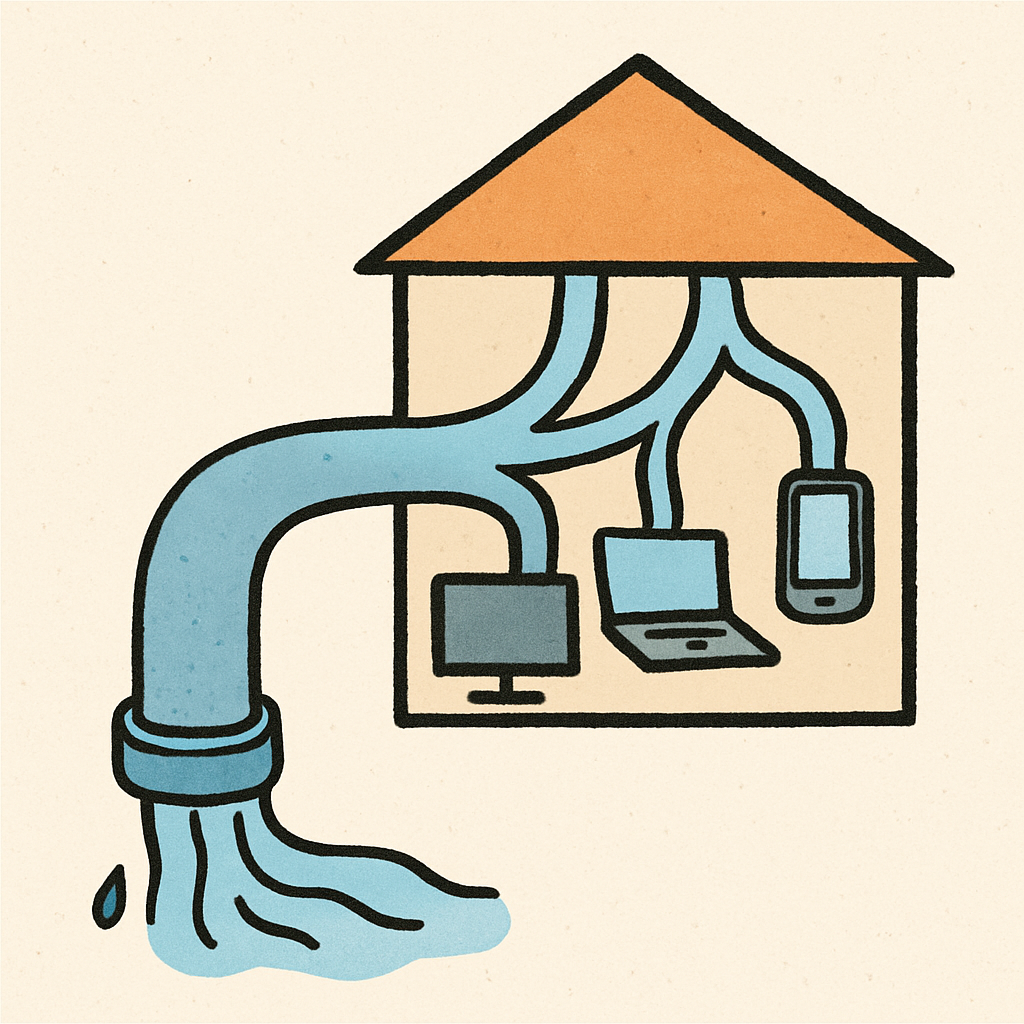
Imagine your home’s broadband connection is the main water pipe supplying your house. When you pay for a 100 mbps internet speed package, you are essentially securing a pipe of a specific width. This total flow is shared across every smart gadget connected to your router on a typical 100mbps broadband connection, rather than giving each tablet or television its own full-speed lane.
Turning on the kitchen tap while someone is showering instantly drops the overall water pressure. This perfectly describes how bandwidth behaves in a busy household. If one person is streaming BBC iPlayer in the living room, they consume part of the available flow, leaving slightly less capacity when someone else starts scrolling through TikTok upstairs.
A common point of confusion is the difference between Megabits (Mbps) for speed and Megabytes (MB) for file sizes. Because eight bits make one byte, a 100Mbps connection actually moves about 12.5 Megabytes of data every second. This translates to real-world download times of roughly five minutes for a full HD movie, while a standard video stream only sips a tiny fraction of your overall pipe.
Knowing how this capacity is divided helps you avoid overpaying for unnecessary broadband upgrades. Determining whether this capacity suits your household requires looking at everyday digital habits.
Can Your Family Handle It? Testing 100Mbps Against 4K Netflix and Zoom
The “Zoom Freeze” during an important work meeting is a modern nightmare, leaving many wondering: is 100Mbps fast enough for working from home? The answer depends entirely on what the rest of your household is doing. Not all internet tasks use your broadband equally. Sending a basic text email is a “data-light” activity, like turning on a dripping tap. Conversely, streaming ultra-high-definition television is “data-heavy,” acting more like an open fire hydrant. Understanding this difference is the secret to keeping the peace.
Matching this package to your family involves understanding the “speed cost” of everyday habits. Here is what different apps actually drain from your bandwidth:
- 4K Netflix: 25Mbps
- HD iPlayer: 5Mbps
- Zoom Call: 3Mbps
- Spotify: 0.5Mbps
As you can see, streaming 4K video on multiple devices is the biggest drain on your bandwidth. Meanwhile, the broadband speed requirements for online gaming are surprisingly low—often under 5Mbps to actually play a match against friends.
Doing the maths reveals why 100Mbps is the “Goldilocks” speed for a typical UK household of two to four people. You could easily have an office video call, two HD television shows, and music playing simultaneously, and still have over half your capacity left over. However, even with enough speed on paper, your connection might still stutter if the physical wires leading to your street are outdated.
The ‘Driveway’ Difference: Why Full Fibre (FTTP) Beats Old Copper (FTTC)
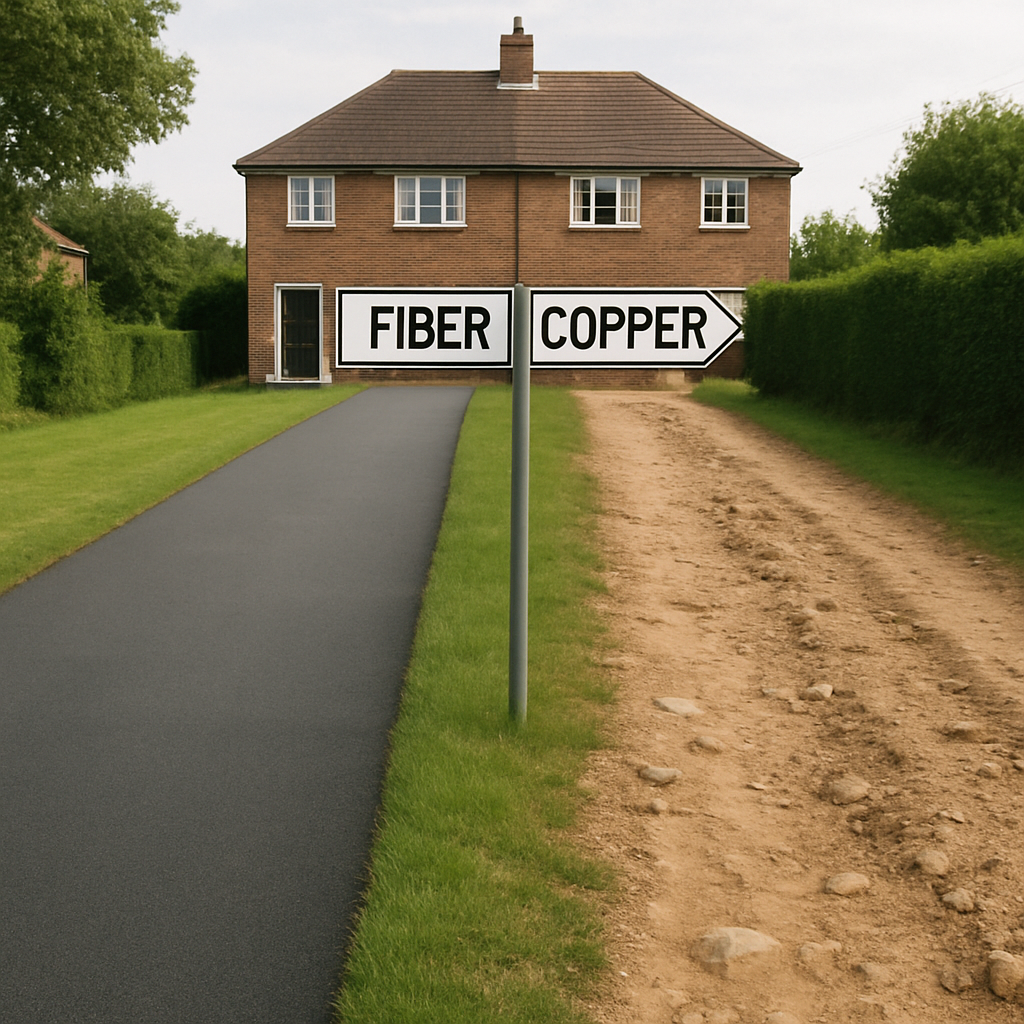
Have you ever noticed your internet slowing down just as the neighbours get home from work? This familiar frustration usually comes down to “The Last Mile” of your connection. Think of the internet as a super-fast motorway travelling to the green cabinet on your street. With “Fibre to the Cabinet” (FTTC), your data speeds down that motorway, but finishes the journey to your house on old copper telephone wires.
That bumpy dirt track of copper is exactly why speeds drop when everyone logs on at once. The difference between FTTC and FTTP connections is entirely about replacing this final stretch. “Full Fibre” (FTTP, or Fibre to the Premises) paves a smooth, dedicated fibre cable straight through your front door. This guarantees your speeds stay perfectly stable, completely unaffected by how many shows the rest of the street is streaming.
Securing a reliable connection starts with knowing what cables actually reach your property. You can easily see if your street is ready for an upgrade by checking the Openreach network coverage map UK online. If your home is eligible, any sensible full fibre broadband guide will recommend making the switch for total peace of mind. Understanding the infrastructure outside prepares you to compare provider packages effectively.
Choosing Your Provider: Navigating M125, BT, and Sky Packages
Shopping for UK internet packages often feels like learning a new language. When adverts promise “Average speeds,” UK rules dictate they must state the speed you will actually get during busy evening hours, not just when the network is quiet. Most providers share the standard Openreach network you learned about earlier, while Virgin uses its own separate TV cable network (called DOCSIS) to deliver your household data.
Comparing major internet service providers at this speed tier reveals three primary choices and popular 100mbps plans:
- Virgin Media’s M125 broadband: Uses their dedicated DOCSIS cable network, delivering around 132Mbps average speeds on an 18-month contract.
- BT Full Fibre 100: Uses Openreach’s smooth fibre straight to your door for highly reliable 150Mbps speeds, usually locking into a 24-month contract.
- Sky Superfast: Also runs on Openreach but often relies on the older copper wires leading to your house, averaging 61Mbps on an 18-month contract.
Before signing a contract, always watch out for confusing marketing terms. Make sure you are paying for a hardwired home connection rather than Wi-Fi only packages (often marketed as wifi only packages), which are essentially just mobile phone SIM cards hiding inside a plastic plug-in box. Even after choosing the perfect home package, your devices might still struggle to load webpages due to internal home setup issues.
Fixing the ‘Zoom Freeze’: Why Your 100Mbps Feels Like 10Mbps
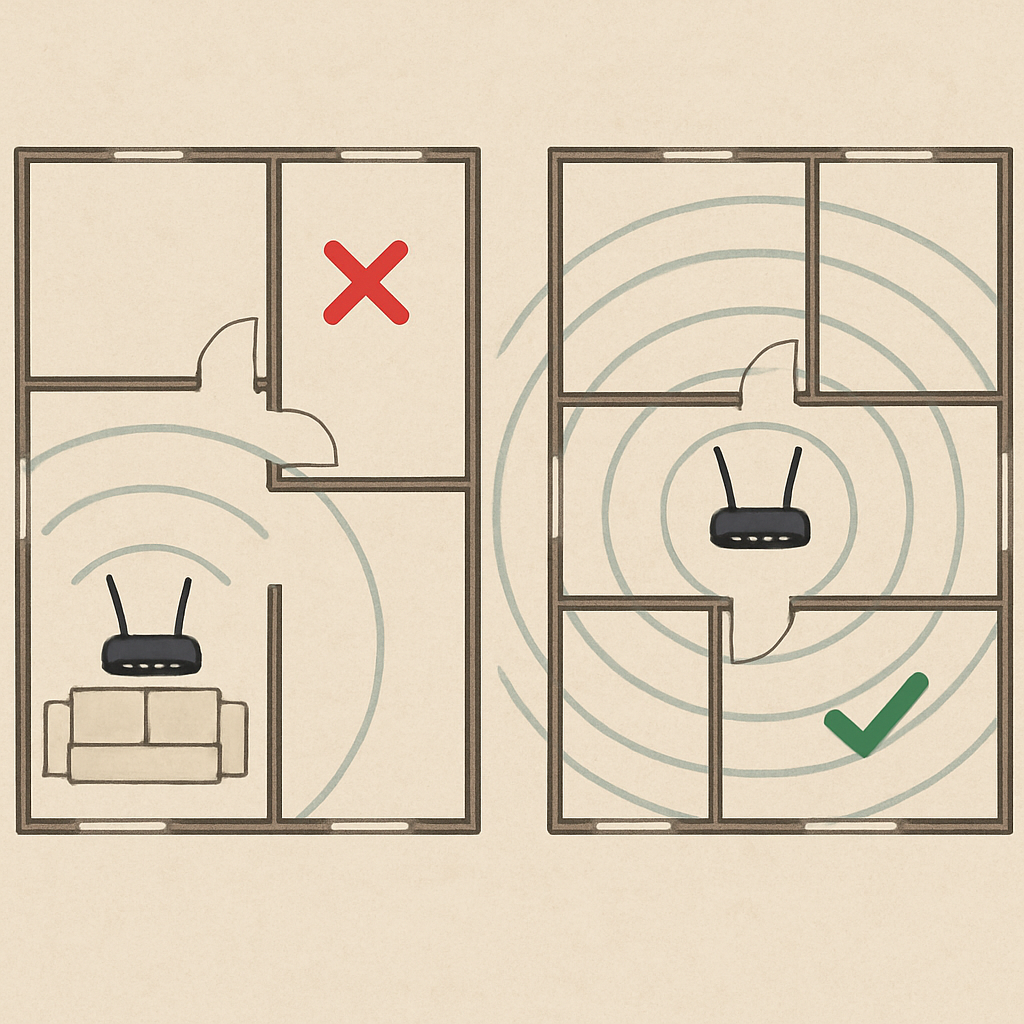
That dreaded “Your internet connection is unstable” message during a crucial video call is incredibly frustrating, especially when you pay for a fast package. The truth is, running a broadband speed test right next to your router might show a perfect 100Mbps, but that speed rarely reaches your upstairs bedroom. In a typical UK home, your signal battles three invisible enemies: distance, physical blockages like thick Victorian brick walls, and electronic interference from everyday appliances like microwaves or baby monitors.
Sometimes the issue isn’t a lack of speed, but a delay in the conversation. This delay is known as latency and ping—essentially your internet’s reaction time. High latency is exactly what causes the dreaded “Zoom freeze” or choppy audio, even if your overall connection is technically fast. Because everyday household electronics create invisible traffic jams in the air, the impact of Wi-Fi router placement on speeds cannot be overstated.
Fixing these headaches often requires zero money, just a little strategic rearranging. Start by getting your router out from behind the sofa and placing it up high in a central hallway. For devices that absolutely cannot drop a connection, like a work computer, you can use an Ethernet bypass—simply plugging a cheap network cable directly from the laptop to the router to skip the Wi‑Fi entirely. With your home setup running smoothly, you can confidently secure the best broadband deal.
Your Switching Strategy: Getting the Best 100Mbps Deal Today
You no longer need to guess if your Wi‑Fi is truly capable. You now understand that 100Mbps is the ultimate sweet spot—giving your family plenty of room for simultaneous Netflix streaming, Zoom calls, and gaming. Better yet, the average monthly cost of superfast fibre sits comfortably between £25 and £35, meaning you never have to overpay for unused speed again.
If your old plan has expired, you are likely paying a loyalty penalty. Under UK rules, you usually only need to give 30 days’ notice to leave. Before starting a new broadband comparison, use this checklist to secure the best 100Mbps fibre broadband deal in the UK:
- Find your contract end date.
- Run a broadband speed test.
- Call the ‘Retentions’ department.
When you compare, look for 100mbps broadband UK offers and clear 100mbps plans from trusted brands, and consider how these stack up against broader broadband comparison UK results and other uk internet packages. Start with step one today to see immediate results. Taking control of your household utilities minimizes buffering issues, ensuring a reliable internet connection, household peace of mind, and potentially lower monthly bills.
Q&A
Question: Is 100Mbps really enough for a typical UK household?
Yes. For most homes with two to four people, 100Mbps comfortably handles multiple HD streams, video calls, browsing, and gaming without paying gigabit premiums. The heaviest drain is 4K video (about 25Mbps per stream), but even with an office Zoom call (≈3Mbps), two HD iPlayer streams (≈10Mbps), and music (≈0.5Mbps), you’d still have plenty of headroom. If your experience is poor despite “enough speed on paper,” the culprit is usually the last‑mile connection (FTTC vs FTTP) or in‑home Wi‑Fi setup, not the 100Mbps tier itself.
Question: What does 100Mbps actually mean in practice—how fast are downloads?
Broadband speeds are measured in Megabits per second (Mbps), while files are measured in Megabytes (MB). Eight bits make one byte, so 100Mbps transfers about 12.5MB every second. In real terms, that’s roughly five minutes to download a full HD movie. Remember the “water pipe” analogy: that total flow is shared across all your devices, so multiple active gadgets divide the available bandwidth.
Question: Why do evenings feel slower, and how does FTTP beat FTTC?
With FTTC, data travels at high speed to your street cabinet over fibre, then finishes the “last mile” to your home on older copper wires—the bumpy “dirt track” that can struggle when many neighbours are online. FTTP replaces that final stretch with fibre directly to your premises, giving stable, consistent speeds that aren’t affected by how many shows the rest of the street is streaming. Check the Openreach coverage map to see if your property can upgrade; if eligible, moving to full fibre is the most reliable fix.
Question: Which 100Mbps-ish packages should I compare, and what should I avoid?
At this tier, three common options are:
- Virgin Media M125: Runs on Virgin’s own DOCSIS cable network; around 132Mbps average on an 18‑month contract.
- BT Full Fibre 100: Uses Openreach FTTP for highly reliable 150Mbps, typically on a 24‑month contract.
- Sky Superfast: Often relies on older copper for the last stretch via Openreach, averaging about 61Mbps on an 18‑month contract. Watch out for “Wi‑Fi‑only” packages (4G/5G SIM in a router) marketed like home broadband; they’re mobile substitutes and not the same as a hardwired home connection.
Question: My speed test shows 100Mbps near the router—why does Zoom still freeze upstairs?
That’s usually Wi‑Fi, not the broadband line. Signal weakens with distance, thick walls, and interference (microwaves, baby monitors). Latency (ping)—your connection’s reaction time—can cause choppy video even when headline speed is fine. Fixes: place the router high and centrally (not behind furniture), minimise interference, and use an Ethernet cable for mission‑critical devices like a work laptop. If you’re on FTTC, upgrading to FTTP also boosts stability.
Question: How do I get the best value on a 100Mbps plan right now?
Expect to pay about £25–£35 per month for superfast fibre. Avoid the “loyalty penalty” by checking your contract end date—under UK rules you typically need only 30 days’ notice to leave. Then: 1) find your end date, 2) run a speed test, 3) call your provider’s retentions team to negotiate. Compare clear mid‑tier offers (e.g., Virgin M125, BT Full Fibre 100, Sky Superfast), verify coverage (especially FTTP availability), and only pay for the capacity you actually use.
Question: How many streams or devices can 100Mbps realistically support at once?
Quite a lot for a typical home. A 4K Netflix stream uses about 25Mbps, HD iPlayer around 5Mbps, a Zoom call roughly 3Mbps, and Spotify about 0.5Mbps. In practice, 100Mbps can handle, for example, one 4K stream (25), two HD streams (10), a Zoom call (3), and music (0.5) with plenty of headroom left. Even several HD streams and multiple video calls can coexist comfortably. The main caveat is Wi‑Fi quality—poor placement, thick walls, or interference can make a solid 100Mbps line feel sluggish in certain rooms.
Question: What matters more for video calls and gaming: speed or latency?
Latency often matters more. Headline “speed” (bandwidth) determines how much data you can move at once, but latency (ping) is your connection’s reaction time. Zoom freezes, choppy audio, and laggy gameplay frequently stem from high latency or Wi‑Fi interference, not a lack of raw speed. Fixes include placing the router high and centrally, reducing interference (microwaves, baby monitors), and using Ethernet for critical devices. Upgrading from FTTC to FTTP also improves stability and latency.
Question: If both are advertised around 100Mbps, why is FTTP still better than FTTC?
Reliability and consistency. FTTC uses fibre to the street cabinet but old copper for the final stretch, which is more prone to slowdowns when the neighbourhood is busy. FTTP runs fibre right to your home, keeping speeds stable and less affected by evening congestion. If your address is FTTP‑ready (check the Openreach coverage map), switching delivers steadier speeds and better real‑time performance for calls and streaming.
Question: Which UK packages should I compare around this tier, and what should I avoid?
The common options are:
- Virgin Media M125: On Virgin’s DOCSIS cable network; around 132Mbps average, typically 18‑month contracts.
- BT Full Fibre 100: On Openreach FTTP; highly reliable ~150Mbps, often 24‑month contracts.
- Sky Superfast: Uses Openreach and often relies on copper for the last mile; averages about 61Mbps on 18‑month contracts. Avoid “Wi‑Fi‑only” or mobile‑style plans (4G/5G SIM in a router) marketed like home broadband—they’re not the same as a hardwired connection and can be more variable.
Question: How do I get the best value on a 100Mbps plan right now?
Aim for £25–£35 per month for superfast fibre. Beat the “loyalty penalty” by: 1) finding your contract end date (you usually only need 30 days’ notice to leave), 2) running a speed test, and 3) calling your provider’s retentions team to negotiate. Then compare clear mid‑tier offers (e.g., Virgin M125, BT Full Fibre 100, Sky Superfast), verify FTTP availability for better stability, and avoid paying for gigabit speeds you won’t use.
Related links
See how Broadband Freedom can help you, click here to check your postcode