

Estimated reading time: 8 minutes
Is your internet grinding to a halt just as you sit down to watch Netflix? That frustrating evening slowdown happens in millions of UK homes. The surprising part is that a much faster, more reliable connection might already be available on your street, even if your current provider hasn’t told you about it. A quick look at a broadband coverage map UK or a broadband speed map (sometimes called an internet map) can reveal whether faster options have quietly arrived.
Instead of just confirming your slow broadband, the goal is to discover the best internet you’re eligible for. If you’ve ever searched “how to find the best ISP in my area,” this guide will show you exactly how. This guide provides a clear, three-step method to uncover the actual speeds you could be getting and find out if a major upgrade is waiting for you right now.
Summary – Broadband Coverage Map UK
This guide helps you find the fastest broadband available at your address, not just confirm slow speeds. Start with a speed test, then use Ofcom’s checker to see whether full fibre (FTTP) is available versus older part-fibre or copper connections. Interpret results (look for Ultrafast/FTTP), consult rollout maps if full fibre isn’t live yet, and then shop by technology. Compare providers across Openreach-based ISPs, Virgin Media, and alternative networks, filtering deals by “Full Fibre/FTTP” to get the best speed and reliability. The Ofcom tool essentially acts as a nationwide broadband coverage map UK and UK fibre optic map (full fibre/FTTP) so you can quickly see what’s possible at your address.
Table of contents
- Summary – Broadband Coverage Map UK
- Step 1: How Fast is Your Internet Right Now?
- From Copper Wires to Full Fibre: What Broadband Types Can You Actually Get?
- Step 2: Use the Official Ofcom Checker to See Your True Potential
- Step 3: What to Do With Your Coverage Results
- How to Find the Best ISP For Your Newly Confirmed Speed
- Your Simple Plan for Faster, More Reliable Internet

Step 1: How Fast is Your Internet Right Now?
Before looking for a better deal, it helps to know what speed you’re currently getting. You can find this out with a free online speed test, which measures your connection in Megabits per second (Mbps). Think of it like water pressure for the internet—a higher Mbps number means more data can flow through the pipe at once. As a guide, streaming a 4K movie on Netflix needs around 25 Mbps.
Your test result will show two key numbers: download and upload speed. Download speed covers anything you receive from the internet, like watching a video or loading a webpage. Upload speed is for anything you send, like your camera feed on a Zoom call or posting photos online. With more of us working from home, a decent upload speed has become essential for clear, stutter-free video calls.
To check your speed, search online for “internet speed test”. For the most accurate result:
- Connect your computer directly to your router with a cable, if possible.
- Close any other apps and browser tabs that are using the internet.
- Run the test a couple of times to get a reliable average.
With these numbers in hand, you’re ready to find out if much faster broadband is available in your area—and to make sense of “high speed internet in my area” comparisons.
From Copper Wires to Full Fibre: What Broadband Types Can You Actually Get?
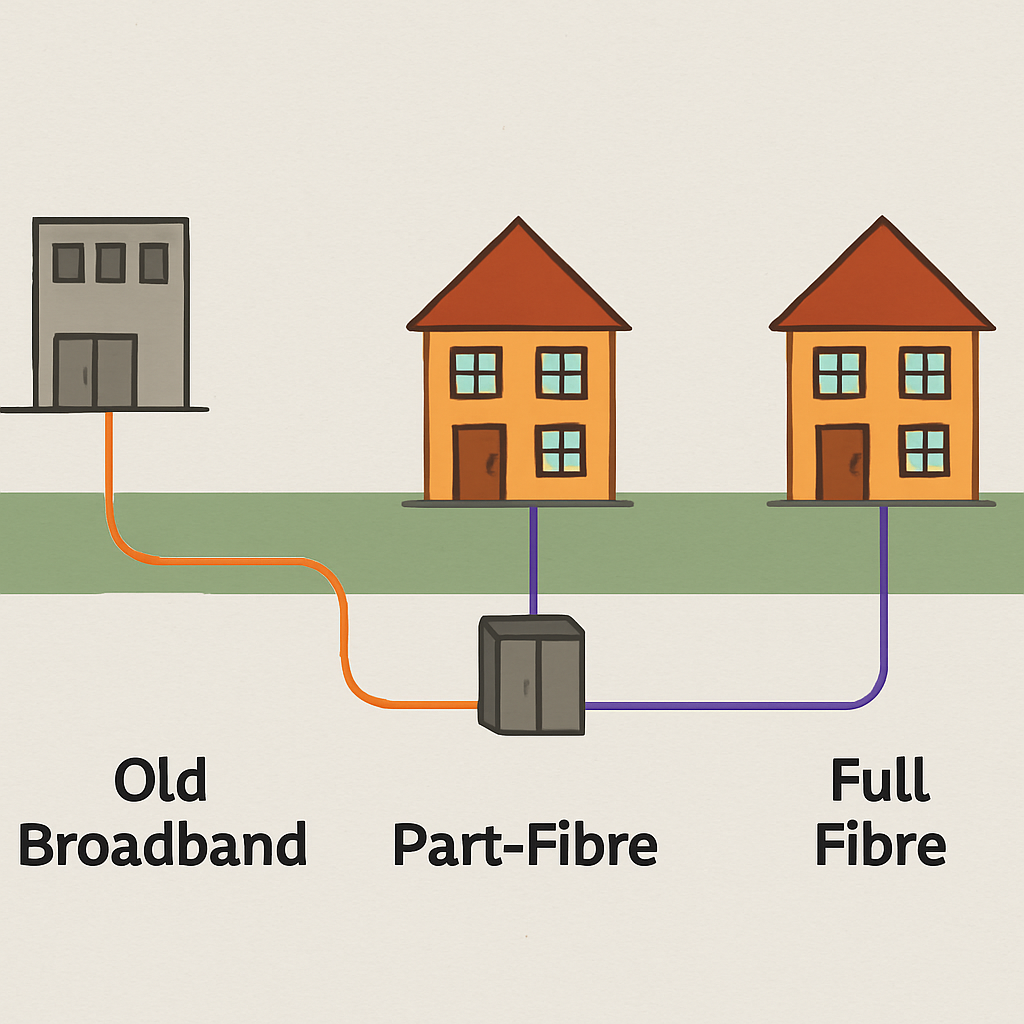
Ever wondered why your neighbour gets blistering-fast internet while you’re stuck with buffering? It all comes down to the physical cables connecting your home to the network. There are three main types of connection in the UK, and the one you have makes all the difference.
The oldest and slowest connections run entirely over old copper phone lines. A big step up from this is what most people have, often called part-fibre (or Fibre to the Cabinet/FTTC). Here, a fast fibre optic cable runs to a green cabinet on your street, but the final stretch to your house still uses that slow copper wire. It’s like taking a motorway but having to exit onto a bumpy country lane for the last mile of your journey.
The best connection you can get is full fibre (or Fibre to the Premises/FTTP). With this, the high-speed fibre optic cable runs directly into your home, completely replacing the old copper line. This extends the motorway right to your front door, delivering ultra-reliable, gigabit-capable speeds that don’t slow down, even when the whole street is online.
This difference between part-fibre and full fibre is the single biggest reason for the internet “postcode lottery.” The next step is to use an official checker to see your home’s true potential.
Step 2: Use the Official Ofcom Checker to See Your True Potential
While any provider’s website can check your postcode, the most reliable place to start is the official tool from Ofcom, the UK’s independent communications regulator. Unlike a provider’s site, which only shows what they can sell you, the Ofcom checker gives a complete, unbiased picture of every connection type available at your address. It effectively serves as a broadband coverage map UK and broadband speed map—a UK fibre optic map (full fibre/FTTP) or FTTP map that shows what’s truly live at your property.
Here’s how to use the Ofcom broadband checker to check your postcode for full fibre:
- Go to the Ofcom broadband and mobile checker website.
- Enter your postcode and select your exact address.
- Scroll down to the “Fixed broadband” results.
The results will show the top speeds you can get, from basic connections to “Ultrafast” full fibre. If it confirms that gigabit speeds are available, you know you have access to the best UK broadband available. It also doubles as a simple internet map for your postcode, so you can compare technologies with confidence. This knowledge puts you in control, armed with the facts before you even start looking at deals.
Step 3: What to Do With Your Coverage Results
The results page can feel technical, but it’s easy to decode. If you see the term ‘Ultrafast’ with ‘FTTP’ (Fibre to the Premises) next to it, you’ve hit the jackpot. This confirms you can get a top-tier full fibre connection. If the best you see is ‘Superfast’, your connection will still rely on older, slower copper phone lines for the final stretch to your home—good, but not the best available.
Finding that full fibre is ‘available’ means the network infrastructure has been built on your street, but you won’t get the faster speeds automatically. A network builder like Openreach or CityFibre has done the hard work; now you can choose a provider like BT, Sky, or Vodafone to sell you a service and get you connected.
If full fibre isn’t an option yet, you can often find clues about upgrades by checking the Openreach fibre rollout map online. You can also look at an FTTP map, a full fibre map, or a gigabit map from network builders to see when your area might be upgraded. While you wait, finding the best ‘Superfast’ deal is your next best option to get the fastest speed possible for now.
How to Find the Best ISP For Your Newly Confirmed Speed
Now that you know what technology is available, who do you buy it from? You might be surprised that many well-known providers—like BT, Sky, TalkTalk, and Plusnet—all use the same underlying network, built by Openreach. This means several different providers can offer you the exact same full fibre connection, allowing you to shop around for the best price on an identical service.
However, some major companies operate on their own separate networks. This is why questions about coverage from Virgin Media versus BT are so common; they are two entirely different systems. Additionally, a growing number of smaller independent builders, often called ‘Altnets’ (Alternative Networks), are installing their own fibre lines. These providers, such as Hyperoptic or Gigaclear, can sometimes be the best option for rural areas, so it’s worth checking them directly.
With this knowledge, you can use comparison websites far more effectively. Instead of just searching by provider, filter your results by the technology you now know you can get, such as ‘Full Fibre’ or ‘FTTP’. This ensures you see every company that can deliver top speeds to your door, letting you compare them on price, customer service, and contract length. Checking local ISP options and even an internet ISP in my area directory can help surface niche providers that serve specific postcodes.
Your Simple Plan for Faster, More Reliable Internet
Armed with this information, you can now confidently find the best ISP in your area and choose a service based on real technology, not just a headline price.
Your 3-Step Action Plan:
- Test your current speed to get a baseline.
- Check the Ofcom map to see the best technology at your address.
- Search for providers that offer that specific technology—this is how you uncover the best fibre broadband in my area from all available networks.
You are now an informed buyer, ready to find that digital motorway to your door.
Related links
See how Broadband Freedom can help you, click here to check your postcode