Amazon Streaming rebrands US ad-free Prime Video as Prime Video Ultra
Estimated reading time: 6 minutes
Key Takeaways
- Amazon streaming introduces Prime Video Ultra, replacing the former ad-free option with a price increase from $2.99 to $4.99 per month.
- This change brings the total cost for ad-free viewing to nearly $20 per month for standard Prime members.
- Prime Video Ultra offers enhanced features like 4K HDR video and Dolby Atmos sound, competing closely with Netflix’s offerings.
- Users should evaluate their viewing habits and hardware capacity before deciding if the upgrade is worth the extra cost.
- To manage subscriptions, users can easily switch tiers by accessing their account settings online.
Table of contents
If you want a good film experience, consider changing your plan on Amazon streaming. In this way, you won’t waste money on unnecessary items, and you can watch for prime video deals when they appear.
However, if you currently pay extra to keep adverts off your screen, prepare for your next bill to look different. In the larger Amazon streaming market, current subscribers are moving to a more expensive plan.
Following a trend set by Netflix and Disney+, this move transforms your standard “no-ads” toggle into a premium product. Come mid-year, Amazon rebrands US ad-free Prime Video option as Prime Video Ultra alongside a price increase.
Summary
Amazon is changing the name of its ad-free Prime Video option to Prime Video Ultra. The price will also go up from $2.99 per month to $4.99 per month. This means that for a regular Prime member, the total cost for ad-free viewing will be almost £20 per month. Ultra now has 4K HDR video and Dolby Atmos sound for ultra HD films. This puts Amazon close to Netflix’s top level, but at a slightly lower price.
Whether it’s worth it depends on your hardware and tolerance for ads – big-screen, home-theater users benefit most. This piece explains the new prices, what features you give up, and how to change your subscription. It also shows where to find Prime Video deals that can help with the price increase.
Decoding the Dollars: How Much More You’ll Pay for Prime Video Ultra
Keep an eye on your next credit card statement, because the era of simply paying one flat fee for everything is fading. Many companies are increasing prices. They are moving regular features to more expensive plans. This is called “subscription creep.”
Amazon is changing its ad-free option. It will now be part of a new package called “Prime Video Ultra.” This means you will have to pay more to keep the same experience you had before.
Here is how the maths shakes out if you want to avoid adverts entirely:
- Standard Prime Membership: Remains ~$14.99/month (now includes ads).
- Old Ad-Free Add-on: Previously cost an extra $2.99/month.
- New “Ultra” Tier: Now costs an extra $4.99/month, bringing your total monthly bill to nearly $20.
A £20 monthly fee may seem high, but it is still lower than what Netflix charges. Netflix’s plans cost over £22 for similar services. Paying more makes sense only if the picture looks better on your telly. This raises a question: does this “Ultra” label really improve your film night, or is it just a name?
Is ‘Ultra’ Worth the Extra Cash? Comparing 4K Quality vs. Basic Viewing
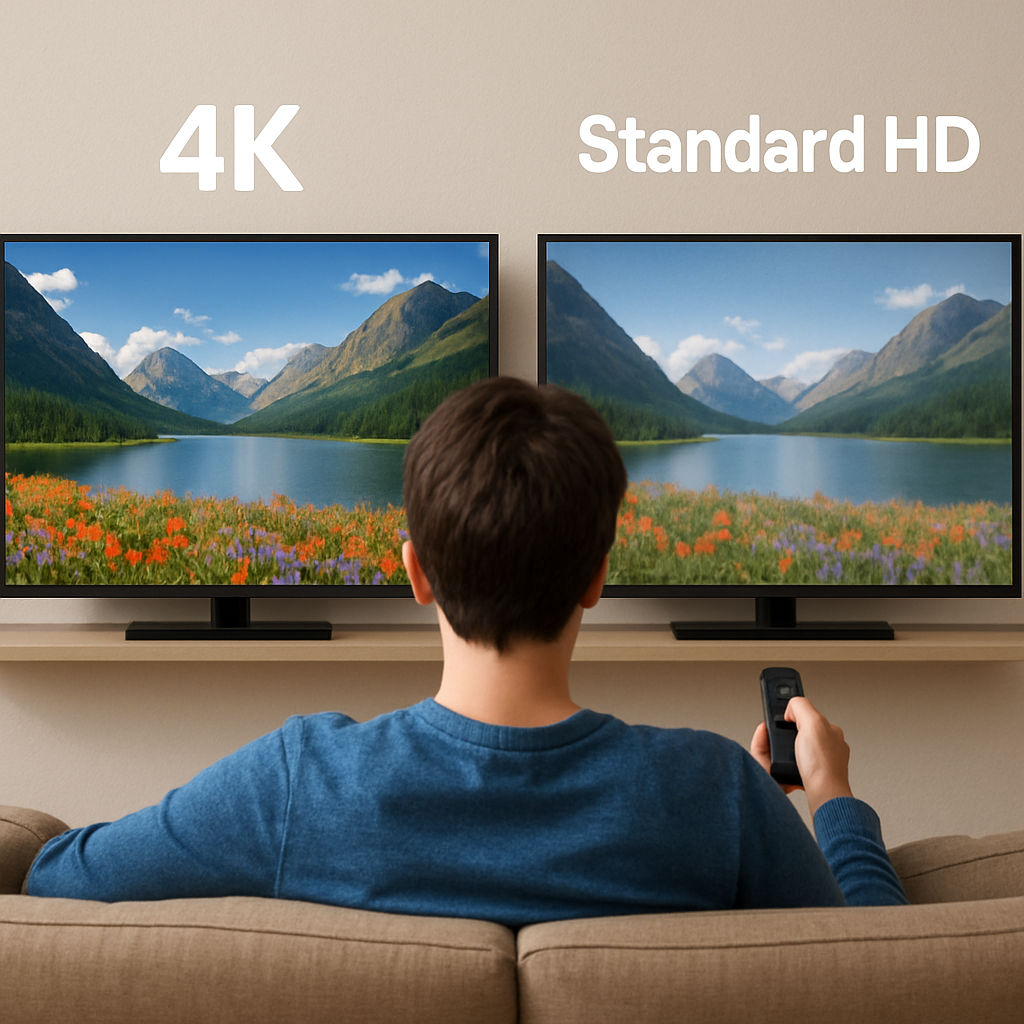
Paying that extra fee lets you use Prime Video Ultra 4K HDR features. It’s like putting on special glasses for your telly. While standard definition looks fine on a smartphone, the basic signal often appears slightly blurry on large, modern screens. This upgrade delivers four times the detail and significantly richer colours, ensuring that dark movie scenes look crisp and vibrant rather than appearing as a washed-out grey mess.
Sound quality also sees a major boost. The Dolby Atmos technology makes sound feel like it moves around your living room. It creates a 3D audio effect that feels like a real cinema. When you look at Prime Video Ultra and Netflix Premium, Amazon offers similar quality for a lower price each month. This is true if your speakers can handle the sound.
Your specific hardware should guide this money decision. If you mostly watch programmes on a tablet or don’t mind adverts, the better picture may not be worth the extra cost.
If you want a great film experience, you should change your plan. This way, you avoid paying for items you aren’t using.
Protect Your Budget: How to Update Your Subscription or Switch Tiers Today
Decide if the “Ultra” experience justifies the higher price tag or if ad breaks are a fair trade-off. Don’t wait for the new billing cycle to hit; take charge to manage Amazon Prime Video subscription settings immediately. To view your status or avoid ads on Prime Video 2024, follow these steps:
- Go to Account & Settings in your browser.
- Select Your Account under the profile menu.
- Click Manage Subscription to adjust your tier.
You can choose to save money by watching adverts or switch to Prime Video Ultra for better quality. Now, you are making a decision instead of just paying.
Frequently Asked Questions
Question: What is Prime Video Ultra, and what’s changing with my current plan?
Short answer: Prime Video Ultra is Amazon’s rebranded, premium ad-free tier for US subscribers. It replaces the previous “no-ads” add-on and officially rolls out around mid-year. Standard Prime Video (included with Prime at about $14.99/month) will now include ads by default.
Current ad-free subscribers will be moved to the Ultra plan. This plan is more expensive but offers benefits like 4K HDR video and Dolby Atmos audio.
Question: How much more will I pay for ad-free Prime Video now?
Short answer: The old ad-free add-on was $2.99/month. Prime Video Ultra is $4.99/month on top of a standard Prime membership (~$14.99/month), bringing your total to nearly $20/month. That’s about $2 more per month than before. Although there has been a price increase, Ultra still costs less than Netflix’s highest tier, which is now more than £22, while providing similar high-quality picture and sound.
Question: Is Prime Video Ultra worth it for me?
Short answer: It depends on your setup and tolerance for ads. If you have a big 4K TV and want great visuals, Ultra’s 4K HDR offers clearer details and brighter colours. Dolby Atmos gives you sound that feels like you are in a theatre. This setup is best for big-screen TV and home-theatre fans.
If you mainly watch on a phone or tablet, or don’t mind commercial breaks, the upgrade may not justify the higher bill.
Question: Do I need specific hardware to benefit from Ultra’s 4K HDR and Dolby Atmos?
Short answer: Yes—your equipment matters. To see meaningful gains, you’ll want a 4K/HDR-capable TV (modern large screens show the biggest improvement). For Atmos, you’ll need compatible speakers or a soundbar/receiver “that can handle the output.” Without suitable video or audio gear, Ultra’s advantages are limited.
Question: How do I switch tiers or manage my Prime Video subscription?
Short answer:
- Go to Account & Settings in your browser.
- Select Your Account under the profile menu.
- Click on “Manage Subscription” to change your plan. You can choose to see adverts to save money or select Prime Video Ultra for the best quality.
Related links