Full Fibre vs Standard Fibre vs ADSL (What You Actually Get at Home)
If you’ve ever shopped for broadband in the UK, you’ve probably seen “full fibre”, “fibre broadband”, and “ADSL” thrown around like they all mean the same thing. They don’t. And that confusion is exactly why people end up overpaying, or upgrading, and still thinking: I pay for fast broadband, so why does it still feel slow?
This guide breaks down full fibre vs fibre broadband in simple terms, including what you actually get at home, not just what’s printed on the deal page. If you want to compare options side-by-side, start with our Broadband Comparison or Compare Broadband Deals.
We’ll also cover why advertised speeds often don’t match real broadband speeds, and how much of your “slow internet” is actually WiFi vs broadband speed. If you’re unsure what your line is really delivering, use the Internet Speed Test and keep the Ultimate Guide to Internet Speed Tests handy.
Is full fibre really that different? Do you actually need gigabit speeds?
In 2026, most households don’t need the fastest package available. But some absolutely do, and paying extra can be worth it when the connection type matches how you use the internet.
Quick definitions
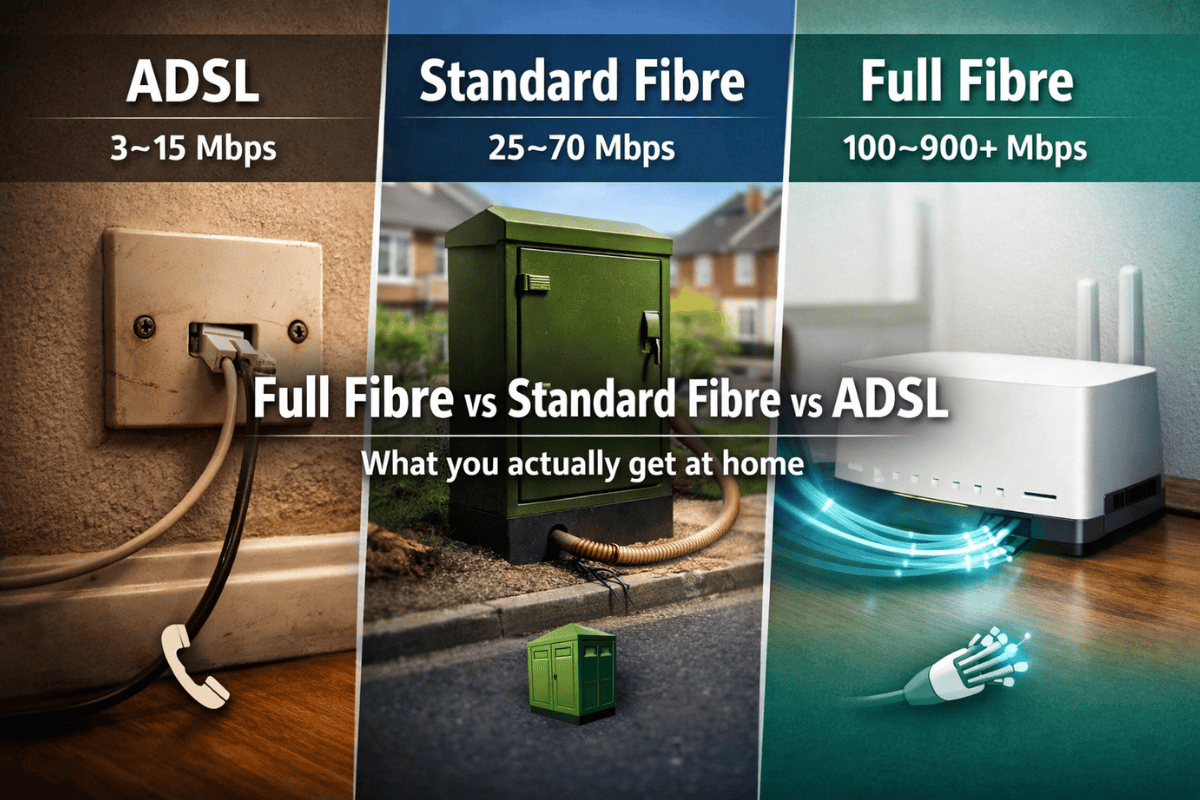
- FTTP (Full Fibre):
Fibre runs all the way into your home (what is full fibre, in plain terms). Real-world speeds are often 100 to 900+ Mbps. Benefit: most consistent speeds. Limitation: not available everywhere yet. - FTTC (Standard Fibre):
Fibre runs to the street cabinet, then old copper finishes the last stretch into your home (FTTP vs FTTC is mainly about that final bit). Real-world speeds are often 25 to 70 Mbps, sometimes higher. Benefit: wider availability. Limitation: speed drops the further you are from the cabinet. - ADSL:
Uses copper phone lines the whole way, with no fibre to your street. Real-world speeds are often 3 to 15 Mbps. Benefit: can work in hard-to-reach areas. Limitation: struggles with streaming, multiple users, and modern home working.
If you’re comparing full fibre vs fibre broadband and want to see which type is available where you live, use our Broadband Comparison.
Real-world speeds vs advertised speeds: why people feel “ripped off”
Broadband deals advertise the fastest speed your line can reach under ideal conditions. Think of it like the top speed on a car: possible, but not what you get on every road, in every weather, with the boot full. Most frustration comes from what happens inside your home and during busy hours, not because a provider is “lying” to you.
That’s why two people on the same package can have totally different experiences, and why “real broadband speeds UK” often feel miles away from the number on the contract. The good news: this is common, and in many cases it’s fixable once you separate WiFi vs broadband speed.
The 3 speed killers
1) WiFi limitations
WiFi is usually the bottleneck, especially through walls and floors. Router placement and distance matter more than people expect, and this catches most people out.
Example: you run a speed test next to the router and see 150 Mbps, then in the bedroom it drops to 25 Mbps, even though your broadband line hasn’t changed.
Quick fix: move the router higher and more central (not behind the TV, not on the floor, not in a cupboard). If possible, use Ethernet for one key device to confirm the line speed. Use the Internet Speed Test in the same room as the router and then again where it feels slow to spot the gap.
2) Network congestion
Even if your home setup is perfect, the network can slow down at busy times. This is why people search “internet slow at night” and feel like their connection “dies” after dinner. It tends to hit FTTC more than FTTP because FTTC relies more on shared local capacity and copper performance, while full fibre is generally more stable under load.
Example: Netflix is fine at 2 pm, but buffers at 8 pm when everyone nearby is streaming, gaming, and video calling.
Quick fix: test at different times (midday vs evening) and compare results. If the slowdown is only during peak time, it’s likely congestion rather than your router. The Ultimate Guide to Internet Speed Tests shows how to test properly so you don’t get false readings.
3) Device limits
Old devices can’t always use the speed you’re paying for. A gigabit package won’t magically make a 7-year-old laptop, budget phone, or older smart TV pull 900 Mbps. This is where fibre broadband speed comparison gets misunderstood: the line can be faster, but your devices may be stuck in the past.
Example: the router is capable of high speeds, but your TV only supports slower WiFi and tops out at 30 to 50 Mbps.
Quick fix: test on a newer phone or laptop first. If new devices are fast but older ones aren’t, the broadband is fine, and the limitation is the hardware.
Do you actually need gigabit? Most households don’t
Gigabit broadband (around 900 to 1,000 Mbps) sounds like the obvious “best” choice. But in real life, most UK households won’t come close to using it day to day. This is where people overspend: they buy the biggest number, then wonder why nothing feels different.
Your speed needs depend far more on what you do online than on how many people live in the house. A couple working from home and streaming in the evening might need less speed than a single person who regularly uploads huge files. And for many homes, stability and low latency matter more than raw download.
How many Mbps do I really need?
| Household / use case | Typical activities | Recommended download | Recommended upload | Priority (speed vs latency vs stability) |
| Light browsing & email | News, banking, social, emails | 10 to 25 Mbps | 1 to 5 Mbps | Stability |
| HD streaming (1–2 screens) | Netflix, iPlayer, YouTube in HD | 25 to 50 Mbps | 3 to 8 Mbps | Stability |
| 4K streaming households | 4K on 1–3 TVs, smart home devices | 50 to 150 Mbps | 5 to 15 Mbps | Stability + speed |
| Home working & video calls | Teams/Zoom, cloud docs, VPN | 50 to 150 Mbps | 10 to 30 Mbps | Stability + upload |
| Online gaming households | Console/PC gaming, voice chat | 30 to 100 Mbps | 5 to 15 Mbps | Latency + stability |
| Large families / heavy usage | Multiple streams, gaming, downloads, backups | 150 to 500 Mbps | 20 to 50 Mbps | Stability + speed |
A few things jump out from that table:
- If you’re asking “how many Mbps do I need?”, the honest answer is usually “less than you think.”
- When people ask “do I need gigabit broadband?”, it’s typically only a strong yes if you have heavy, simultaneous use plus big uploads (large cloud backups, content creation, sending large files), or you want more headroom for lots of devices at peak times.
- A fibre broadband speed comparison is only useful if you compare the right things. Going from ADSL to fibre is a big jump. Going from 150 Mbps to 900 Mbps is often a “nice to have” unless your usage actually demands it.
- The best broadband speed for home is the slowest tier that feels effortless for your busiest hour of the day, not the fastest tier available.
This lines up with Ofcom’s general insight: even as faster services become more widely available, most households still choose sub-gigabit options because they’re making practical choices, not missing out.
If you want a straight view of options by speed tier and type, use the Broadband Comparison to pick the level that matches your real usage.
UK full fibre availability in 2026 and what it means for switching
UK full fibre coverage has expanded quickly, and the headlines often make it sound like everyone can get it now. In reality, full fibre availability in the UK is still a postcode-by-postcode situation. Two people in the same town can have completely different options, even if they are only a few streets apart.
That’s because rollout is driven by street-level infrastructure, permissions, and where networks have prioritised buildouts. One road might already have FTTP availability in the UK, while the next road is still on FTTC, simply because the fibre build has not reached those specific properties yet. Industry trackers like ThinkBroadband highlight these patterns, but the key point for you is simple: national progress does not guarantee availability at your front door.
It’s also normal for some homes to default to FTTC even when FTTP exists nearby. Your building might be harder to wire, your landlord or managing agent might need to approve work, or the provider that serves your exact address might not offer FTTP yet. This is why fibre broadband availability by postcode is more useful than any coverage headline.
And even when FTTP is available, whether I should switch to full fibre is not always a clear yes. If your current FTTC connection is stable and already meets your needs, the upgrade might not feel dramatic, especially if your biggest issue is WiFi coverage inside the home. On the other hand, if you regularly hit peak-time slowdowns, rely on video calls, or need better upload performance, FTTP can be a meaningful improvement.
What availability really tells you
- Whether full fibre is available at your exact address, not just your area
- Whether switching might require installation work or an engineer visit
- Whether speeds will actually improve for your usage, not just on paper
- Whether the price increase outweighs the real benefit for your household
- Whether you need flexibility, like a rolling option, before committing long-term
The safest way to know is to check what’s available at your address using Compare Broadband Deals, then sense-check it against your needs and budget. If you want more context on switching, you can also read How to Switch Broadband Provider or explore Compare 1 Month Rolling Broadband if flexibility matters.
Bottom line: treat availability as a starting point, then decide based on your address, your setup, and your actual usage.
Upgrade checklist: when full fibre is worth paying extra
Use this as a practical decision tool, not a sales pitch. A full fibre upgrade checklist helps you decide if paying extra will actually change your day-to-day experience. Full fibre is not essential for everyone, but for the right household it can be the difference between “good enough” and “finally reliable”.
Streaming households
- You stream on 2+ screens simultaneously most evenings. Tip: if buffering mainly occurs during peak times, FTTP can reduce those slowdowns.
- You regularly watch 4K content (Netflix, Sky, YouTube) on more than one TV. Tip: check each TV’s WiFi quality, not just your package speed.
- Your home has WiFi weak spots, and you rely on wireless for everything. Tip: A full fibre upgrade won’t fix poor WiFi alone, but it gives you more headroom once you improve router placement or add mesh.
- Your household does big downloads while others are streaming. Tip: if one person downloading ruins everyone’s stream, you likely need more stability and capacity.
Home working and video calls
- You do daily Teams or Zoom calls, and the quality drops at busy times. Tip: test performance at 9 am and 8 pm to see if peak time congestion is the real issue.
- You upload files, send large attachments, or use cloud backup often. Tip: FTTP usually improves upload speeds, which makes work feel smoother than higher download speeds alone.
- Two people work from home at the same time. Tip: stability matters more than chasing the biggest Mbps number.
- Video calls freeze when someone else starts streaming. Tip: this is often upload and stability, not just download speed.
Gaming and low-latency needs
- You play competitive games where responsiveness matters. Tip: look for stability and low latency, not just headline download speed.
- Gaming feels worse in the evenings, even when speeds look “fine”. Tip: peak-time congestion can cause lag spikes, and FTTP can help reduce that compared to FTTC in many areas.
- You game while others stream or video call. Tip: if the household competes for bandwidth, full fibre can keep everything steady.
- You upload clips or stream gameplay. Tip: A better upload can matter more than a faster download package.
Quick “yes” signals
- You frequently think, “Do I need full fibre broadband?” because your current connection feels inconsistent, not just slow.
- You want the best broadband for streaming, gaming, and video calls, and your household uses the internet heavily during peak hours.
- You have FTTP available at your address, and the price difference is small enough that reliability is worth it.
Once you’ve run through this full fibre upgrade checklist, the practical next step is to compare options that match your needs using Broadband Deals and sanity-check the best tier for your home with What’s the best Broadband Plan for you?.
Common misconceptions to correct
- “Full fibre will fix bad WiFi.”
Full fibre can improve the connection coming into your home, but it cannot fix weak WiFi in a back bedroom. Router placement, thick walls, and older devices often limit speeds more than the broadband line. - “Higher Mbps always means better gaming.”
Competitive gaming depends more on latency (how quickly your connection responds) and stability than huge download speeds. A steady 50–100 Mbps can feel better than 900 Mbps with lag spikes. - “ADSL is always slow.”
ADSL is slower than fibre, but it can still be “good enough” for light browsing, email, and basic streaming for one person. The problem is when you add multiple users, HD/4K streaming, and home working. - “You’ll always get the advertised speeds.”
Advertised speeds are maximums under ideal conditions. Real-world speeds vary by time of day, network load, and in-home factors like WiFi quality and device limits. If you want a reality check, run the Internet Speed Test in multiple rooms. - “If my speed test looks good, my broadband is fine.”
A single test can hide the real issue. You might get a good result near the router and still have poor performance where you actually use the internet. The fix is often location, not package. - “If FTTP is available near me, I definitely have it too.”
Full fibre availability is address-specific. Two neighbouring streets can have different options due to rollout and building access. Always check your exact address before assuming. - “All ‘fibre broadband’ is basically the same.”
This is one of the biggest broadband misconceptions UK households run into. “Fibre” often means FTTC (fibre to the cabinet), which still uses copper into the home, while full fibre (FTTP) removes that copper. That difference can affect stability and peak-time performance. - “Slow internet means my provider is lying.”
Sometimes a line fault exists, but more often it’s WiFi vs broadband speed. This is why full fibre myths and fibre vs ADSL myths persist. To diagnose properly, follow the steps in the Ultimate Guide to Internet Speed Tests so you can separate line speed from home setup issues.