What Is an ISP? A Straightforward Guide to Internet Service Providers

What if the company you pay for broadband isn’t the same one that owns the network bringing it to your home? It’s easy to confuse an ISP, the broadband network and your home Wi-Fi, even though each plays a different part in getting you online.
If broadband deals seem hard to compare, start by separating those parts. Your internet service provider (ISP) sells and manages your broadband service. The network carries the connection to your property, while your router shares it around your home over Wi-Fi.
This guide explains what an ISP does, what a broadband deal may include and why options depend on your address. You’ll also learn which details matter when comparing services, from connection type to contract terms and phone or TV extras. Once the terminology makes sense, it’s easier to compare providers and focus on what suits your household.
Key Takeaways
- An ISP provides access to internet services. Understanding its role helps you see what a broadband deal includes.
- Connection technology depends on the network serving your property, so check availability for your address before comparing packages.
- Consider how your household uses the internet, including streaming, calls and downloads, when deciding what speed may suit you.
- Identify your needs and check availability before comparing relevant options. A comparison platform helps you explore deals, but doesn’t provide the connection.
What Is an ISP? Understand the Company Behind Your Internet Service
An internet service provider (ISP) gives customers access to internet services. It’s the company you sign up with for home broadband, and it manages the service you receive. The provider doesn’t necessarily own the cables or other infrastructure used to connect your property.
How do the terms fit together?
Broadband is the internet service or connection supplied to your home. A network carries that connection to your property, while your router shares it with devices around the home. These are related parts of getting online, but they aren’t interchangeable terms.
Is an ISP the same as a broadband provider?
Usually, yes. “Broadband provider” is the familiar consumer term for a company selling home internet. The provider manages your service, even if another company owns or maintains the network infrastructure used to deliver it. In the UK, network operators can make their infrastructure available to different providers, so the company on your bill may differ from the company behind the physical network.
ISP, broadband and Wi-Fi: what is the difference?
Imagine watching a programme on a tablet at home. Broadband brings the internet connection to your property; your router sends a Wi-Fi signal so the tablet can connect wirelessly. Ofcom’s broadband speed guidance explains more about the speeds associated with a broadband service.
If the tablet struggles in one room but works well elsewhere, Wi-Fi coverage may be the issue rather than the ISP connection. If several devices lose internet access at once, the service or network could be involved. Knowing the difference helps you describe a problem more clearly.
How an ISP Connects Your Home to the Internet
After you sign up for broadband, your provider arranges the service for your property. It uses the network infrastructure available at your address, and the connection may need to be activated or installed before you can get online. The route and technology can differ between homes, so an offer advertised nationally may not be available everywhere. Ofcom’s coverage and speed information explains why it’s important to check your address.
What does the broadband network do?
The network carries data between your home and internet services. When you open a website, for example, information travels from your device across the connection and network to reach it, then data comes back. Your broadband provider arranges and manages your service, but it doesn’t necessarily own or operate every part of the infrastructure used along the way.
Where do the router and Wi-Fi fit in?
Inside your home, the router connects devices to the broadband service. It can send data over Wi-Fi or through a wired connection, where supported. An issue affecting one device or room may be different from a problem with the connection reaching your property. To investigate performance, compare results in more than one location and, where possible, try a wired connection to help narrow down the cause.
Our internet speed guidance can help you interpret speed results. Once you understand what’s available at your address, compare broadband deals that match your household’s needs.
What to Consider When Choosing an ISP in the UK
Start with your address, not a provider’s headline advert. Broadband technology and packages vary by property, so a service promoted nationally may not be available where you live. Check options using your postcode and compare deals that can serve your home. This keeps your decision focused on services you can order.
How much speed should you look for?
Choose a speed that fits how your household uses the internet. One person browsing and sending messages has different needs from a household where several people stream, join video calls and download large files at the same time. Consider busy periods, too. If everyone goes online together, a plan suited to light use may feel limiting. Use this broadband speed guidance to assess what may work for your household instead of relying on a universal speed recommendation.
Why check availability and contract details?
Look beyond the opening price or advertised speed before choosing an ISP. Compare the contract length, setup or activation details, what’s included and the cost after an introductory offer ends. If phone or TV services are bundled, consider whether you’ll use them. A deal is useful when its terms and features suit your needs throughout the agreement.
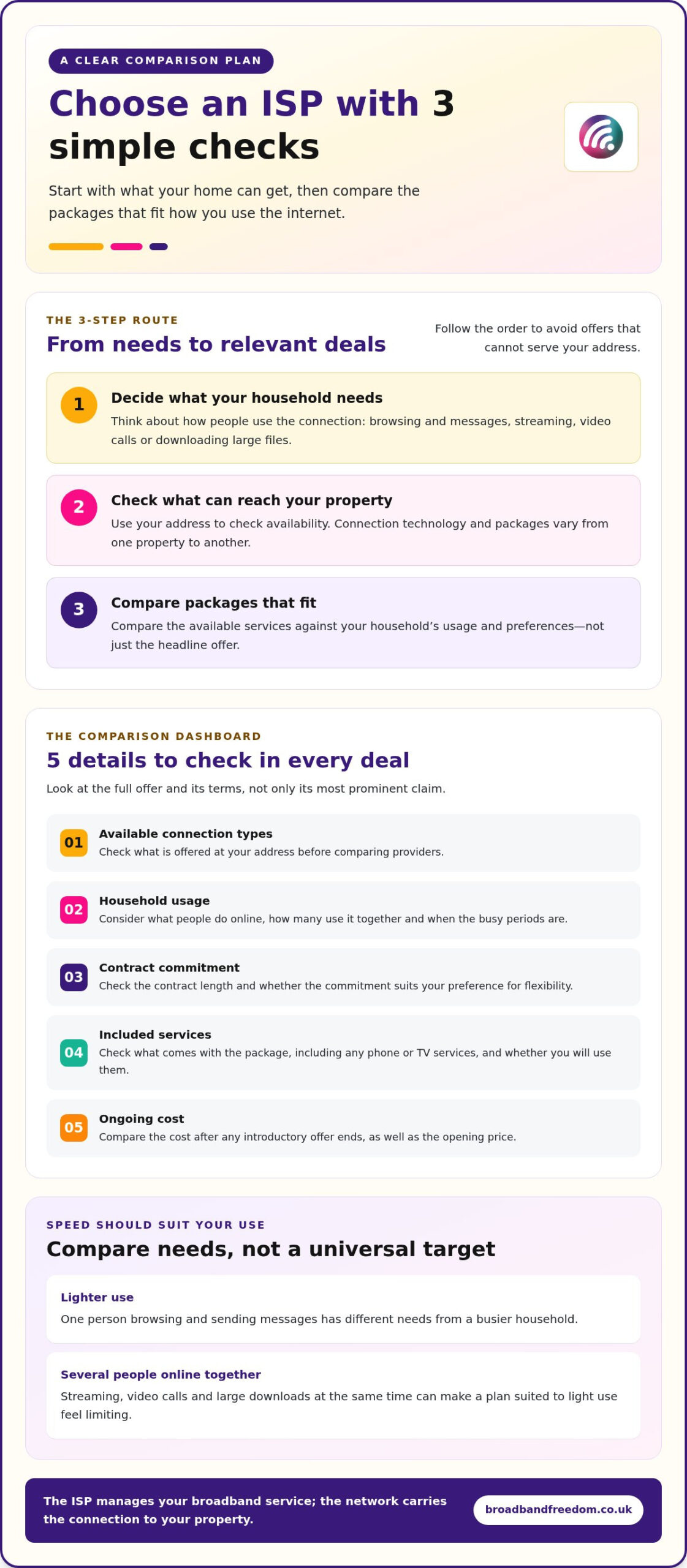
Make a short checklist before comparing: available connection types, household usage, contract commitment, included services and ongoing cost. Then weigh up the complete offer, not just its most prominent claim. For a practical comparison framework, read Compare Broadband Deals: The 2026 Guide to Saving on Your Terms and assess broadband options against your priorities.
How to Explore ISP Options Without the Jargon
Make your search manageable with three simple steps:
- Decide what your household needs from its broadband service.
- Check which services can reach your property.
- Compare packages that fit your usage and preferences.
This order keeps you focused on relevant choices instead of getting lost in technical terms or offers that aren’t available at your address.
What does a broadband comparison platform do?
A comparison platform brings offers from different providers together so you can review them more easily. Broadband Freedom is a UK-wide comparison and referral platform, helping people explore broadband, phone and TV offers for their property and needs. The platform doesn’t provide the internet connection itself. Availability and suitability depend on the address and household.
What is a sensible next step?
Consider address availability, household usage and contract preferences together. For example, if flexibility matters more than a long commitment, include contract length in your comparison rather than focusing only on speed. Reviewing provider options helps you see which services fit your priorities.
When you’re ready, compare broadband deals and focus on the options that suit your household.
Make Your Next Broadband Choice Work for You
Your household’s needs can change, so consider both your current routine and future plans when choosing an ISP deal. A move, a new study or work pattern, or more people sharing the connection may shift what matters most. Keep your priorities clear to make it easier to weigh up your options.
Broadband Freedom presents a range of UK offers, including full fibre, fibre, standard broadband and flexible options such as no-contract deals. The right choice depends on your requirements and what’s available for your property, so compare the terms as well as the connection type.
Ready to explore what could suit your household? Compare broadband deals for your needs.
Frequently Asked Questions
How do I find out which ISP I currently use?
Check a recent broadband bill, email or bank statement for the company name and account details. You can also look in your provider’s app or online account, or search your inbox for messages about your broadband service. If someone else arranged the connection, ask the account holder. The name on your router may offer a clue, but it isn’t always the company billing you.
Can I change my ISP without changing my Wi-Fi name?
Usually, you can keep the same Wi-Fi name and password by setting them on the new router. Devices that remember those details may then reconnect without you joining the network again individually. The steps vary by router, and some equipment may use different default settings. Note your current network name and password before switching, then follow the new router’s setup instructions.
Does my ISP control my Wi-Fi?
Your ISP may supply the router and provide instructions or tools to manage it, but Wi-Fi settings are usually changed through the router’s settings or app. These can include the network name and password. For example, you can change the password if you share it with guests, then reconnect household devices using the new details. The exact controls depend on the router and service.
Can an ISP see what I do online?
Your ISP handles information needed to provide your connection, but that doesn’t mean it can automatically read everything you do. Encrypted websites protect the content of your activity, such as messages or payment details, from being read in transit. The amount of connection information visible can vary. Check your provider’s privacy information to understand what data it collects and how it uses it.
Will changing ISP automatically make my internet faster?
No. A new ISP improves speed only if the service available to you can deliver a better connection and your current broadband is the limiting factor. Slow performance could instead be linked to Wi-Fi coverage, a device or several people using the connection at once. Compare the service’s expected speeds for your address, then consider whether switching would address the cause of the slowdown.

Article by
Elaine Lang
Elaine has over 20 years across Marketing, Communications and Public Relations in the UK. She has worked across large UK corporations, including Commercial Banks and Airports, to online consumer finance and technology solutions. Elaine has post graduate qualifications in Marketing from the Chartered Institute of Marketing (CIM) and the Industry of Direct Marketing (IDM). She is a lifelong feline fan, sharing her home with around 4-6 cats for many years. This of course can be a challenge when trying to work at home, as they like to try to help!