How to find and fix the cause of slow evening internet
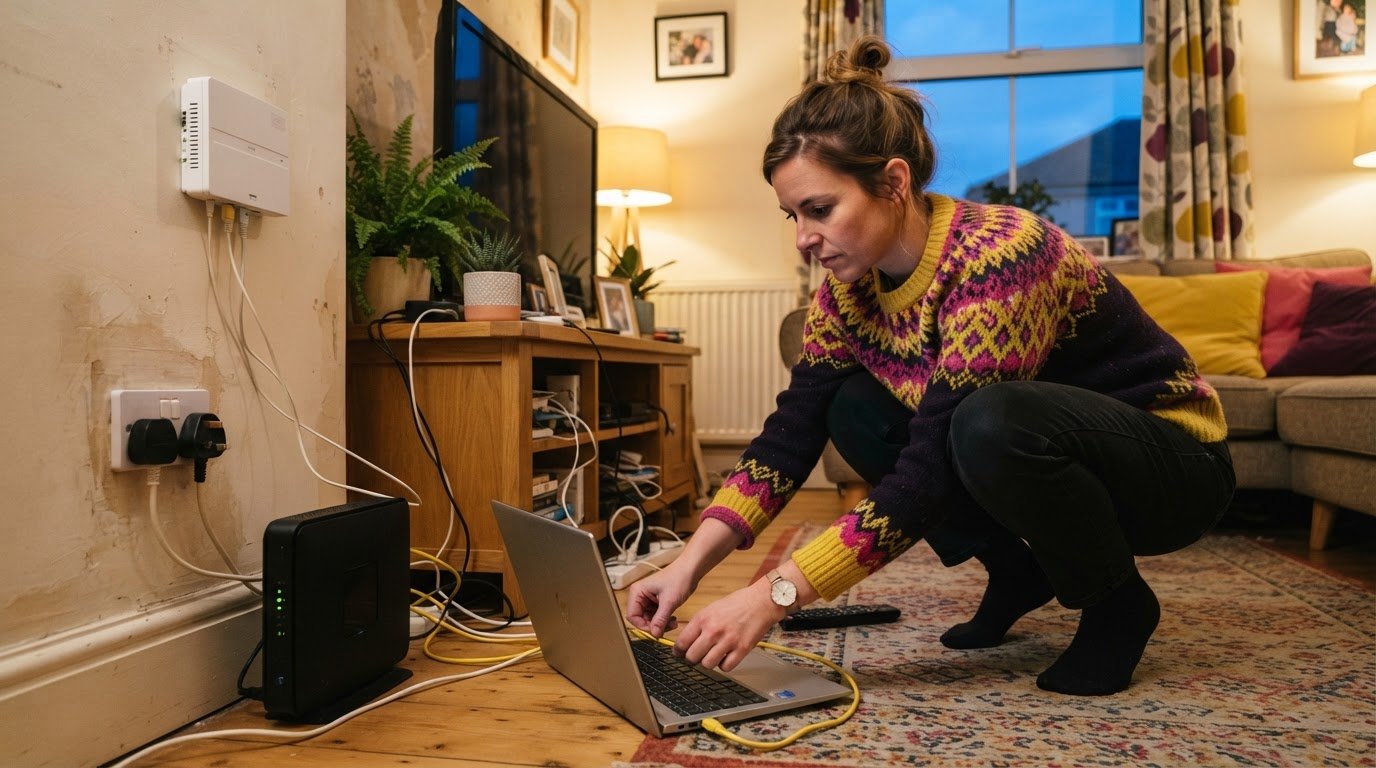
Peak-time demand can cause slow internet in the evenings in the UK, though weak Wi-Fi or an unsuitable package can feel similar. Ofcom’s March 2023 measurements found speeds were typically lowest around 9pm.
It’s frustrating when streaming, gaming or video calls falter as everyone gets online. Compare wired and Wi-Fi speed tests to help diagnose slow internet in the evenings and see whether the problem happens at other times.
This guide to slow internet in evenings UK explains what to try at home, when to report a persistent fault and how to compare full-fibre options before deciding whether to switch provider.
Key Takeaways
- Compare wired speed tests from busy and quiet times to see whether the slowdown follows a daily pattern.
- Test close to the router and over Wi-Fi to help separate a wireless coverage problem from a line issue.
- If speeds fall below your guaranteed minimum, understand the steps your provider must take before you can leave without penalty.
- Compare full-fibre options with your current connection to see whether a different broadband type could better suit your household.
Can I leave my provider because of slow evening speeds?
You may be able to leave without penalty if your provider cannot fix speeds below your guaranteed minimum. Identify your connection type, keep a record of test results and follow the provider’s complaint process before deciding.
-
Check how connection type affects peak-time speeds
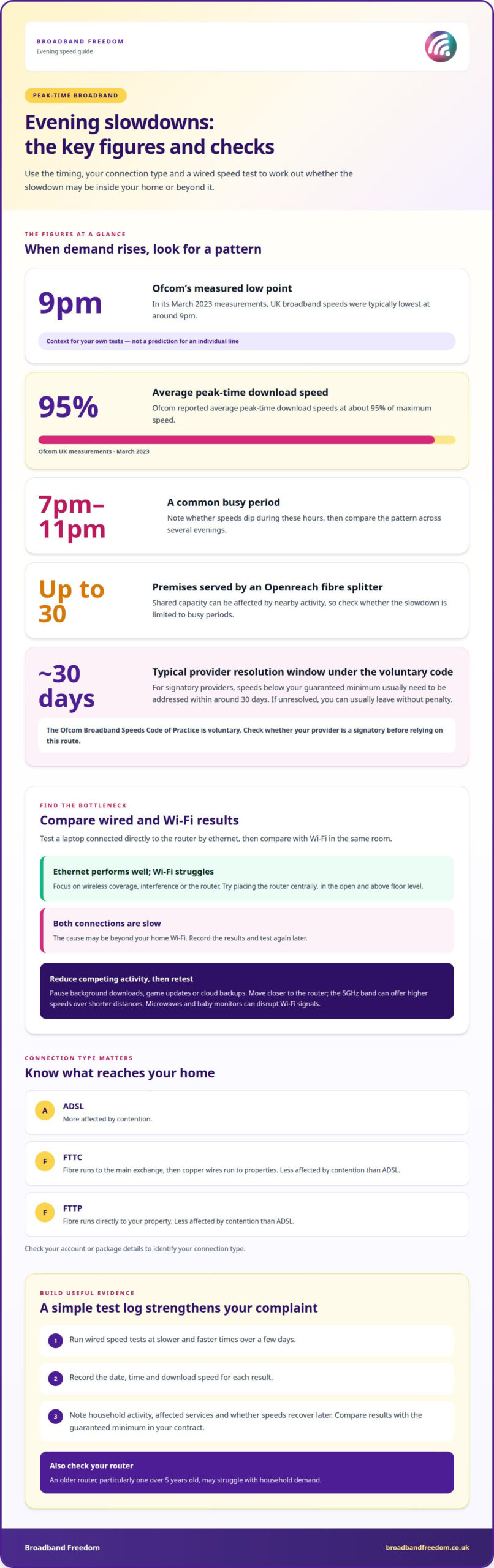
Check your account or package details to identify whether your connection is ADSL, FTTC or FTTP. ADSL is more affected by contention, while FTTC and FTTP are less affected. FTTC uses fibre to the main exchange, then copper wires to properties; FTTP runs fibre directly to your property. Include this connection type in your complaint if your speeds consistently fall during busy periods.
-
Review guaranteed minimum speeds and the Ofcom Speeds Code
Find the guaranteed minimum speed in your contract, then compare it with your recorded results. Under Ofcom’s voluntary Broadband Speeds Code of Practice, a signatory provider that can’t fix speeds below that minimum usually has around 30 days to resolve the issue. If it remains unresolved, you can usually leave penalty-free. The code applies to signatories, so establish whether your provider follows it before relying on this route.
-
Record speed-test results for an ISP complaint
Use a laptop connected directly to your router by ethernet rather than relying on Wi-Fi results. Run speed tests at slower and faster times over a few days. Record the date, time and download speed for each result. Note whether streaming or other household activity is underway, and pause background downloads where practical. Send the log to your provider with a concise description of the recurring slowdown.
-
Compare Ofcom peak and overnight speed measurements
Use Ofcom’s published broadband speed measurements as context, not as a prediction for your individual line. According to Ofcom, UK speeds were typically lowest around 9pm in its March 2023 measurements, and average peak-time download speeds were about 95% of maximum speed. Compare your evening and overnight tests with your package’s advertised typical evening speed. This helps show whether your results follow the broader peak-time pattern.
UK evening peak-time broadband congestion
Evening demand can slow a connection when households share network capacity. Track when it happens and what is using your broadband before deciding where the bottleneck may be.
-
Identify congestion on shared networks
Note whether speeds dip between 7pm and 11pm, when broadband use commonly rises. Streaming, gaming and video calls can all add demand across shared networks. Openreach fibre splitters typically serve up to around 30 premises, so nearby activity may affect shared capacity. Compare the pattern across several evenings, rather than judging from one busy night. A slowdown limited to peak hours can point towards congestion rather than a constant fault.
-
Check for evening ISP network congestion
Compare your connection at different times and note whether the slowdown affects several online activities. If video, gaming and browsing all struggle together, the issue may be broader than one app or device. A provider’s network carries traffic from many customers, and demand can rise at the same time. Keep a simple log of the time, affected services and whether speeds recover later. This gives your provider a clearer pattern to investigate.
-
Compare evening and weekend congestion
Test the same activities on a weekday evening and at the weekend. Demand can rise during both periods, as more people are home and using connected devices. Record whether the issue happens every evening, only at weekends or during both. This helps distinguish a recurring peak-time pattern from a problem tied to a particular day. Include streaming and gaming in your notes if those activities falter.
- Check what’s happening inside your home at the same time. Multiple devices share the available bandwidth, so phones, televisions, consoles and laptops can compete during a busy evening. Pause a large download or game update, then see whether another activity improves. If it does, household demand may be contributing alongside wider network traffic. Once you’ve identified a persistent pattern, compare broadband deals to explore packages that better match your household’s needs.
Diagnosing Wi-Fi versus access-network slowdowns
Compare a device’s Wi-Fi performance with its performance over ethernet to locate the slowdown. To improve evening performance, reposition the router, reduce competing device activity, and check for provider faults or network management.
-
Separate Wi-Fi slowdowns from access-network slowdowns
Connect a laptop to the router using ethernet, then compare its speed test with Wi-Fi in the same room. If ethernet performs well but Wi-Fi struggles, focus on signal coverage, interference or the router. Place it centrally, in the open and above floor level. If both connections are slow, the issue may be beyond your home network. Record the results and test again later.
-
Check for overcrowded home Wi-Fi networks
Pause background downloads, game updates and cloud backups, then retest while fewer devices are active. Phones, televisions and consoles all share your home connection, so simultaneous streaming or video calls can affect performance. Move closer to the router and try the 5GHz band for higher speeds over shorter distances. Microwaves and baby monitors can also disrupt Wi-Fi signals. An older router, particularly one over 5 years old, may struggle with household demand.
-
Consider provider throttling and network management
Check your provider’s network-management information and note whether slowdowns affect particular activities, such as streaming or gaming. Don’t assume every evening dip means throttling: congestion, a weak Wi-Fi signal or background traffic can cause similar symptoms. If the connection drops as well as slowing, check your provider’s service-status information for maintenance or an outage. Record when the problem starts and whether it affects ethernet too.
-
Assess shared network capacity and contention
Note whether wired speeds also fall during busy periods. Contention means customers share network capacity, so demand from nearby homes can contribute to peak-time slowdowns. FTTC and ADSL connections are more affected by contention than FTTP, although full fibre can still experience congestion. If ethernet remains slow across repeated tests, give your provider the times and results. This evidence can help distinguish a home Wi-Fi issue from a wider network problem.
Checking for full-fibre or lower-contention packages
- Check which connection types are available at your address before changing packages. FTTP runs fibre directly to your property; FTTC uses fibre to a local cabinet, then copper wires. Full fibre is less prone to evening congestion than older part-fibre connections, though congestion can still occur. Treat connection type as a factor, not a guarantee of uninterrupted speeds.
- Compare each package’s advertised typical evening speed with your own results. Look beyond the maximum speed: the evening figure better reflects performance during busy hours. A faster package may help if household members stream, game and make video calls simultaneously. It won’t resolve weak Wi-Fi coverage or background updates, so match the package to the cause you’ve identified.
Match package capacity to your household
- Consider how many devices need reliable service at once. A household with simultaneous streaming, video calls and downloads has different demands from one mainly browsing on a laptop. Think about when activities overlap during peak hours. More capacity can support concurrent use, but router placement or background traffic may be the real bottleneck.
- Compare available full-fibre and fibre broadband deals using your address and household priorities. Weigh connection type, typical evening speed and contract details together, rather than choosing by maximum speed alone. Availability and offers vary by postcode, and full fibre can still experience congestion. Choose the option that best fits your needs and the evidence from your connection.
Broadband Freedom
Once you’ve identified whether your evening slowdown points to package speed or connection type, Broadband Freedom can help you compare broadband options. We bring together daily updated offers, including the latest broadband offers from BT, as well as broadband and phone packages and broadband and TV packages. Use your speed-test findings and household needs to guide your comparison, including connection type and typical evening speeds. A package change won’t resolve a weak Wi-Fi signal or an unresolved line fault, so keep those causes in view when weighing your next step. Explore your options with Broadband Freedom.
Choose your next broadband step with confidence
Use your evening connection to work out what matters next. If several people stream, game or make video calls at once, prioritise a package that fits those routines. If your current connection type limits performance, compare alternatives available at your address. The right decision depends on your household’s needs, not simply the biggest speed figure.
Broadband Freedom offers full-fibre, fibre and standard broadband deals, giving you options to weigh against your connection needs. If slow internet in the evenings in the UK is disrupting your online activities, use your recorded results and priorities to compare packages. Focus on connection type and the speeds you need during your busiest hours.
Explore broadband deals with Broadband Freedom and take a clear, considered next step towards a connection that better suits your home.
Frequently Asked Questions
Why does my internet slow down at night?
Evening demand can slow broadband when household activity and wider network traffic increase together. Streaming, online gaming and video calls all need bandwidth, while automatic backups or device updates may run unnoticed. If the slowdown happens during those activities, pause background downloads and retest. A VPN can also reduce speeds because it encrypts and reroutes your data through a remote server.
How do I tell if it is congestion or a fault?
A slowdown that appears at similar busy times and improves later suggests congestion. A fault is more likely if speeds remain poor at quieter times, the connection drops repeatedly or the router shows a warning. Note which devices and services are affected, then check your provider’s service-status information for reported maintenance or outages. If only one device struggles, investigate that device before blaming the broadband line.
Is it the network, or your Wi-Fi?
Compare a device’s performance close to the router with its results in the room where problems occur. If it works well nearby but struggles further away, distance, thick walls or interference may weaken the Wi-Fi signal. If the issue affects devices in different rooms, test with an ethernet connection to help separate wireless problems from a wider connection slowdown. This comparison narrows down what to investigate next.
Can my neighbours’ internet usage affect my speed?
Yes, neighbours’ activity can contribute if your homes share network capacity, particularly during busy periods. Their private Wi-Fi doesn’t directly use your home’s wireless connection, but shared broadband infrastructure can carry traffic from multiple properties. A neighbour streaming over their own connection may therefore add to wider network demand. Your own devices, router signal and connection type also influence the speed you experience.
What is contention ratio?
Contention ratio describes how many users share broadband network capacity. A higher level of sharing means more customers may compete for capacity at the same time, particularly during busy periods. It doesn’t tell you the exact speed your household will receive, because demand changes and network capacity varies. For a practical comparison, look at your connection type and the advertised typical evening speed for packages available to you.
What time is broadband slowest in the UK?
Ofcom’s published measurements found UK broadband speeds were typically lowest around 9pm, within the evening peak window of 8pm to 10pm. Those measurements were based on March 2023 data, so they describe a national pattern rather than predict the speed at your home today. Compare your own results at busy and quieter times to see whether your connection follows that pattern.

Article by
Elaine Lang
Elaine has over 20 years across Marketing, Communications and Public Relations in the UK. She has worked across large UK corporations, including Commercial Banks and Airports, to online consumer finance and technology solutions. Elaine has post graduate qualifications in Marketing from the Chartered Institute of Marketing (CIM) and the Industry of Direct Marketing (IDM). She is a lifelong feline fan, sharing her home with around 4-6 cats for many years. This of course can be a challenge when trying to work at home, as they like to try to help!