Broadband for garden offices: choose wired or wireless by distance and use
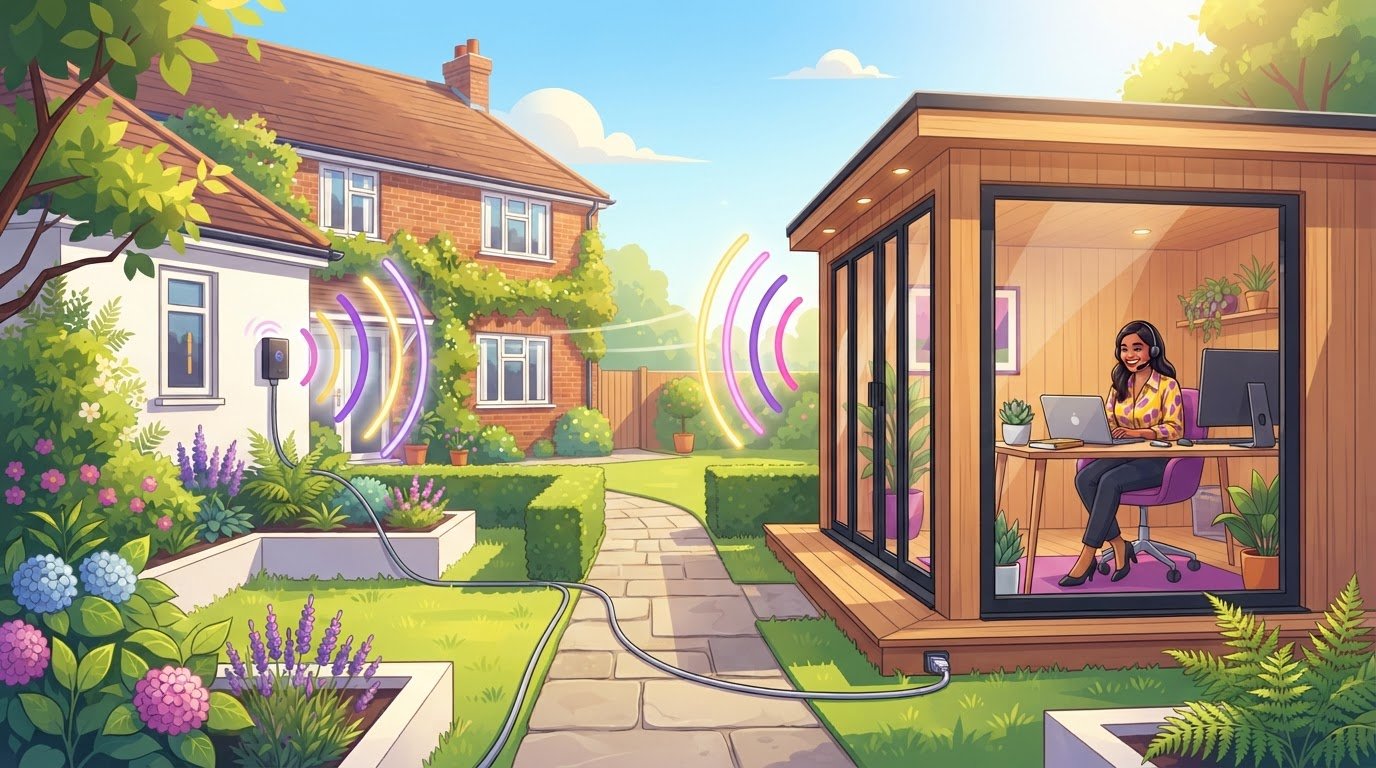
Wireless isn’t automatically the simplest choice: for a garden office, a wired Ethernet connection usually gives the most stable performance, while Wi-Fi extenders work best when the office is roughly 10-20 metres from the house with one or two walls in the way. Choosing broadband for a garden office in the UK starts with the distance and the work you do there. If video calls or streaming matter, a weak signal can quickly become frustrating.
When choosing broadband for a garden office in the UK, consider more than whether to use a cable or wireless connection. The broadband package matters too: contract length, speed and any data allowance can affect whether a home connection or mobile broadband suits your routine. This guide compares wired and wireless options, explains practical factors that affect performance and helps you assess contract terms and data needs. You can then match the connection to your garden office and your working day.
Key Takeaways
- Match the connection to the distance from your home and the work you do, especially if video calls or streaming are part of your routine.
- Compare a direct cable with wireless options, taking obstacles, signal strength and performance at different times of day into account.
- Check contract length and data limits against how often you use the garden office and how much you stream or work online.
- Compare available broadband options by your needs, then weigh flexibility against the connection and allowance your work requires.
1. Connectivity recommendations by distance and usage
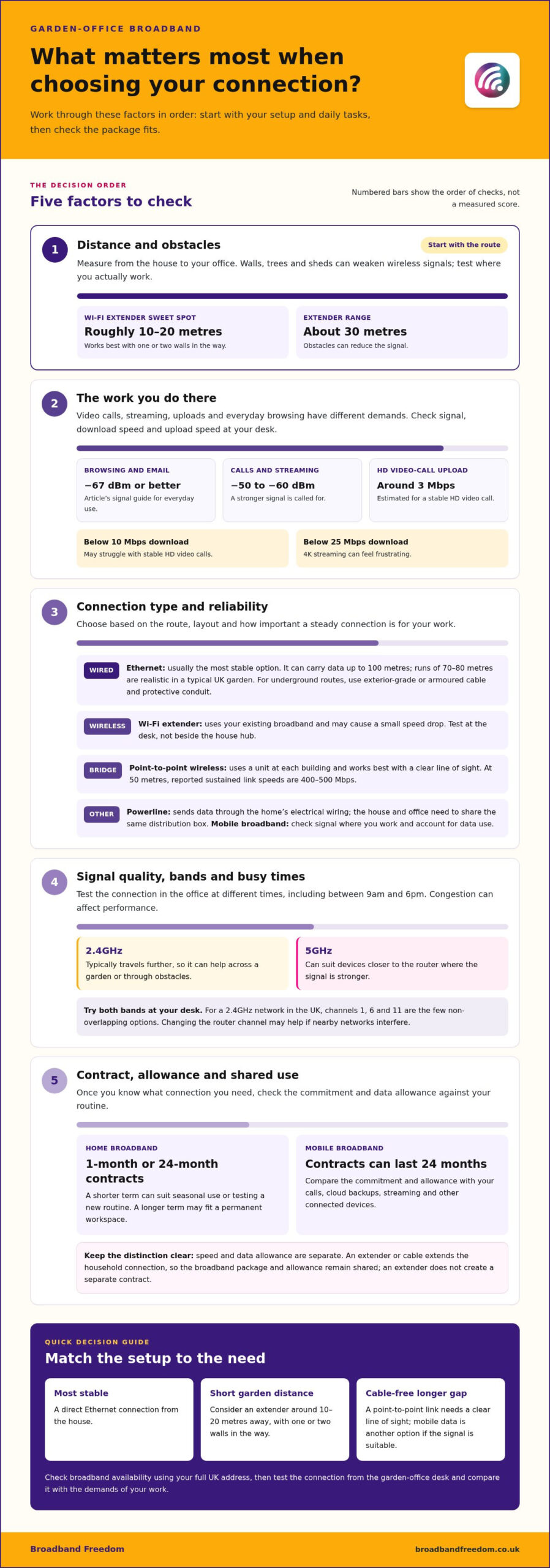
Start by measuring the route between your house and garden office. A Wi-Fi extender works best when the building is roughly 10-20 metres away, with one or two walls in the way. Most Wi-Fi extenders have a range of about 30 metres, but walls and other obstacles can weaken the signal. Test the connection at your desk, not just beside the house Hub.
Match signal quality to your work. Around -67 dBm or better suits everyday browsing and email; streaming films or making video calls calls for roughly -50 to -60 dBm. A download speed below 10 Mbps may struggle with stable HD video calls, while 4K streaming can feel frustrating below 25 Mbps. For calls, check upload speed too: around 3 Mbps is estimated for stable HD video.
Plan the route and connection
If reliability matters most, run Ethernet from the house. A direct wired connection is usually the most stable option, and Ethernet can carry data over distances up to 100 metres. Runs of 70-80 metres are realistic in a typical UK garden. For an underground route, choose exterior-grade or armoured cable and protective conduit. If the installation involves electrical work, consult GOV.UK’s Approved Document P on electrical safety in dwellings.
For a longer gap without a cable, a point-to-point wireless link uses two units, one on the house and one on the garden building. It works best with a clear line of sight. At 50 metres, reported sustained link speeds are 400-500 Mbps. A cellular-connected tablet or laptop can also use mobile data directly or share its connection through a hotspot. Check the signal where you work and consider data use during calls or streaming.
To assess the broadband available at your address, use Ofcom’s coverage checker alongside a test from your garden-office desk. Then compare the home package’s speed with the connection your work needs.
2. Factors to consider when choosing garden-office internet
Check broadband availability using the full UK address, not just the town or postcode. An address checker shows which connection types and advertised speeds are available. Then test your existing internet in the garden room at different times, including between 9am and 6pm, when congestion can affect performance. This gives you a clearer starting point for broadband for a garden office in the UK.
Consider the route and Wi-Fi bands
Choose a setup that suits the distance, building layout and electrical arrangement. An Ethernet cable connects the router directly to the garden office. Wi-Fi avoids a cable run, but walls and distance can weaken the signal. Powerline networking sends data through the home’s electrical wiring, so the house and garden office need to share the same distribution box.
Wi-Fi frequency affects coverage. The 2.4GHz band typically travels further than 5GHz, making it useful across a garden or through obstacles. The 5GHz band can suit devices closer to the router, where a stronger signal is available. Try both bands at your desk and keep the one that performs better for calls, uploads or streaming.
Test the connection where you work
For a 2.4GHz network, channels 1, 6 and 11 are the few non-overlapping options in the UK. If nearby networks interfere, changing the router’s channel may help reduce congestion. An extender can improve coverage, though it may cause a small speed drop. A point-to-point Wi-Fi link needs a clear line of sight, so consider trees, walls and sheds during installation.
Before choosing broadband for a garden office in the UK, compare the speed your work needs with the connection available at your address. Test in the office, not only beside the router, and repeat at different times. If you’re also reviewing your home package, use broadband deal comparisons to weigh available speeds against your needs.
3. Broadband contract durations and data plans
Yes. You can choose a separate home broadband contract for a garden office, rather than extending the household’s existing Wi-Fi signal. Home broadband offers include 1-month and 24-month contracts, giving you a choice between shorter commitment and a longer term. Mobile broadband contracts can last 24 months, so compare the commitment as well as the connection method.
Match the contract to your routine
A 1-month home contract can suit a garden office used seasonally or while you test a new working routine. A 24-month home contract may fit a permanent workspace where you expect to use the connection regularly. Before choosing, check the contract length, any minimum term and what happens at the end. An extender uses your existing broadband, so it doesn’t create a separate contract or data allowance.
Data allowances matter most if you use mobile broadband. Video calls, cloud backups and streaming can all use data, particularly when several devices share a connection. List your regular tasks, then compare each plan’s allowance and usage conditions. If the garden office depends on a mobile signal, consider whether you’ll also use that plan at home or while travelling.
Compare allowance as well as speed
Speed and data allowance are separate considerations: a fast connection can still fall short if its data limit does not match your use. Note how often you have video meetings, transfer large files or stream, and account for other household devices. With a wired setup, the cable extends the home connection, but the broadband package and allowance remain shared. A Wi-Fi extender can improve coverage without a separate package.
Before deciding, compare the contract term, speed, data allowance, number of devices and whether the connection will be shared. This makes it easier to weigh using the household package against taking a separate one, especially if the garden office has different needs or requires its own connection.
4. What broadband options are available for a garden office in the UK?
You can connect a garden office by extending home Wi-Fi, running Ethernet, using powerline networking, installing a point-to-point wireless link or choosing mobile broadband. The right option depends on your home connection, garden layout, installation requirements and data use.
An Ethernet cable connects the router directly to the garden office and is well suited to a fixed desk used for video calls, large file transfers or streaming. Powerline networking sends data through electrical wiring and may support Gigabit speeds. The house and garden office need to connect to the same distribution box, so check that the electrical setup suits this option.
A Wi-Fi extender can extend the existing home network without a cable run. For a separate building or longer distance, point-to-point Wi-Fi uses a unit at each end to create a wireless link. Trees, walls and other obstructions can weaken the signal, so consider the route between the house and garden office before choosing this setup.
Mobile broadband uses a 4G or 5G router and a cellular connection instead of extending the home network. A dedicated 4G router can typically deliver 30-80 Mbps in areas with good coverage. The very latest 5G routers have an average speed of 110 Mbps. Mobile performance depends on local reception, while a data plan’s allowance matters for regular streaming and video meetings.
Compare these options by the connection you need, the building’s electrical arrangement and the mobile signal outdoors. Then match the broadband package to your expected speed and data use. Compare broadband deals to weigh suitable home connections against your garden-office requirements.
Broadband Freedom: Broadband and Phone Packages
Once you’ve chosen how to connect the garden office, Broadband Freedom can help you compare broadband packages from major UK networks. If you’re reviewing your household package too, compare Broadband and Phone Packages or Broadband and TV Packages. You can also explore the latest broadband offers from BT.
Daily updated offers make it easier to compare current packages with your needs, including the speed and contract length you want. Check whether the package includes a data allowance that suits your use. Comparing these details can help you decide whether to keep your household plan or choose another package for your setup.
Visit broadbandfreedom.co.uk to explore the available broadband choices.
Make your next broadband choice with confidence
Choosing broadband for a garden office in the UK is a useful opportunity to review whether your household package suits the way you work. Consider how your needs may change, from occasional remote working to regular calls, uploads or streaming. Keep the garden-office connection in mind as you compare packages, so you choose one that fits your intended setup.
Broadband Freedom offers Full Fibre Broadband Deals, Fibre Broadband Deals and Standard Broadband Deals. Compare the options against your needs and the availability at your address, rather than choosing on speed alone. The right fit is the one that makes sense for your working routine and package requirements.
Take the next step at your own pace. Compare broadband deals with Broadband Freedom and find an option to consider for your home and garden office. A clear comparison can make your decision simpler, so you can focus on getting more from your workspace.
Frequently Asked Questions
Wired or wireless?
Choose a wired connection for a fixed desk or work where dropped connections could disrupt calls or file transfers. Wireless is more convenient if you move between the house and garden office or want to avoid laying cable. For example, connect a desktop computer by Ethernet while phones and tablets use Wi-Fi. Let the building layout and devices you use guide your choice.
Can I extend my existing home broadband to a garden office?
Yes. An extender or mesh device can extend your existing home broadband into the office using the same package and connection. Place it where it can still receive a usable signal from the router, rather than at the edge of coverage. Then test the devices you use in the office, such as a laptop during a video call.
Is an outdoor Ethernet cable or fibre link best for a garden office?
Outdoor Ethernet is a practical option for many garden offices, provided the cable is rated for outdoor use and protected along its route. Fibre can suit a link between separate buildings where electrical interference is a concern, but it requires compatible equipment at both ends. Compare the route, protection and equipment needed, not just the cable; for high-demand outbuildings requiring integrated connectivity, specialist engineering firms such as AVC Principles illustrate how structured ICT and network systems are designed for reliable performance.
How much does it cost to install a broadband connection in a garden office?
Installation costs vary with the route and equipment required. A short cable run is different from one that needs trenching, conduit, specialist outdoor cabling or professional labour. A wireless bridge also requires equipment at each end. To plan your budget, note the distance, obstacles and protection required, then compare those needs with the installation method.
Is 4G or 5G home broadband suitable for a garden office?
Yes, if the mobile signal reaches the garden office and the plan’s data allowance suits your work. A 4G or 5G router can provide a separate connection without a cable from the house. Test reception where the router will sit, then use your usual laptop tasks, including calls and file uploads, to judge whether the service fits your working day.
What are the risks of burying network cables between a house and garden office?
Later digging can damage a buried cable, while unsuitable cabling or poor protection can leave it vulnerable to water and wear. Use exterior-grade or armoured Ethernet cable in protective conduit, and plan the route before landscaping or other garden work. Avoid areas likely to be disturbed, such as planting beds or fence-post positions.

Article by
Elaine Lang
Elaine has over 20 years across Marketing, Communications and Public Relations in the UK. She has worked across large UK corporations, including Commercial Banks and Airports, to online consumer finance and technology solutions. Elaine has post graduate qualifications in Marketing from the Chartered Institute of Marketing (CIM) and the Industry of Direct Marketing (IDM). She is a lifelong feline fan, sharing her home with around 4-6 cats for many years. This of course can be a challenge when trying to work at home, as they like to try to help!