Virgin Media broadband deals, prices and availability

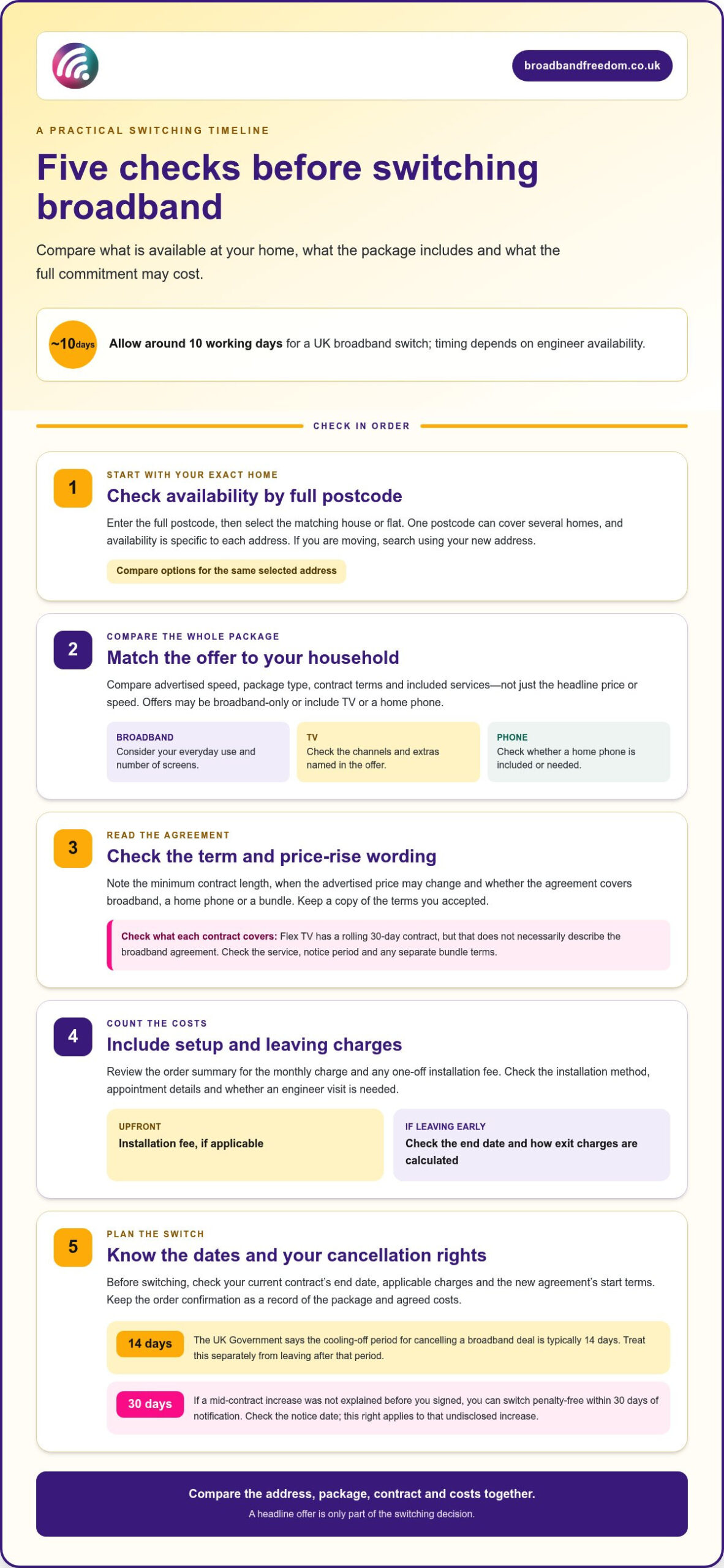
The headline speed isn’t the whole story: switching broadband in the UK usually takes around 10 working days, depending on engineer availability. Before choosing between Virgin Media deals, check availability at your address, compare speeds and contract terms, and factor in setup costs and any mid-contract price rises.
Virgin Media deals can vary by address, package and contract, so the right choice depends on what’s available where you live and how you use your connection. A headline price or speed alone won’t show the full picture.
This guide explains how to check availability, compare package features and review costs and price-rise terms before switching. It also offers practical ways to match broadband speed to your household, so you can compare options more confidently.
Key Takeaways
- Enter your full postcode to see which Virgin Media packages are available at your address before comparing options.
- Read the contract’s price-rise terms and cancellation conditions so you can judge the longer-term commitment, not just the opening offer.
- Check what setup involves and whether installation charges apply, then include any upfront costs in your comparison.
- Compare advertised speeds, contract terms and package details against your household’s needs before deciding whether to switch.
Mid-contract price increases and switching costs
Before choosing a broadband deal, compare the minimum term, price-rise terms and cost of leaving early.
Minimum terms and changing contract terms
A minimum contract period sets how long you agree to keep the service. Check its length, when the advertised price changes, and whether the agreement includes broadband, a home phone or a bundle. Ofcom’s new rules banning inflation-linked mid-contract price hikes would come into force in January 2025 for new contracts. Read the terms for any other price changes, and keep a copy of what you accepted.
If a mid-contract increase wasn’t explained before you signed, you can switch penalty-free within 30 days of notification. Check the notice date and act within that window. This right concerns an increase you weren’t warned about before signing; it doesn’t automatically remove charges for leaving for another reason.
Flex TV has a rolling 30-day contract, which differs from a fixed broadband term. Check which service the rolling arrangement covers before treating it as a way to end a broadband agreement. For a student offer, compare the contract end date with your tenancy and check whether a rolling option suits a shorter stay.
Contract length and switching costs
A longer contract can limit when you can switch without an early exit charge. Before signing, note the end date and how early-exit charges are calculated. Compare those terms with the deal’s opening price and later costs, especially if broadband is bundled with fibre or TV.
If flexibility matters, compare no-contract broadband deals with fixed-term options. A rolling contract can make leaving more flexible, but check its notice period and any separate terms for a bundle. Don’t assume a mobile phone agreement or home phone add-on ends automatically with broadband.
The UK Government says the cooling-off period for cancelling a broadband deal is typically 14 days. Treat this separately from an early exit after that period. Before you switch, check your current contract’s end date, any applicable charges and the new agreement’s start terms.
Availability and postcode checking
Virgin Media deals in the UK can include broadband, TV and phone packages. What you can order depends on your address and the offers currently available there. Enter your postcode to view the options for your home.
Checking availability by postcode
Enter the full postcode for the property you want connected, then select the matching address. One postcode can cover several homes, so choose the specific flat or house rather than a nearby property. Check the results for available speeds and package types. If you’re moving, search using your new address.
Availability is specific to each address: a package shown for one property may not appear for another. Compare options for the same selected address, noting which include broadband only and which add other services. If none suit, consider other packages available at that address before deciding whether to switch.
Available broadband, TV and phone deals
The line-up may include broadband-only packages and bundles with TV or a home phone. Check the included services, advertised speed, contract terms and any extra channels in each offer. TV options can vary by address, so use the postcode results to see what’s available for your home.
For TV, check the channels and extras named in the offer. If sports or Sky Cinema are listed, make sure they’re the channels you want. Also consider how your household streams: a home with several people watching on different screens may have different speed needs from one used mainly for browsing and email.
Compare the complete package rather than its headline label. Check whether you need a home phone, which TV extras are included, and whether the broadband meets your everyday needs. To weigh available packages against other UK options, use a broadband deal comparison alongside your postcode results.
Installation costs and setup
Monthly prices and setup fees vary by package and offer. Before ordering, review the order summary for the monthly charge and any one-off installation fee, so you know the costs before confirming.
Check installation arrangements and charges
Check the order details for the installation method, appointment information and charges. If an engineer visit is needed, follow the appointment instructions and arrange access to the property. Keep the confirmation email or order summary as a record of the package and setup details.
For a new home, check that the order has the correct address and that someone can provide access if needed. If you’re replacing an existing connection, identify which service is being replaced and note any equipment or account instructions in the order details. Check whether installation has a separate fee.
Prepare your home and choose the right package
Before installation, think about where you’ll use broadband most. A router near a home office may suit video calls, while a central position may work better for several devices. Follow the setup instructions supplied with your order, then test the connection on the devices you use for streaming, browsing and downloads.
Check what the package includes before confirming. If you want TV, look for the channels you watch, such as Sky Sports, and check whether they’re included. If broadband is your priority, compare the speeds with your usual activities. A household that downloads large files while streaming may have different needs from one that mainly browses.
Compare the monthly charge and setup fee, then save the order confirmation. It records the agreed costs and package details if you need to review the installation arrangements or contact Virgin Media about your order.
Comparing providers and deals
Compare broadband deals against the same set of needs, rather than choosing on headline speed alone. Start with package type, advertised speed, contract length and the price after any promotion. Then check which extras matter at home. One household may need a landline, while another may prioritise TV channels or unlimited data.
Compare the details that affect everyday use
Use the advertised average speed as a like-for-like starting point. Ofcom’s broadband speed guidance explains how providers present speed information, helping you judge what a package is designed to deliver. If several people stream or download at once, consider whether a faster option fits your routine. Don’t pay extra for speed your household won’t use.
For a TV bundle, compare the named channels and services, not just the package label. Check whether sports or cinema channels are included, and whether Netflix is part of the offer or billed separately. For broadband with a phone service, see whether calls and line rental are included or cost extra.
Weigh ongoing terms, not just the opening offer
Compare the monthly charge across the full contract and note when promotional pricing ends. Review the agreement’s price-change wording alongside Ofcom’s guidance on telecoms price rises. That makes it easier to compare the lasting cost, rather than deciding from an introductory rate alone.
Finally, consider the practical cost of flexibility. A shorter commitment may suit someone expecting to move, while a fixed term may better match a stable household. Compare up to 30 UK providers using the same checklist: speed, contract, ongoing price and useful extras. Then shortlist the packages that meet your needs without paying for features you won’t use.
Broadband Freedom: Full Fibre Broadband Deals
Broadband Freedom helps you compare broadband deals from UK providers, including Virgin Media offers. Compare Full Fibre Broadband Deals, Fibre Broadband Deals and Standard Broadband Deals to weigh different connection types. Broadband and Phone Packages are available for households that want a home phone included.
Narrow your options by considering your household’s speed needs, whether you need a phone service and how the contract fits your plans. Broadband Freedom’s comparison platform helps you weigh available packages against those priorities, rather than focusing on headline speed alone.
Compare broadband deals on Broadband Freedom’s website and choose the package that fits your household.
Choose a broadband deal that fits what comes next
Choose a broadband package that works for your household now and for changes you can reasonably anticipate. Think about plans such as working from home more often, sharing the connection with new housemates or adding a TV service. This can help you decide which trade-offs matter before committing.
A shortlist of Virgin Media deals is most useful when compared with your own priorities, not a neighbour’s package or a headline speed. Decide which features are essential, which are optional and what contract terms you’re comfortable with. Then compare alternatives on the same basis to make a clear, considered choice.
Broadband Freedom offers a way to compare available broadband options and focus on the package that suits your needs. Compare broadband deals with Broadband Freedom and take your next step with confidence.
Frequently Asked Questions
How to switch broadband providers?
Prepare your account details, installation address and preferred activation date before placing an order. Keep confirmation emails and note any equipment return instructions so old kit doesn’t get misplaced. Ofcom’s consumer guidance on switching broadband offers an independent reference alongside the instructions in your order confirmation. Once the new service is active, check that any separate phone or TV accounts you still need remain in place.
What do I get with a broadband package?
A broadband package provides internet access, while equipment and add-ons vary by offer. Before ordering, list the devices used for work, study and entertainment, then compare the package summary with your needs. A streaming subscription, for example, may still be billed directly by its service even if you watch it using broadband. Save the summary to refer to the agreed inclusions later.
What other broadband deals can I get?
UK households can compare full fibre, fibre and standard broadband, as well as packages combining internet with TV or a phone service. The right option depends on availability at your address and the terms that suit your plans. Someone expecting to move may prioritise flexibility, while a household with several regular users may focus on connection capacity. Compare package features, not just deal names.
Are there discounts for new customers, existing customers, students or people on benefits?
Discounts and eligibility conditions vary by offer and customer group. Check whether a promotion is limited to new customers, requires proof of student status or applies to a benefit-related social tariff. Ofcom’s guidance on social tariffs explains how these tariffs work and who may qualify. Compare the full terms and keep any requested eligibility evidence rather than judging value by an introductory promotion alone.
Which Virgin Media deals include TV channels, streaming services or landline calls?
Some packages combine broadband with TV or a home phone, but options vary by address. Check the postcode results for included channels and whether Netflix is included or billed separately.

Article by
Elaine Lang
Elaine has over 20 years across Marketing, Communications and Public Relations in the UK. She has worked across large UK corporations, including Commercial Banks and Airports, to online consumer finance and technology solutions. Elaine has post graduate qualifications in Marketing from the Chartered Institute of Marketing (CIM) and the Industry of Direct Marketing (IDM). She is a lifelong feline fan, sharing her home with around 4-6 cats for many years. This of course can be a challenge when trying to work at home, as they like to try to help!