How to Use Google DNS for Faster, Secure Internet

Have you ever wondered why your high-speed broadband feels sluggish whilst you’re simply trying to load a basic webpage? It’s incredibly frustrating when you’re paying for a premium connection, yet you’re still stuck watching a loading icon spin. Most of us assume our ISP is doing its best, but often, the default “phonebook” of the internet they provide is the actual bottleneck. By switching to google DNS, you can bypass these local traffic jams to enjoy faster page loads and enhanced security without spending a single penny.
We understand that technical jargon can feel overwhelming, but changing your DNS is one of the simplest ways to reclaim control. According to Google for Developers, their service maintains a 99.99% uptime. Performance data from May 2026 shows an average global response time of just 15ms, significantly outpacing many standard configurations. In this guide, you’ll learn how to implement this free upgrade. We’ll also help you determine if your connection issues are a simple fix or a sign that you need to compare more reliable fibre broadband deals. As Google’s engineering team states, the service is designed to make the web ‘faster and more secure’ for users everywhere.
Key Takeaways
- Understand how switching to google DNS can reduce latency by using anycast routing to connect your device to the nearest UK data centre.
- Improve your browsing reliability and security by bypassing common ISP outages and utilising built-in protection against phishing and spoofing.
- Follow our straightforward guide to configure the 8.8.8.8 and 8.8.4.4 IP addresses on your router or individual devices for an instant, free performance boost.
- Learn to distinguish between slow DNS resolution and physical line congestion to determine if a new Full Fibre deal is the better long-term solution.
What is Google DNS and Why Should UK Users Care?
Think of the Domain Name System (DNS) as the phonebook of the internet. When you type a website address like broadbandfreedom.co.uk into your browser, your computer needs to find its numerical IP address to connect. google DNS is a free, global service that handles this look-up process on your behalf. Since it’s a simple software adjustment within your router or device settings, you don’t need to buy any new hardware or pay for a subscription to see an improvement. It’s an easy win for anyone looking to optimise their existing connection without any financial commitment.
The Role of DNS in Your Daily Browsing
Every time you click a link, your device sends a request to a DNS server. If that server is slow, you’ll experience a noticeable delay before the page even begins to load. This delay is known as latency. By using Google Public DNS, you’re tapping into a massive network designed for speed. Google’s infrastructure handles over a trillion queries every day, ensuring that your requests are resolved as quickly as possible. It’s a small change that makes your entire browsing experience feel much snappier, especially when you’re jumping between multiple tabs or using web-based applications.
Why Your ISP Default Server Might Be Failing You
Most UK users rely on default servers provided by giants like BT, Sky, or TalkTalk. These servers often become congested during peak evening hours when everyone in your neighbourhood sits down to stream. Some ISPs also use their DNS to block certain websites or redirect you to search pages when a URL is mistyped. If you’re tired of these restrictions or slow response times, switching to google DNS is a great first step toward a more liberated internet experience. However, if your underlying internet speed is physically limited by old copper wiring, you may eventually need to consider a Full Fibre upgrade to truly see the difference.
The Benefits: Speed, Reliability, and Security
Google uses anycast routing to ensure your request reaches the nearest data centre. For UK users, this usually means a server in London or a nearby European hub. This reduces the time it takes for a website to start loading. Unlike standard router setups that might struggle during peak times, Google’s infrastructure is built for massive scale. It currently maintains a 99.99% uptime record. This level of reliability ensures your connection stays stable whilst others might face ISP-specific outages. It’s a pragmatic way to improve your connection without any extra cost.
For organisations requiring this level of reliability on a larger scale, particularly across the African continent, Torch Services offers managed technology solutions that help maintain robust and efficient network infrastructures.
Boosting Your Browsing Speed
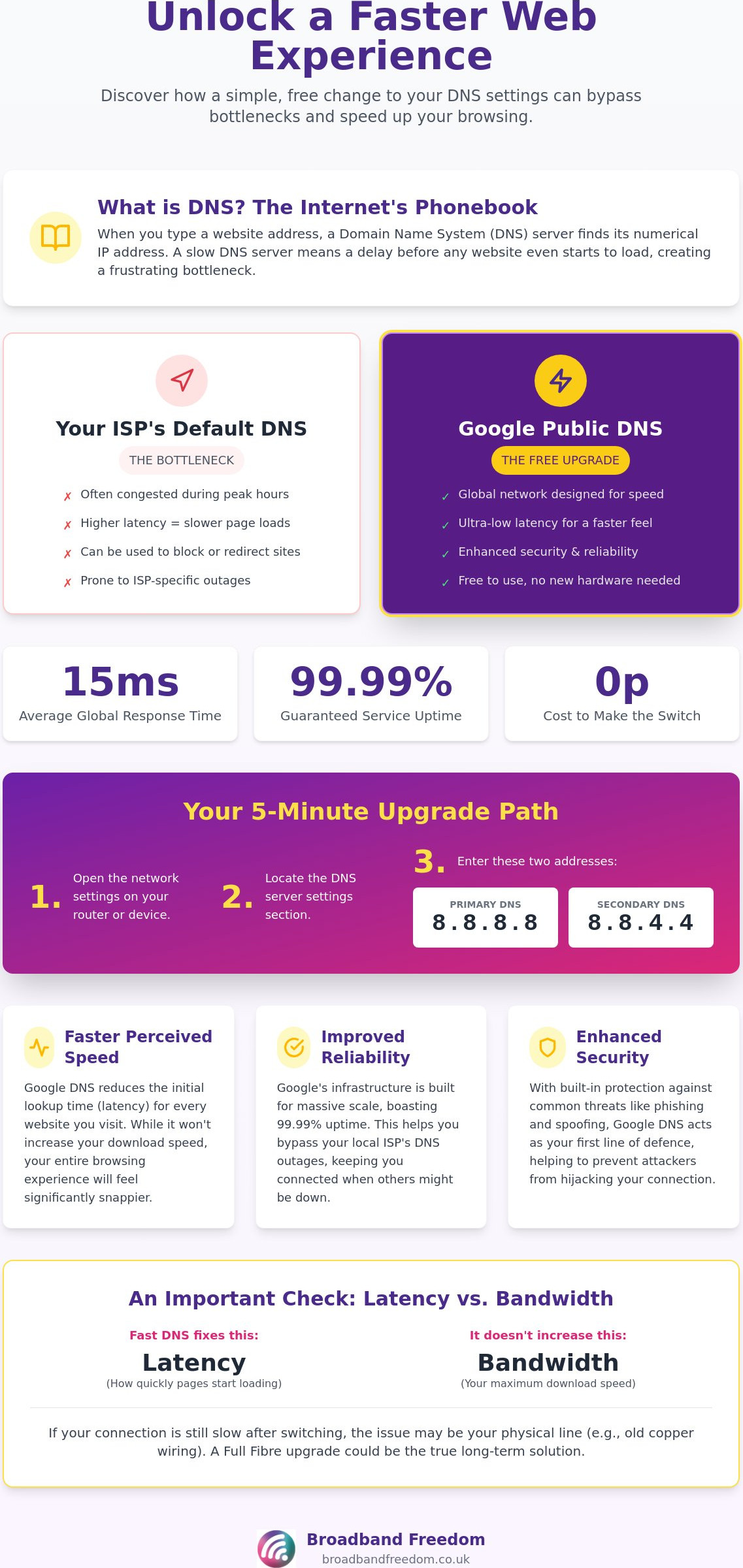
It’s vital to understand that google DNS doesn’t increase your raw megabits per second. If your line is capped at 30Mbps, your downloads will stay at that limit. However, the web will feel much faster because the lookup time for every page is reduced. To understand the difference between resolution latency and your actual bandwidth, you can refer to Broadband Freedom’s internet speed guide. This distinction helps you decide if a software tweak is enough or if you need a physical hardware upgrade.
Security and Privacy Considerations
Google utilises DNSSEC to verify that the records you receive are authentic. This prevents attackers from hijacking your connection to steal passwords. “A secure DNS resolver is essentially the first line of defence in preventing man-in-the-middle attacks,” according to cybersecurity industry standards. Regarding privacy, Google’s policy is clear. They retain your IP address for 48 hours for diagnostics before anonymising the data. You can review these protocols on the official Google Public DNS page. If your connection remains slow, it might be time to compare broadband deals for a faster Full Fibre line.
How to Set Up Google DNS on Your Devices
Switching to google DNS is a straightforward process that takes less than five minutes. You only need two addresses to get started: 8.8.8.8 (primary) and 8.8.4.4 (secondary). Before you begin, always note down your current settings. This ensures you can revert back if you encounter any unexpected issues. You can find more technical details and troubleshooting tips in the Google DNS FAQ. This small software change offers a cleaner, faster path to your favourite websites without requiring any physical hardware adjustments.
Choose Your Configuration Level
Decide whether to apply changes to your entire home or just one machine. Configuring your router is the most efficient method. It automatically protects every smartphone, tablet, and laptop connected to your Wi-Fi. However, if your ISP has locked your router settings, you’ll need to configure each device individually. This granular control is useful for testing performance on a single PC before committing to a network-wide change. If you find your router is too restrictive, it might be time to compare broadband deals for a more flexible provider.
Configuring Your Home Router
Access your router admin panel by typing 192.168.1.1 or 192.168.0.1 into your browser. Look for the “LAN” or “DHCP” settings. Most UK routers from providers like BT or Virgin Media place DNS settings under an “Advanced” tab. Locate the primary and secondary DNS fields and enter the Google addresses. Save your changes and restart the router to apply the new configuration. This ensures that every request from your home network benefits from Google high-speed resolution infrastructure immediately. It’s a pragmatic way to bypass the local bottlenecks of standard ISP hardware.
Setting Up Windows and macOS
On Windows 11, navigate to Settings, then Network & Internet. Select your connection, click “DNS server assignment”, and enter the manual IPs in the Network and Sharing Centre. For macOS, go to System Settings, click Network, and then select “Advanced” under your active connection. Add the Google IPs to the DNS tab. Once finished, open your command prompt or terminal and type “ipconfig /flushdns” (Windows) or “sudo dscacheutil -flushcache” (macOS). This clears old data, forcing your system to use the new settings immediately for a snappier browsing experience.
When DNS Tweaks Aren’t Enough: Upgrading Your Connection
Changing to google DNS is an excellent way to sharpen your browsing experience, but it won’t fix a fundamentally slow line. If you’re currently on an old copper ADSL connection, the physical “pipe” itself is the limitation. You can identify a hardware speed problem if large file downloads or video streams remain sluggish even after the initial page load. According to Ofcom reports, average UK home speeds are rising, yet many regional areas still lag. Use our full fibre broadband checker to see if your street has been upgraded to modern FTTP infrastructure.
Finding Better Broadband Deals in 2026
Moving to Fibre to the Premises (FTTP) is the most effective way to eliminate latency. This technology delivers data via light signals directly to your home, bypassing the congested local cabinets that plague older networks. When you compare broadband deals, you’ll find that Full Fibre provides a more consistent experience during the busy evening peak. Whilst google DNS helps your device find websites faster, a physical fibre line ensures the data actually arrives without delay. It’s the difference between having a better phonebook and having a faster car to reach your destination.
Actionable Next Steps for UK Households
Follow this pragmatic checklist to optimise your home setup. First, run a baseline speed test. Second, switch your router to Google’s public servers as described in this guide. Third, re-test your connection to see if page responsiveness has improved. If the results are still disappointing, it’s time to explore a more robust package. Be sure to check for mid-contract price hikes and consider no-contract broadband deals if you prefer flexibility. Taking these steps empowers you to make an informed decision based on your specific household requirements rather than settling for sub-par service.
Maximise Your Browsing Potential Today
Optimising your settings with google DNS is a pragmatic first step towards a more reliable internet experience. By bypassing congested ISP servers, you’ve gained a faster way to resolve web addresses and added a layer of modern security to your home network. However, software tweaks can only do so much if your physical line is outdated. As the UK moves towards a Full Fibre future in 2026, ensuring your hardware matches your high-speed ambitions is essential for lag-free streaming and gaming.
Finding Your Perfect Connection
We provide independent and expert advice to help you navigate these choices without the stress. Our platform features daily updated broadband offers and allows you to compare up to 30 of the UK’s best providers in seconds. If your current speed still feels like a bottleneck, it’s time to see what’s available in your local area. Compare the latest Full Fibre deals to truly transform your speed and enjoy the liberated connection you deserve. Don’t let a slow connection hold you back when a better deal is just a few clicks away.
Frequently Asked Questions
Is Google DNS free to use in the UK?
Yes, it is an entirely free service for all users in the UK. There are no hidden charges, contracts, or subscription fees for using google DNS. It is a public recursive service designed to make the web more accessible and efficient for everyone. Whilst some niche providers charge for advanced web filtering, Google’s public offering remains a zero-cost way to improve your connection’s reliability and response times.
Will switching to Google DNS increase my download speed?
No, this change will not increase your physical download bandwidth or your raw megabits per second. Your maximum speed is determined by your broadband provider and the physical quality of the line entering your home. However, it makes the internet feel faster by reducing the “resolution latency” or the time your browser waits for a website to load. For a genuine increase in raw speed, you should consider upgrading to a Full Fibre deal.
Is Google DNS safer than my ISP’s default DNS?
Yes, it often provides more robust security features than the default servers used by many UK ISPs. It supports DNSSEC, which uses digital signatures to validate that the website records you receive are authentic and haven’t been tampered with by hackers. This protection against cache poisoning and spoofing attacks makes google DNS a more secure choice for households concerned about online safety and data integrity.
Can Google DNS bypass website blocks in the UK?
It can sometimes bypass basic DNS-based filters, but it doesn’t circumvent all restrictions. Many major UK providers implement court-ordered blocks at a deeper network level that a simple DNS change cannot bypass. If your provider has blocked a site due to legal requirements, changing your server settings will rarely grant access. It is primarily a tool for performance and security rather than a method for bypassing regional legal restrictions.
What are the Google DNS IPv6 addresses?
The primary IPv6 address is 2001:4860:4860::8888 and the secondary address is 2001:4860:4860::8844. As more UK infrastructure moves towards this modern standard, configuring these addresses ensures your home network remains efficient and future-proof. You can enter these in your router’s IPv6 configuration panel alongside the standard IPv4 addresses (8.8.8.8 and 8.8.4.4) to ensure the best possible connectivity across all your modern devices.

Article by
Elaine Lang
Elaine has over 20 years' experience across Marketing, Communications, and Public Relations in the UK. She has worked with large UK corporations, including Commercial Banks and Airports, as well as online consumer finance and technology solutions. Elaine holds postgraduate qualifications in Marketing from the Chartered Institute of Marketing (CIM) and the Institute of Direct Marketing (IDM). She is a lifelong feline fan, having shared her home with around 4-6 cats for many years. This can, of course, be a challenge when trying to work from home, as they often like to try and help!