Onestream Broadband Review: Speeds, Pricing & Deals

94% of UK homes can now access superfast part-fibre speeds according to Ofcom data, yet many households still pay a premium for brand names they rarely benefit from. You likely want a fast, dependable connection without the stress of confusing technical jargon or unexpected mid-contract price hikes. If you are considering onestream broadband, finding a simple, low-cost solution should be straightforward, but the anxiety over slow installation times often keeps people stuck with poor-value deals.
This review helps you decide if Onestream is the right budget-friendly provider for your home by comparing their latest fibre deals and actual performance. We have analysed data from Openreach, which aims to reach 25 million premises with full fibre by 2026, to see how this independent provider utilises the national network. You will learn about their speed guarantees, the transparency of their contract terms, and how their TrustPilot rating of 4.3 out of 5 compares to the wider market. We provide the essential facts you need to secure a reliable connection while keeping your monthly outgoings under control.
Key Takeaways
- Understand how Onestream uses the Openreach network to deliver widespread fibre access without the typical corporate overhead.
- Identify the most efficient speed tier for your home, from basic 35Mbps browsing to ultra-fast 900Mbps full fibre.
- Uncover the reality of onestream broadband contract terms and how to factor annual price adjustments into your household budget.
- Follow a streamlined five-step plan to switch providers safely and avoid common pitfalls like service gaps or hidden fees.
- Learn how to compare no-frills deals against premium competitors to ensure your internet connection remains both reliable and affordable.
What is Onestream Broadband and How Does It Work?
Onestream is a Hampshire-based independent provider that delivers high-value internet services without the premium price tags of major corporations. They operate as a wholesale-based provider that delivers FTTC and FTTP services across the country. By stripping away non-essential extras like TV bundles, they cater specifically to cost-conscious users. This makes them a popular choice amongst students and renters who prioritise monthly savings. Amongst the list of UK internet service providers, Onestream stands out by positioning itself as a “no-frills” gateway to national infrastructure.
The Technology Behind the Connection
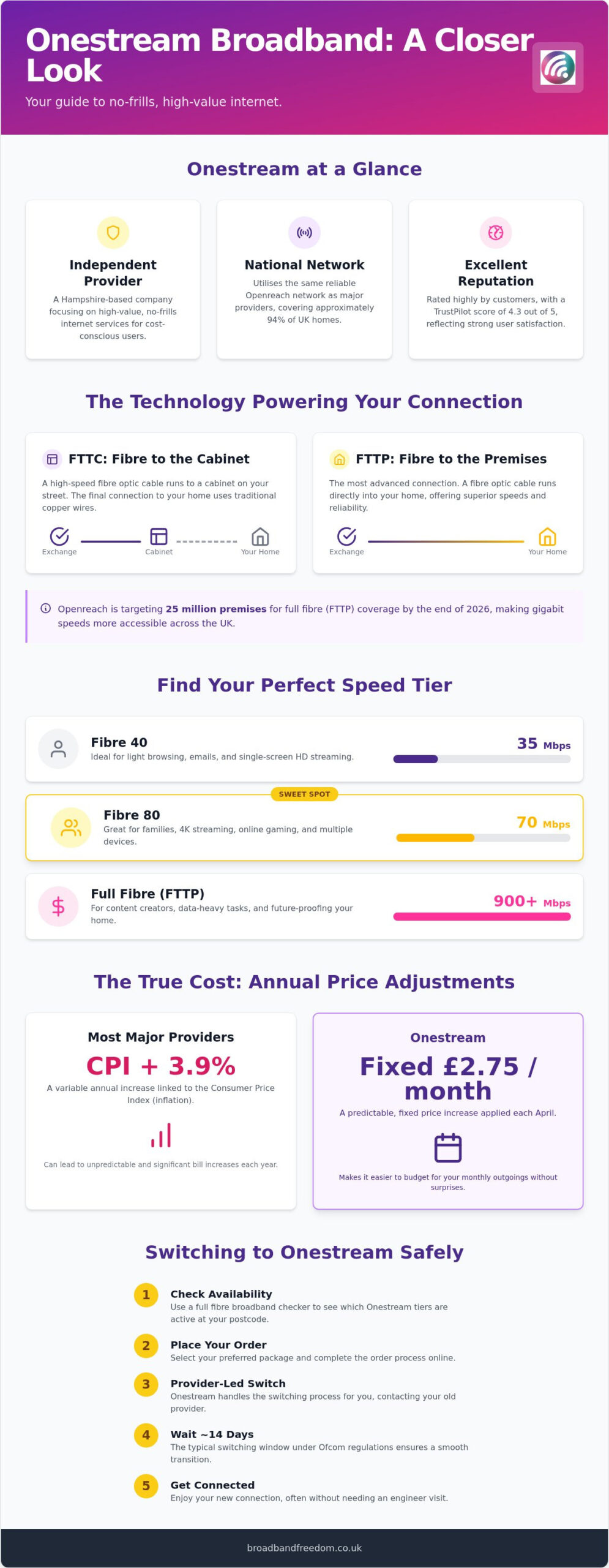
Most users don’t realise that onestream broadband uses the exact same physical infrastructure as industry giants like BT. They utilise the Openreach network, which provides part-fibre services to approximately 94% of UK homes. This means if you can get fibre from a big-name provider, you can get it from Onestream. They offer two main technologies: Fibre to the Cabinet (FTTC) and Fibre to the Premises (FTTP). FTTC uses copper wires for the final leg of the journey, whilst FTTP delivers a direct fibre-optic connection to your door.
Full Fibre and Network Reach
Full Fibre is more reliable and offers higher speeds than older copper systems. Openreach reports that they are targeting 25 million premises for full fibre coverage by the end of 2026. This massive rollout ensures that independent providers can offer high-speed technology to regional consumers. By using this shared network, Onestream ensures their performance metrics remain competitive with the market. This setup allows you to benefit from the same cables used by premium brands while paying a lower monthly rate for your home internet connection.
Availability and Setup in 2026
Checking your local options is the first step toward a cheaper bill. Use a full fibre broadband checker to see which Onestream tiers are active at your postcode. Once you place an order, the transition is usually seamless. Most switches follow the Gaining Provider Led process. Under Ofcom regulations, this switching window typically takes around 14 days, ensuring you aren’t left without a connection. This efficient process reduces the stress of moving between different networks while you focus on finding the best value.
Onestream Speeds and Packages: Choosing the Right Tier
Onestream provides a tiered speed structure to suit different user archetypes. Their Fibre 40 package delivers a 35Mbps average, which is perfect for light browsing or single-screen streaming. For larger families, the Fibre 80 tier offers a 70Mbps average, standing strong against other fibre broadband offers. When selecting onestream broadband, always consider the gap between ‘average’ and ‘guaranteed’ speeds. Per Ofcom’s guidelines, your provider must disclose the minimum speed you will receive during peak times at your address.
Is 80Mbps Enough for Your Household?
The 60-80Mbps range is widely considered the ‘sweet spot’ for UK households. This speed easily handles simultaneous 4K streaming, gaming, and video calls without dropouts. It offers a great balance between monthly cost and daily performance for the average family. Regarding hardware, onestream broadband typically includes a standard router. Whilst functional, users in larger homes might benefit from renting a “Superstream” router for range. If you aren’t sure which tier fits your lifestyle, you can compare broadband deals to see how these speeds stack up against competitors.
Full Fibre and Gigabit Options
Full Fibre (FTTP) delivers a significant upgrade in reliability by removing old copper components. These gigabit-capable connections are vital for content creators who need high upload speeds for large files. The UK government target aims for 85% gigabit coverage by the end of 2026, and this provider utilises the Openreach network to meet this demand. Choosing a 900Mbps+ plan future-proofs your home as digital demands increase. This technology ensures a stable connection even when multiple devices are downloading software updates or streaming high-definition content at once.
The True Cost of Onestream: Contracts and Price Hikes
Understanding the financial commitment of onestream broadband is essential for avoiding bill shock. Whilst many major providers calculate annual increases based on the Consumer Price Index (CPI) plus 3.9%, Onestream has historically applied a fixed annual price increase of £2.75 per month starting every April 1st. This predictable figure can be easier to budget for than variable inflation-linked percentages. You should always check your specific contract for a ‘fixed-price’ guarantee, as these are becoming more popular in 2026 to attract savvy switchers. To ensure you aren’t overpaying, compare broadband deals before your current term expires.
Managing Your Contract and Social Tariffs
Missing your ‘end of contract’ date is a common mistake that leads to rolling onto expensive standard rates. Set a reminder for 30 days before your 12 or 24-month term ends to negotiate a new deal or switch. For households receiving Universal Credit or other benefits, it’s worth inquiring about social tariffs. According to Ofcom social tariffs data, millions of eligible UK homes are still missing out on these discounted rates. Reviewing different broadband providers helps you identify which companies offer the most robust support for low-income households.
Customer Service and Reliability
Onestream maintains a Trustpilot rating of 4.3 out of 5, with many users praising their low entry costs. However, some customers report longer wait times for phone support during peak hours. It’s important to remember that whilst the physical network is managed by Openreach, Onestream handles the ‘last mile’ of customer service and billing. This distinction means technical repairs are usually efficient, but administrative queries require patience. You can find more detail on consumer rights regarding mid-contract changes in official Ofcom price rise guidance to stay fully informed before signing.
How to Compare and Switch to Onestream Safely
Switching to onestream broadband is a pragmatic move for those looking to lower monthly household bills. The UK market is highly competitive; moving between providers is now simpler due to Ofcom’s streamlined switching regulations. You should compare broadband deals to see Onestream alongside Virgin Media or Sky. This ensures you don’t miss out on speed or reliability for the sake of a few pounds. Every UK contract also includes a 14-day statutory ‘cooling-off’ period. This legal protection, as detailed by Citizens Advice, gives you the freedom to test the connection and cancel without penalty.
The Five-Step Switching Process
Following a structured approach makes the transition frictionless. First, compare current market rates using an independent tool. Second, check availability at your postcode to see which fibre tiers are active. Third, order your chosen plan; consider broadband and phone packages if you require a landline. Fourth, your new provider will typically give notice to your old one. Finally, install your hardware on the activation date. This process usually takes around 14 days, as mandated by Ofcom switching rules. This ensures your service transition remains seamless and stress-free.
Using Comparison Tools to Your Advantage
Independent comparison platforms offer a more objective view than individual provider websites. You can often find exclusive deals on these sites that aren’t available directly from the provider. These platforms allow you to filter by specific needs, such as “no contract” or “student deals.” Is onestream broadband right for you? It remains a top choice for users who want the lowest monthly bill and a reliable Openreach-backed connection. If you prefer premium perks or complex TV bundles, you might look elsewhere. Find the latest Onestream deals and compare today to secure your household’s digital future.
Secure Your Home Connection for Less
Onestream offers a pragmatic solution for households prioritising cost over premium extras. By utilising the Openreach network, they provide the same technical reliability as major brands while maintaining a budget-friendly profile. You now understand how their specific speed tiers cater to different lifestyles and why transparency regarding annual price adjustments is vital for your planning. Research from Openreach confirms that the expansion of full fibre continues to improve accessibility for independent providers across the UK.
Take Control of Your Monthly Bills
Choosing onestream broadband allows you to reclaim autonomy over your monthly outgoings without sacrificing performance. To ensure you are getting the best value, compare the latest Onestream broadband deals and save today. Our platform allows you to evaluate their offers against 30 of the UK’s top providers with daily updated data. Expert guidance from Ofcom helps you identify the minimum speed guarantees required for a stable connection. Secure your household’s digital future with confidence.
Frequently Asked Questions About Onestream
Does Onestream use the BT Openreach network?
Yes, Onestream delivers its services via the Openreach network. This infrastructure is shared with major providers like BT and Sky, ensuring that coverage is available to approximately 94% of UK homes. By using these established cables, they provide a reliable connection without the need for independent network builds. You can verify your local coverage through the Openreach fibre checker to see which speeds are available at your address.
How much are the mid-contract price increases in 2026?
Onestream typically applies a fixed annual price increase of £2.75 per month each April. Unlike many competitors who use a percentage-based calculation linked to inflation, this flat rate provides more predictability for your household budget. Always review your specific contract terms to see if a fixed-price guarantee was included. This clarity helps you manage your monthly outgoings more effectively while avoiding the uncertainty of variable inflation rates.
Can I get onestream broadband without a landline?
Yes, you can access onestream broadband without a traditional landline if you opt for their Full Fibre (FTTP) packages. These modern connections deliver data directly to your home via fibre-optic cables, removing the requirement for old copper phone lines. If you live in an area where only part-fibre (FTTC) is available, a line rental fee is usually bundled into your monthly package price. This setup is ideal for mobile-only households looking to cut unnecessary costs.
What happens if my broadband speed is slower than promised?
If your connection speed falls below the minimum guarantee, you have rights under Ofcom’s code of practice. Report the issue to the support team immediately to allow them to investigate the fault. If the speed isn’t restored to the guaranteed level within 30 days, you may be entitled to cancel your contract without paying early exit fees. Always keep a record of your speed tests as evidence for your claim.
How long is a typical Onestream broadband contract?
Most onestream broadband agreements last for either 12 or 24 months. Shorter 12-month terms offer more flexibility for renters or students, whilst 24-month contracts often provide the lowest monthly rates. It’s vital to track your contract end date to avoid rolling onto standard pricing. Set a reminder 30 days before your term concludes to negotiate a better deal or switch providers to maintain your budget-friendly rate and ensure your service remains cost-effective.

Article by
Elaine Lang
Elaine has over 20 years' experience across Marketing, Communications, and Public Relations in the UK. She has worked with large UK corporations, including Commercial Banks and Airports, as well as online consumer finance and technology solutions. Elaine holds postgraduate qualifications in Marketing from the Chartered Institute of Marketing (CIM) and the Institute of Direct Marketing (IDM). She is a lifelong feline enthusiast, having shared her home with around 4-6 cats for many years. This, of course, can be a challenge when trying to work from home, as they do like to try and help!