Reliable broadband for working from home: which connection to choose

Could mobile broadband be the better choice for working from home in a rural area? It can be a useful option where fibre or cable isn’t available and the mobile signal is strong, but a fixed fibre connection is generally the steadier choice for calls and online work. Choosing reliable broadband for working from home means weighing what’s available at your address against how you use the internet.
When choosing reliable broadband for working from home, speed matters, but a fast package won’t help if the connection struggles during video calls or busy periods. Your work tasks, the number of people online at home and the connection type all play a part.
This guide compares fixed-line fibre, standard broadband, mobile broadband and satellite, including their strengths and limitations. You’ll learn what speeds may suit your work, when mobile broadband can make sense, and how to narrow down the options for your home.
Key Takeaways
- Match your broadband speed to your work: routine office tasks need less capacity than regular video calls or large file transfers.
- For a steadier connection, consider fixed-line fibre; mobile broadband can be a practical alternative in rural areas with a strong signal.
- Reduce interruptions by using a wired Ethernet connection for important calls and uploads, and weigh how many people share your connection.
- Compare broadband packages around your household’s needs, and remember that Ofcom gives UK customers 14 days to cancel a switch request free of charge.
What’s the best broadband for working from home?
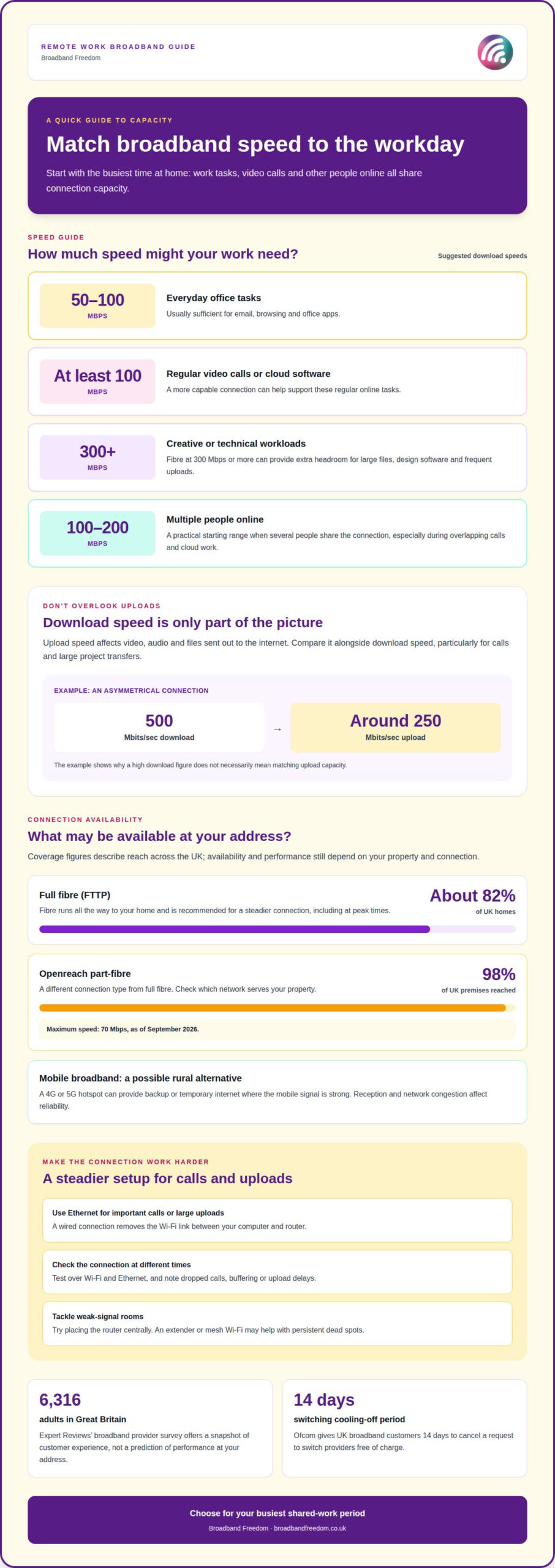
For reliable broadband for working from home, match download speed to your tasks and the number of people online. For multiple home workers, aim for 100-200 Mbps to help avoid slowdowns.
Recommended speeds for remote work
For email, browsing and office apps, 50-100 Mbps is usually sufficient. Regular video calls or cloud software can make a more capable broadband connection useful. These speeds suit everyday work better than basic connections, while larger households may need more capacity. Expert Reviews’ broadband provider survey included 6,316 adults in Great Britain, offering a substantial snapshot of customer experience. Compare advertised speeds with your household’s actual work demands.
Speeds for creative and technical work
Creative and technical work can involve large files, design software or frequent uploads. Fibre broadband at 300 Mbps or more can benefit people handling those workloads. It offers more headroom than the 50-100 Mbps range for basic tasks, especially when several work applications run together. Check both download and upload speeds: transferring project files can depend on the latter. A higher download figure alone may not meet every work need.
Upload speeds for calls and file transfers
Upload speed matters when your connection sends video, audio or work files out to the internet. For example, an asymmetrical connection with a 500 Mbits/sec download speed may offer around 250 Mbits/sec upload. That difference matters for large file transfers and busy video calls. Compare the upload figure alongside download speeds when reviewing a provider’s package. Broadband speed information can help you understand which figures to consider.
Speeds for multiple home workers
When two people work from home, simultaneous video calls and shared cloud tools compete for network capacity. Choose 100-200 Mbps as a practical starting range for a household with multiple internet users. If you also transfer large files or stream while working, the higher end can provide more room. Review how many people are online at busy times, then choose a package suited to those overlapping tasks.
| Work needs | Suggested speed |
|---|---|
| Email, browsing and office apps | 50-100 Mbps |
| Video calls or cloud software | At least 100 Mbps |
| Creative or technical large files | 300 Mbps or more |
| Multiple internet users | 100-200 Mbps |
Ofcom gives UK broadband customers a 14-day cooling-off period to cancel a request to switch providers free of charge. Choose a speed around your busiest shared-work period, not just your lightest use.
Fixed-line and mobile broadband connection types
Check reliability with speed tests over Wi-Fi and Ethernet at different times of day. Note dropped calls, buffering and upload delays. If you find weak-signal rooms, try moving the router to a central position; mesh Wi-Fi can help extend coverage.
Fixed-line broadband reaches your home through a phone line, cable or fibre. Full fibre, also called FTTP, runs fibre all the way to your home and is recommended for a steady connection, including during peak hours. It’s available to about 82% of UK homes, so access depends on your address.
Options where full fibre isn’t available
Openreach part-fibre reaches 98% of UK premises and has a maximum speed of 70 Mbps as of September 2026. It uses a different connection type from full fibre, so check which network serves your property. Mobile broadband connects through a mobile network instead of a fixed line. A 4G or 5G hotspot can provide backup internet or a temporary connection in a rural home with a strong signal. Reception and congestion affect its reliability.
Improve stability for calls and uploads
For important video calls or large uploads, connect your computer to the router with Ethernet. This removes the Wi-Fi link between your device and router. If the signal is weak in certain rooms, try a more central router position. An extender or mesh network may help with persistent dead spots.
A symmetrical connection has matching upload and download speeds. This can suit work involving large file transfers or video calls. Compare upload capacity as well as download speed, and consider how the connection performs when work and household activities overlap. Alongside speed and stability, maintaining secure network access is equally essential for remote workers, with managed IT specialists such as CX IT Services helping organisations protect sensitive data across off-site setups.
Broadband reliability and customer satisfaction
Expert Reviews’ broadband provider survey included 6,316 adults in Great Britain. That sample gives context on customer views, but not how a package performs at your address. Assessing reliable broadband for working from home starts with recording connection drops, slow downloads and failed calls. A short log can show whether issues happen at particular times or in specific rooms.
What reliability looks like day to day
Look beyond advertised download speed when assessing reliability. Frozen calls, pages that stall and slow cloud uploads can disrupt your working day. Note when problems happen, such as during a video meeting or while someone else streams. This can help you tell a Wi-Fi coverage issue from a wider fault. Surveys offer a customer perspective, while your own workday notes show how the service performs at home.
For an outage or missed repair appointment, record when the problem started, the appointment time and any provider reference. Then review Ofcom’s information on automatic compensation and the provider’s complaints process. Eligibility depends on the circumstances and the scheme’s terms, so keep messages and dates together.
Use evidence to assess service
Customer satisfaction involves more than raw speed. Consider how faults are handled and whether calls remain usable. Keep a short fault log so you can describe repeated disconnections during morning meetings, rather than simply calling a package unreliable. Specific details make it easier to explain the impact on your work.
Test at consistent times over several workdays, using the same device and room. Compare Wi-Fi results with Ethernet where possible. If Ethernet is steady but Wi-Fi falters, local coverage may be the issue. If both struggle, record the results for the provider. Expert Reviews’ broadband provider survey offers a broader customer snapshot, while these checks reveal whether your connection supports reliable broadband for working from home.
Choosing broadband for different household needs
Choose a broadband package based on who uses the internet and what they do online. Count activities that happen at the same time, such as work calls, streaming and gaming, rather than relying on household size alone. Needs can change when someone starts working from home or adds regular video meetings. Before switching, consider these UK household examples:
- One or two people: 0-50 Mbps can suit light browsing, social media and streaming.
- Three or more people: 101-500 Mbps can support high-quality streaming and gaming.
- Four or more people: speeds above 500 Mbps can suit multiple streamers and gamers.
Match speed to shared activities
These ranges help you assess capacity alongside the number of people at home. Two people browsing lightly have different demands from four people gaming and streaming at once. Think about your busiest period, such as evening gaming alongside remote work, and choose capacity for those simultaneous activities. Larger households may need more headroom when several people use high-bandwidth services together.
Connection availability also shapes your choice, particularly in rural areas. Satellite broadband may be a longer-term option where fibre or cable isn’t available. Mobile broadband can suit a rural home with a strong signal, especially as a temporary connection. The connection types available at your address may narrow your options before speed becomes the deciding factor.
Review options when routines change
Compare broadband deals by connection type and speed, then weigh them against your household’s regular activities. If everyone mainly browses, the highest speed may not be necessary. If several people work, stream and game together, prioritise capacity for those overlapping demands. Reassess your broadband package when household routines change, such as a new home worker or regular online gaming.
Broadband Freedom
Broadband Freedom helps you compare UK broadband deals when weighing connection reliability against your work needs. Its comparison covers up to 30 providers, so you can review different options side by side. Focus on connection type, speed and whether your work involves calls, cloud tools or large uploads. That keeps the decision centred on your household, not just a headline speed.
If fibre is a priority, compare Full Fibre and fibre deals where available. Standard broadband deals provide another type of connection to consider. Availability and performance depend on your address, so match the options available with your work requirements. Regular video meetings, for example, make upload capacity and a stable connection especially relevant.
Broadband Freedom also offers broadband and phone packages. This may suit households that want those services together, rather than broadband alone. Start by listing what you need from the connection, including work calls, file transfers and other people’s online activities. Then compare packages against those priorities. Comparing broadband deals can help you narrow the choice without treating one connection type as right for every home.
Use this comparison when choosing a new connection or reviewing whether your current setup still suits your working routine. If fibre access is limited at home, compare the available connection types against your speed needs. If several people work or stream at once, consider the demands they share. The aim is a broadband package that fits how your household actually uses the internet.
For a straightforward next step, contact Broadband Freedom to discuss your broadband options.
Frequently Asked Questions
What are my broadband options if I work in a rural area?
Your options depend on the connection types available at your address. Check fixed-line availability first. If fibre or cable isn’t available, satellite may be a longer-term option. Mobile broadband can work as a temporary connection where the signal is strong. Test reception in your work area, as signal strength can vary around the home.
Which is the best broadband provider?
There isn’t one provider that suits every household. The right choice depends on the options at your address, your work activities and how your household uses the internet. Compare contract terms and package details as well as speed. A household with frequent video meetings, for example, may value upload performance and clear fault-support information more than a package aimed at light browsing.
Can I get Full Fibre broadband in my area?
Full Fibre availability varies by address, so enter your postcode in a broadband availability checker. Check that the results show whether the network reaches your property, rather than relying on coverage nearby. If Full Fibre isn’t available, compare the other fixed-line connection types offered at your address. A new-build block and a nearby house, for example, may have different options.
What are the most important things to consider?
Start with the work you do, how many people use the connection at busy times and which connection types are available at home. Check upload speed if you send large files or make regular video calls. Read the contract length, cancellation terms and fault-support details too. Together, these factors help you decide whether a package suits your working routine and household needs.
What internet speed do I need?
For everyday email, browsing and office apps, 50-100 Mbps is usually sufficient. Regular video calls or cloud software call for at least 100 Mbps, while large creative or technical files can benefit from 300 Mbps or more. Look at upload speed too, particularly if you send files or present during calls. Add capacity if several people are online together.
What broadband speed is reliable for working from home in the UK?
For regular calls and cloud tools, aim for at least 100 Mbps; basic office tasks often work with 50-100 Mbps. Reliability also depends on the connection and your home network, not just the headline speed. If several people work online at once, consider 100-200 Mbps. For large project files, prioritise upload performance as well as download speed.

Article by
Elaine Lang
Elaine has over 20 years across Marketing, Communications and Public Relations in the UK. She has worked across large UK corporations, including Commercial Banks and Airports, to online consumer finance and technology solutions. Elaine has post graduate qualifications in Marketing from the Chartered Institute of Marketing (CIM) and the Industry of Direct Marketing (IDM). She is a lifelong feline fan, sharing her home with around 4-6 cats for many years. This of course can be a challenge when trying to work at home, as they like to try to help!