How to Get Temporary WiFi Fast: Easy Options for Short-Term Internet

Key Takeaways
- Temporary internet via a phone hotspot offers quick access for work and streaming during short gaps in broadband service.
- For longer use, users can consider dedicated options like MiFi devices or 4G/5G home routers, which provide steadier connections.
- Coverage check and data limits are crucial when selecting temporary internet options; consider pay-as-you-go data SIMs or rolling plans.
- Proper setup and regular monitoring can enhance the reliability of temporary WiFi, especially in terms of router placement and data management.
- Ultimately, temporary internet solutions help users stay connected while awaiting permanent broadband installations.
Table of contents
Temporary WiFi can solve the frustration of waiting for broadband today. Fast internet access matters when someone is moving house, staying in temporary accommodation or dealing with an unexpected outage. A phone hotspot provides an immediate connection for work, streaming and daily tasks. Dedicated mobile broadband can provide a steadier option when the gap lasts longer.
This piece explains how to get temporary wifi and compare temporary wifi internet with other temporary internet options. It also helps readers choose temporary wifi for home without committing to a long-term plan.
Coverage includes no-contract WiFi and temporary broadband. It also covers temporary broadband in the UK. It includes temporary WiFi for houses and home WiFi. It helps readers find the best temporary home WiFi.
Step 1: Get Temporary WiFi Now Using Your Phone
A phone can create temporary WiFi. It does this by sharing its mobile data connection. This can provide internet at home during a short gap if service is delayed.
- iPhone users can open Settings > Personal Hotspot.
Or open Settings > Mobile > Personal Hotspot.
Turn on Allow Others to Join.
Then set a Wi‑Fi password. Apple requires a password with at least eight characters. - Android users can swipe down and tap Hotspot. If the tile is missing, add it through Edit. Users can also open Settings, Network & internet, Hotspot & tethering, then Wi-Fi hotspot. Samsung phones use Settings, Connections, Mobile Hotspot and Tethering.
- Laptop or tablet users can open Wi-Fi settings, select the phone’s hotspot name, enter the password, and connect. Android phones can share mobile data with up to 10 devices through Wi-Fi hotspot.
A strong mobile signal supports steadier work tasks and video calls. Before using this no contract wifi, the account holder should check if the mobile plan supports tethering. They should also check if any fees apply.
Hotspot use draws from the phone’s data allowance. Connected computers can use data for updates, cloud backups, or high-quality video. Users should pause these tasks and check the phone’s data monitor or carrier app. After use, users should turn off the hotspot to stop further sharing and save battery.
Step 2: Move to a Dedicated Connection for Longer Use
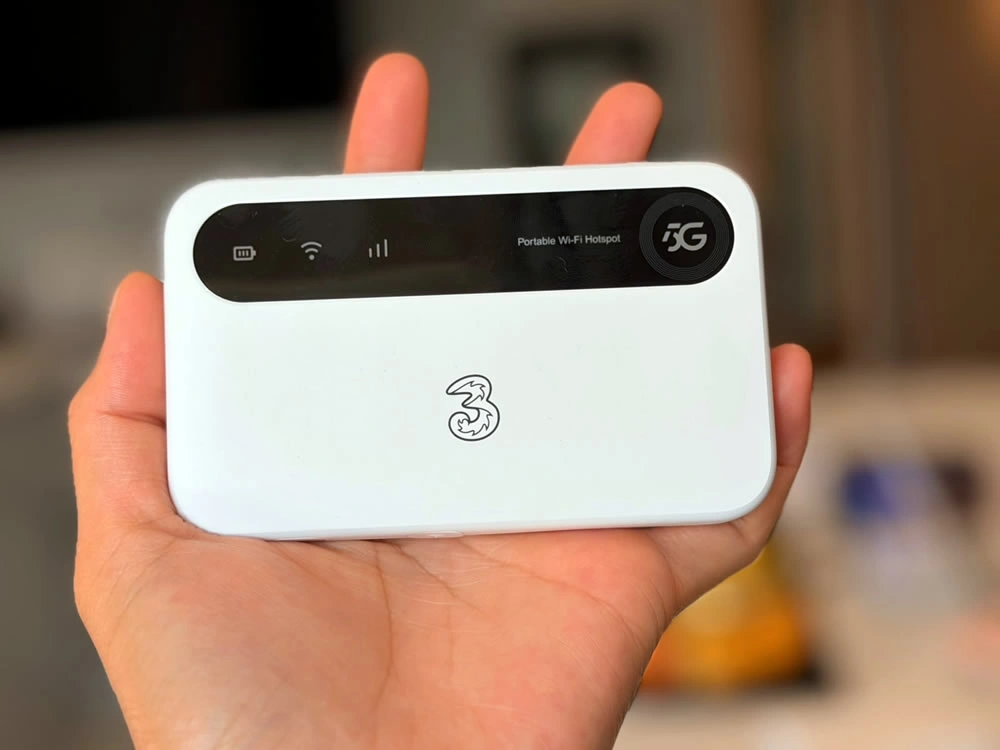
Image Source: 3G.co.uk
A dedicated mobile connection helps save phone data and battery life. Users should match the device to their needs if they need it for longer periods.
- MiFi or portable router: They insert a data-only SIM, switch on the unit, and join its network using the supplied name and password. A mobile WiFi device can connect up to ten devices within 10 metres. This temporary Wi‑Fi option suits short lets and temporary home use.It works through mobile network coverage.
- USB dongle: They plug it into a laptop to access mobile data. Dongles suit one person because many connect only to the computer they are plugged into.
- 4G or 5G home router: Several users can place a mains-powered hub where the mobile signal is strongest. Insert a SIM card if needed. Then connect devices as you would to home Wi‑Fi. Three’s 4G home hub supports up to 30 devices.
They should check the postcode in Ofcom’s mobile coverage checker. They should compare providers at the address before ordering temporary broadband in the UK. Users can choose a pay-as-you-go data SIM or a one-month rolling plan to get no contract wifi.
Three’s rolling plans renew each month, and customers must give 30 days’ notice to cancel. They should check data limits, delivery times, and terms before choosing the best temporary WiFi for home.
Step 3: Keep Your Short-Term Internet Working Reliably
Reliable temporary WiFi depends on router placement, sensible data settings, and regular checks. Users should keep a portable router or hub in an open, central spot away from furniture, fish tanks, and microwaves. Thick walls, insulation, and glazing can weaken indoor mobile and home WiFi signals. If reception is stronger outside, users can test the signal near a window. They can also compare providers using Ofcom’s coverage checker.
- Run a speed test in the work area and again near the router. This shows whether the issue comes from local WiFi coverage or the mobile connection.
- Disconnect idle devices. Active devices share the available connection, so pause cloud backups, app updates, and high-quality streaming during calls.
- Conserve the data allowance. iPhone’s Low Data Mode restricts background refresh, automatic downloads, backups, and streaming quality. Users can also disable video autoplay and download media while connected to WiFi.
Users should place a WiFi extender halfway between the hub and the room that needs coverage. If temporary WiFi remains slow, they should rescan WiFi, restart the hub, and retest. Rental users should keep the return label and pack the router, cable, adapter, battery, and pouch. One UK rental provider sets a 600GB monthly fair-use threshold for unlimited service.
Conclusion
Temporary WiFi is a practical way to stay connected. It helps while you wait for fixed broadband. It also suits short-term stays. A phone hotspot can get them online right away. MiFi devices and 4G or 5G home routers offer a stronger option for longer gaps. They should check coverage and data limits, along with their device needs, before deciding.
Sensible setup and monitoring can help temporary internet keep work and streaming available while supporting everyday tasks.
FAQs
Q1. What is the quickest way to get internet for a few days?
Use your phone’s hotspot to share mobile data with your laptop or tablet. Check that your plan allows tethering, confirm you have enough data, and protect the hotspot with a password.
Q2. Can I work from home using a phone hotspot?
Yes, a strong mobile signal can support work tasks and video calls. Test the connection first, and pause updates, cloud backups, and high-quality streaming during meetings.
Q3. What is the best temporary WiFi option while waiting for broadband?
A phone hotspot suits a short gap. For longer use, consider a portable MiFi device.
You could also use a 4G or 5G home router.
Choose based on mobile coverage and how many devices need internet.
Q4. Can I get temporary WiFi without a long-term contract?
Yes. A pay-as-you-go data SIM or one-month rolling plan can provide short-term access. Check data limits, equipment costs, delivery times, and cancellation notice before ordering.
Q5. How do I choose a mobile network for temporary home WiFi?
Check coverage at your address using Ofcom’s mobile coverage checker and compare providers. Test the connection where you will work, since indoor reception and router placement affect performance.
Related links