
Broadband Router Guide: Boost Your Home Connection

Did you know that the Wi-Fi Alliance forecasts 1.1 billion Wi-Fi 7 device shipments in 2026? If you’re still using an old broadband router provided years ago, you’re likely missing out on the massive performance leaps offered by modern hardware. It’s incredibly annoying to pay for a premium fibre plan only to suffer through buffering during peak evening hours or lose signal entirely in the upstairs bedroom. Most of us accept these dead zones as a fact of life, but they’re actually a symptom of outdated tech failing to keep pace with our digital demands.
We agree that your home connection should just work, regardless of how many devices are running at once. This guide empowers you to reclaim control of your network by showing you how to choose, optimise, and upgrade your equipment for the fastest UK speeds. We’ll cut through the confusion between WiFi 6 and WiFi 7 and explain why the FCC recently updated minimum speed requirements for funded infrastructure programmes. You’ll learn which technical features actually matter in 2026 and how to find the best broadband deals that include high-performance hardware.
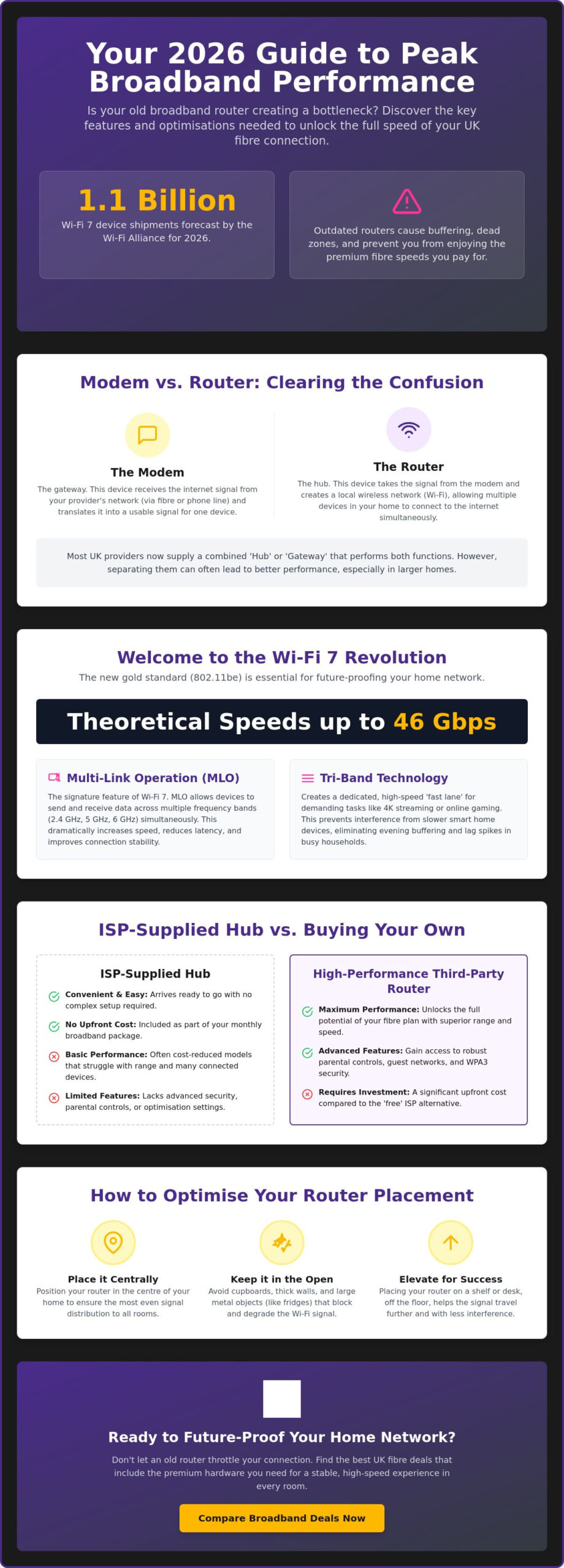
The transition to Wi-Fi 7 is now the industry standard, offering theoretical speeds up to 46 Gbps. According to official company reports, this technology is essential for the next generation of high-bandwidth, low-latency applications. We have reviewed the latest market options to ensure you get the most stable WiFi in every room of your house.
Key Takeaways
- Distinguish between your modem and your router to identify which piece of hardware is actually bottlenecking your home connection.
- Learn why WiFi 7 is the new essential standard for wireless stability and how tri-band technology can eliminate evening buffering.
- Compare the performance of standard ISP hubs against high-end third-party alternatives to decide if buying your own broadband router is worth the investment.
- Master the physical placement of your hardware to bypass common household interference and extend your signal to every room.
- Discover how to find the best UK fibre deals that include premium hardware to ensure your home network remains future-proof.
Understanding Your Broadband Router and Why It Matters in 2026
A broadband router is the gateway that connects your local devices to the global internet via your ISP. It acts as the central hub that organises your home data traffic, ensuring each device receives the correct information at the right time. Understanding what is a router? is the first step to improving your connection. In 2026, a high-quality broadband router is more critical than ever as we integrate more smart tech into our daily lives.
The Vital Role of the Router in Modern UK Homes
Your router manages the “last-mile” delivery of your fibre connection to your favourite devices. Even on an ultrafast full fibre plan, a poor router creates a bottleneck that stifles performance. If you notice buffering, use our Broadband Speed Test UK to check your current performance. A modern broadband router helps you reclaim your time by prioritising high-demand traffic like video calls or 4K streaming. Physical obstacles like thick walls or kitchen appliances can further degrade this signal if your hardware isn’t up to the task.
Broadband Router vs. Modem: Clearing the Confusion
Most modern UK providers now supply a “two-in-one” gateway device. These units combine a modem, which receives the signal from the street, with a router that distributes it throughout your home. Whilst these devices have evolved to handle gigabit speeds in 2026, they often lack the range of premium standalone hardware. This setup is designed for ease of use, but power users often find that a single box struggles to provide stable coverage in larger British homes. Knowing the difference between receiving and distributing a signal allows you to pinpoint exactly where your network needs an upgrade.
Key Features to Look for in a Modern 2026 Router
WiFi 7 (802.11be) is now the gold standard for home connectivity. According to the Wi-Fi Alliance, shipments of compatible devices have reached 1.1 billion in 2026. This standard utilises Multi-Link Operation (MLO) to send data across the 2.4 GHz, 5 GHz, and 6 GHz bands simultaneously. Tri-band routers offer a dedicated frequency to prevent interference amongst smart home gadgets. This separation ensures your 4K stream doesn’t stutter just because a smart bulb is updating in the background. It’s a simple way to reduce network congestion in busy households.
This is particularly useful for those running sophisticated indoor growing setups with equipment from a hydroponics shop UK, where Wi-Fi-enabled nutrient dosers and climate controllers require a consistent signal to function correctly.
WiFi 7 and the Future of Wireless Connectivity
WiFi 7 handles more data simultaneously whilst reducing latency for gamers. It provides theoretical speeds up to 46 Gbps, which is essential for maximising the latest fibre connections. You won’t need to bin your old tech either. These units are backward compatible with WiFi 6 and older gear. High-performance models like the TP-Link Archer BE9700 now offer 10 Gbps wired ports to support these wireless leaps. This ensures your broadband router can handle the most demanding tasks without breaking a sweat.
Security Protocols: Keeping Your Data Safe
Protecting your network is vital. WPA3 encryption is a non-negotiable security feature for any broadband router in 2026. The National Cyber Security Centre highlights the importance of modern encryption to defend against evolving threats. Look for hardware with built-in parental controls and guest networks to isolate visitor traffic. Don’t overlook physical ports. Gigabit Ethernet remains the best choice for gaming and home office setups where absolute stability is required. If you’re looking for a better connection, you can compare broadband deals that feature these high-spec hubs today.
ISP-Supplied Routers vs. Buying Your Own
Most UK households use the “free” hub provided by their provider. Whilst these units are convenient, they are often cost-reduced versions of retail hardware. It’s vital to check your contract terms; many providers require you to return their broadband router when you switch. Failing to do so can result in unexpected fees. If you live in a small flat, the standard equipment is usually sufficient. However, for power users or those in larger homes, the performance gap between a standard hub and a premium third-party device is significant.
When is Your Provider Hub Good Enough?
Standard hubs are adequate for light users who primarily browse or stream on a single screen. If you live in a modern apartment with thin walls, you likely won’t experience signal dropouts. According to official Ofcom advice, these hubs are designed for plug-and-play simplicity. You can research which companies offer the best-rated hardware by visiting our guide to Broadband Providers. They receive automatic firmware updates, ensuring your security remains current without manual effort.
The Advantages of Third-Party Hardware
Upgrading to a third-party broadband router unlocks advanced customisation. You gain access to VPN support and better traffic prioritisation. According to official Netgear reports, high-performance models like the Nighthawk RS700S support internet plans up to 10 Gbps. This level of control is essential for households with heavy gaming or professional home office requirements. These devices often feature more antennas and better processors to handle multiple simultaneous connections without overheating or slowing down.
Mesh WiFi for Larger Properties
For multi-storey houses with thick internal walls, Mesh WiFi systems are the ultimate solution. Systems like the Amazon eero Max 7 offer wireless speeds up to 4.3 Gbps. These systems use multiple nodes to blanket your entire property in signal, effectively eliminating dead zones. This ensures high-speed connectivity in every room, from the basement to the attic. If you want the best equipment for your home, compare broadband deals to see which providers include premium hardware today.
How to Optimise Your Router for the Best Performance
Optimising your broadband router is the quickest way to fix connection issues without an engineer visit. Physical obstacles are the primary cause of signal degradation in older British homes. Start by identifying the best location to ensure your signal reaches every corner of your property. According to official Ofcom advice, even small changes in placement can increase speeds by up to 20%. Avoiding interference from other household electronics is equally vital for maintaining a stable stream.
Perfect Positioning: The “Centre and High” Rule
Placing a router inside a cupboard or behind the telly is a recipe for poor signal. WiFi waves are easily absorbed by dense materials like wood, brick, and metal. Signals naturally travel downwards and outwards from the antennas. This makes a central, high shelf the ideal spot for your hardware. Aim for a location that has a clear “line of sight” to the areas where you use your favourite devices most frequently. Keep your broadband router away from large mirrors, as the silvering can reflect and distort wireless signals. If you are designing your space to be both beautiful and functional, you can read more about kitchen islands from Broadway Kitchens to find out how to balance luxury aesthetics with modern living needs.
Identify and avoid common sources of wireless interference in the kitchen and lounge. Microwaves, baby monitors, and cordless phones often operate on the 2.4 GHz frequency, which causes congestion. Beyond physical placement, regular firmware updates are essential to maintain speed and security. These updates often include “bug fixes” that resolve unexpected connectivity drops. Most modern units handle this automatically. However, checking your settings manually via the manufacturer’s app ensures you aren’t running on outdated software that could leave you vulnerable to threats.
Finding the Best Deals with High-Spec Hardware
If your current setup still struggles after optimising, it’s likely time for a hardware upgrade. Look for “Pro” or “Premium” tiers in Fibre Broadband Offers that bundle high-performance routers. Some providers now offer “WiFi in every room” guarantees, often using Mesh extenders to bridge coverage gaps. Research from industry analysts at ISPreview suggests these guarantees are becoming a standard feature for gigabit-capable plans. You can Compare Broadband Deals to find packages that prioritise hardware quality alongside raw download speeds.
Take Control of Your Home Network Today
Your connection is only as strong as the hardware distributing it. We’ve explored how a modern broadband router acts as the vital engine room for your digital life, especially as WiFi 7 becomes the new industry standard. By mastering physical placement and understanding when to opt for a Mesh system, you can finally eliminate dead zones and buffering for good. These simple, pragmatic steps ensure you get the full value from your monthly subscription.
Finding the right hardware doesn’t have to be a complex chore. We offer an expert comparison of over 30 UK providers, featuring daily updated offers on Full Fibre and Mesh bundles. Our independent advice prioritises your autonomy, helping you identify the deals that include the premium kit you need without the usual industry jargon.
Ready to upgrade your experience? Compare the latest UK broadband deals with premium routers and reclaim the high-speed connection you deserve. A more stable and efficient home network is well within your reach.
Frequently Asked Questions
What is the difference between a modem and a broadband router?
A modem brings the internet signal into your property from the street, whilst a broadband router shares that signal with your laptops, phones, and smart TVs. Most modern UK hubs are “two-in-one” gateway devices that perform both roles in a single box. If you want better performance, you can often bypass the router part of your provider’s hub and use your own high-spec hardware instead.
Can I use any router with my UK broadband provider?
Most UK providers allow you to use your own hardware, provided it supports the specific technical settings required by their network. Full Fibre users can usually plug a third-party unit directly into the Openreach box on the wall. If you’re with Virgin Media, you’ll need to switch their Hub into “Modem Mode” via the settings menu to use your own equipment successfully without creating network conflicts.
How often should I replace my broadband router to maintain speed?
You should aim to replace your broadband router every three to five years to keep pace with new wireless standards and security updates. Technology moves quickly; the transition from WiFi 6 to WiFi 7 in 2026 offers significant improvements in stability for busy homes. Keeping hardware for too long often leads to “bottlenecks” where your devices can’t reach the speeds you’re actually paying for in your monthly plan.
Does a more expensive router actually increase my internet speed?
An expensive router doesn’t change the speed provided by your ISP, but it does ensure that speed actually reaches your devices without dropping off. Cheaper hardware often struggles to distribute data effectively across multiple rooms or to many devices at once. High-end models use better processors and antennas to ensure you get the maximum possible throughput from your fibre plan, even during peak evening hours.
What is a Mesh WiFi system and do I need one for my home?
Mesh WiFi uses several interconnected nodes to blanket your entire home in a single, strong wireless signal. Unlike traditional range extenders, these nodes communicate with each other to ensure you don’t lose connection as you move between floors. This is the best solution for larger British properties with thick internal walls that typically block standard wireless signals. If you live in a small flat, a single high-quality hub is usually sufficient.

Article by
Elaine Lang
Elaine has over 20 years across Marketing, Communications and Public Relations in the UK. She has worked across large UK corporations, including Commercial Banks and Airports, to online consumer finance and technology solutions. Elaine has postgraduate qualifications in Marketing from the Chartered Institute of Marketing (CIM) and the Institute of Direct Marketing (IDM). She is a lifelong feline fan, sharing her home with around 4-6 cats for many years. This of course can be a challenge when trying to work at home, as they like to try to help!