How to Get Internet for a New Build House: Complete Guide

82% of UK homes now have access to Full Fibre, yet securing reliable internet for a new build house often feels like a battle against invisible databases. You’ve likely found your fresh postcode is missing from standard checkers or are confused by the “white box” in your hallway. It’s a common frustration for homeowners expecting instant connectivity.
We’ll help you navigate provider restrictions, understand your ONT hardware, and secure a gigabit-capable deal. This guide explains how to use Building Regulations 2010 Part R and Ofcom data to stay online for move-in day.
Key Takeaways
- Confirm your legal right to gigabit-capable internet for a new build house, as Full Fibre is now the mandatory standard for new developments.
- Identify your network wholesaler early to see if you are restricted to specific providers like OFNL or have the freedom of the Openreach network.
- Place your broadband order at least three to four weeks before moving in to bypass database delays and secure a “day one” connection.
- Compare independent Full Fibre deals instead of accepting the developer’s default partner to ensure you get the best price and speed.
- Locate your ONT hardware in the hallway to understand how remote activation can get you online without a scheduled engineer visit.
Understanding the New Build Broadband Landscape in 2026
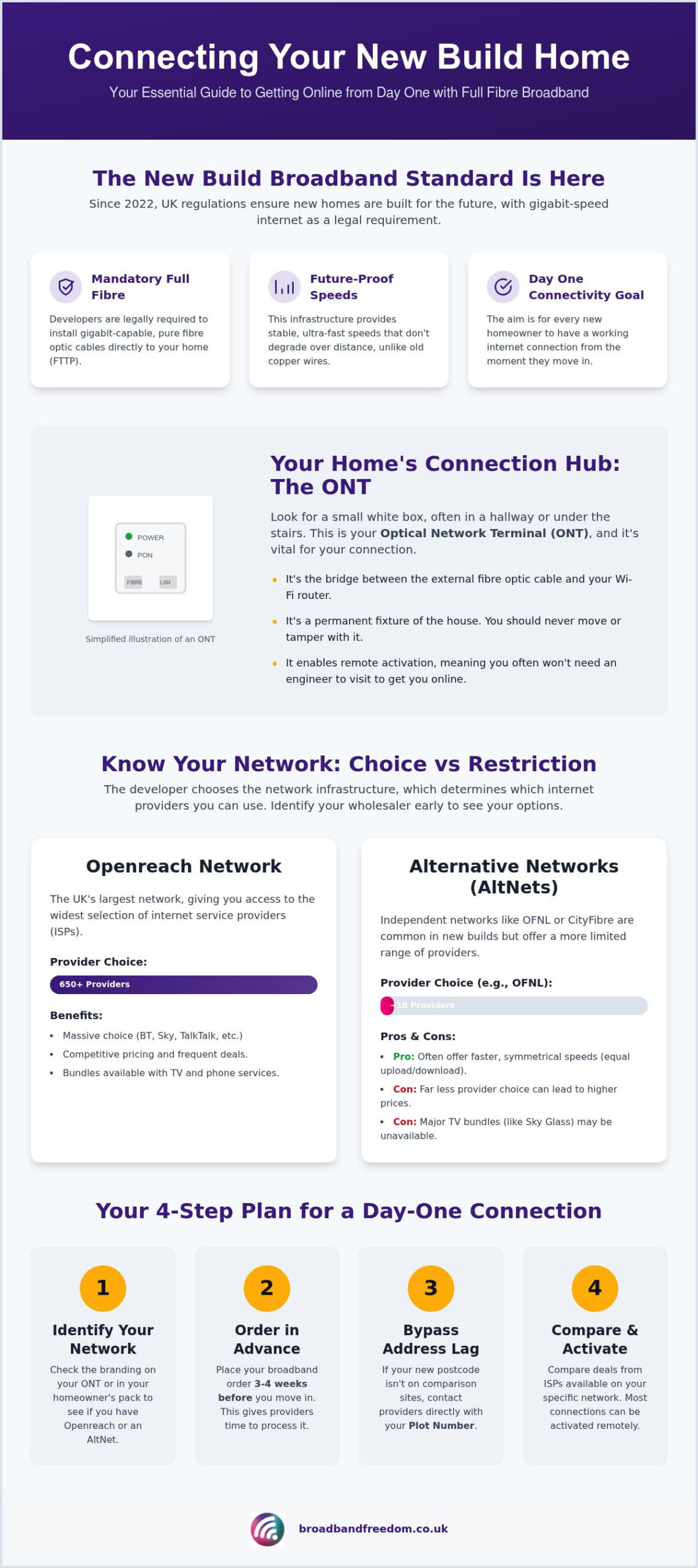
Since December 2022, UK building regulations have transformed how we access the internet for a new build house. Developers are now legally required to install gigabit-capable infrastructure as standard, with a £2,000 per-dwelling cost cap to ensure compliance. This shift means the old days of copper wires and slow speeds are over. Instead, modern homes use pure glass fibre cables to deliver data directly to your door. This broadband network architecture, known as Fibre to the Premises (FTTP), provides a stable and lightning-fast connection that doesn’t degrade over distance. Whilst the goal is “Day One” connectivity, database sync issues between the Royal Mail and ISPs can sometimes cause initial delays for new residents.
The Role of the ONT: Your New Home Connection Hub
Look for a small white box, often located under the stairs or in the hallway. This is your Optical Network Terminal (ONT). It acts as the bridge between the external fibre line and your internal router. It’s essential to understand that the ONT replaces the traditional master phone socket you might be used to. You should never try to move or remove this unit because it’s a permanent fixture of the property infrastructure. If you’re moving in and find the ONT is missing, contact your developer immediately. Most modern setups allow for remote activation, meaning you won’t always need an engineer to visit once your hardware is in place.
Gigabit-Capable Infrastructure and 2026 Standards
According to recent Ofcom data, approximately 82% of UK residential premises now have access to Full Fibre. In new developments, this figure is nearly 100% due to current government mandates. You won’t find basic ADSL in these homes because the infrastructure is designed for the future. “By 2026, the industry has moved beyond testing; Full Fibre is the reliable backbone of the UK’s digital economy,” says a senior network engineer at a leading UK wholesaler. To see how these speeds translate to your daily use when setting up internet for a new build house, check our guide on internet speed requirements.
Comparing Networks: Openreach vs OFNL and Independent AltNets
Identify your wholesaler before choosing a provider. Openreach covers most of the UK, but developers often use AltNets like CityFibre or OFNL. Under new legislation for new builds, gigabit-capable infrastructure is mandatory. However, this doesn’t guarantee a choice of networks. You might find yourself in an exclusivity trap where only one wholesaler’s broadband network architecture is available. This physical limitation dictates which ISPs you can use for your internet for a new build house. Understanding these constraints early prevents frustration during the move-in process.
Identifying Your Network Wholesaler
Don’t guess which cables are installed. Check the branding on your ONT box or your “Homeowner Pack”. Openreach allows access to 650+ providers, whereas OFNL typically offers around 18. According to the Ofcom Full Fibre guide, your network choice is often fixed by the developer’s partnership. Use our Full Fibre checker to verify which wholesalers serve your postcode. This clarity helps you avoid wasting time on providers that cannot service your specific address, ensuring you find a functional deal quickly.
AltNet Pros and Cons
Independent networks often provide symmetrical upload and download speeds, which is a significant advantage for remote workers. The main drawback is the lack of traditional TV bundles from giants like Sky or Virgin Media. You’ll need to evaluate specific broadband and phone packages tailored to these smaller networks. Whilst variety is lower on AltNets, the performance often exceeds traditional providers. Before committing, compare broadband deals to ensure you aren’t paying a premium for a restricted service.
The Step-by-Step Guide to Getting Online for Move-in Day
Secure your connection early to avoid a digital blackout on move-in day. You should order internet for a new build house at least three to four weeks before your completion date. This lead time allows providers to synchronise with the network wholesaler and dispatch your router. Whilst many modern homes support “Remote Activation” through the pre-installed ONT, some still require an engineer to test the light signal. Under UK government regulations for new build broadband, your home must have the physical infrastructure ready, but the digital activation remains your responsibility.
Navigating Address Database Lag
New postcodes often suffer from database lag. A “silver” address exists in the developer’s records but hasn’t been fully registered as “gold” by Royal Mail. This is why comparison sites often return no results for homes under six months old. If your address is missing, don’t panic. Use your “Plot Number” and the developer’s site reference when speaking to providers. You can also check government guidance on address registration to see how local authorities handle new street naming. Contacting a provider’s specialist new build team directly often bypasses automated system errors.
Managing the Installation and Engineer Visit
On activation day, the engineer will verify the fibre light signal at your ONT. Once the “PON” or “Data” light is solid green, you are ready to connect. Plug your router into the ONT and perform a speed test immediately. If you notice a discrepancy between your promised and actual speeds, you should troubleshoot your internet speed using a wired Ethernet connection first. Place your router in a central, open location rather than inside a cupboard to ensure the signal reaches every room. Avoid placing it near large metal objects or thick walls which can dampen the signal.
Ready to find the fastest connection for your new postcode? Compare the latest Full Fibre deals to lock in your move-in date.
Maximising Value: Finding the Best New Build Broadband Deals
Your housebuilder will likely suggest a “preferred partner” for your connection. Don’t feel pressured to sign up immediately. These recommendations often benefit the developer more than the homeowner. Instead, compare fibre broadband offers to find independent deals that provide better long-term value. When choosing internet for a new build house, determine if a Gigabit (1000Mbps) plan is essential. Data from Ofcom suggests that 500Mbps is more than sufficient for most high-demand households. Paying for top-tier speeds you won’t fully utilise is an unnecessary move-in expense.
Flexible Solutions for Uncertain Move-in Dates
Completion dates for new builds are notoriously fluid. If you commit to a long-term contract too early, you risk paying for a service you can’t use. Consider no contract broadband as a flexible alternative during your first few months. This rolling plan allows you to stay online without being tied down if your move-in date shifts. You can also use a 5G mobile hub as a temporary stop-gap whilst waiting for fibre activation. Most major ISPs now allow you to negotiate a “delayed start” if you provide updated completion evidence.
Bundling Services and Avoiding Hidden Costs
Many homeowners prefer combining their connectivity with entertainment. Evaluating broadband and TV packages can often unlock introductory discounts or free gifts. However, you must check the 2026 terms for mid-contract price hikes. “By 2026, consumers should treat broadband like any other utility; loyalty rarely pays,” says a digital consumer rights advocate. Most providers now use the Office for National Statistics inflation figures to adjust prices every April. To find the true value, calculate the “effective monthly cost” to ensure you aren’t surprised by hidden costs later.
Secure Your Connection for Move-In Day
You now have the tools to bypass the developer’s recommended partner and secure the right internet for a new build house. By identifying your ONT hardware and wholesaler early, you avoid the common pitfalls of network exclusivity. Remember that your completion date is the trigger for activation; maintain dialogue with your provider if your move-in date shifts. This proactive approach ensures you aren’t left in a digital blackout during your first week. Verify your address registration status via the Royal Mail Postcode Address File before placing your final order to ensure your postcode is live.
Expert Support for Your New Build Setup
Don’t let database lag or network confusion slow you down. We provide daily updated 2026 deals from over 30 UK providers, ensuring you find a competitive plan that fits your household’s unique requirements. According to Ofcom, the transition to Full Fibre is standard for new developments, and your home is perfectly positioned to benefit. Our experts help you navigate these specific setup challenges with ease.
Compare the best Full Fibre deals for your new home here
Your new home is built for the future. Make sure your connection is ready to keep up.
Frequently Asked Questions
Why is my new build address not showing up on broadband comparison sites?
Your address is likely missing because it hasn’t been fully registered on the Royal Mail Postcode Address File (PAF) yet. Comparison sites and ISP databases rely on this central registry to verify availability. If your home is less than six months old, you may need to provide your plot number and developer site reference to providers manually. This “silver address” status is a common hurdle when setting up internet for a new build house.
Can I choose any provider for my new build house?
Your choice is dictated by the physical infrastructure installed by your developer. If your home is on the Openreach network, you can pick from over 650 providers. However, if your development uses an independent network like OFNL, you are limited to their specific list of partner ISPs. Always check your “Homeowner Pack” to see if you are restricted to a single “Open Access” wholesaler before signing a contract.
What is the white Openreach or OFNL box on my wall?
That white box is an Optical Network Terminal (ONT). It functions as the entry point for fibre optic cables and converts light signals into digital data for your router. Unlike traditional master sockets, the ONT is a permanent piece of property infrastructure that must stay in the house when you move out. You simply plug your router into this box using an Ethernet cable to activate your home network.
How long does it take to get internet in a new build?
Expect a lead time of three to four weeks for activation. Whilst the physical cables are already in the ground, providers need time to process your order and synchronise with the network wholesaler. If you wait until move-in day to order internet for a new build house, you could face several weeks without a connection. Ordering as soon as you have a firm completion date is the best way to ensure day one connectivity.
Do I need a phone line for broadband in a new build house?
No, you don’t need a traditional copper phone line for modern Full Fibre broadband. New build homes use Fibre to the Premises (FTTP) technology, which carries data via light signals rather than electrical pulses. If you still want a home phone, most providers offer a Digital Voice service that plugs directly into your router. This setup is more reliable and offers better call quality than old analogue lines whilst removing the need for line rental fees.

Article by
Elaine Lang
Elaine has over 20 years across Marketing, Communications and Public Relations in the UK. She has worked across large UK corporations, including Commercial Banks and Airports, to online consumer finance and technology solutions. Elaine has post graduate qualifications in Marketing from the Chartered Institute of Marketing (CIM) and the Industry of Direct Marketing (IDM). She is a lifelong feline fan, sharing her home with around 4-6 cats for many years. This of course can be a challenge when trying to work at home, as they like to try to help!