Sky Moving Home: A Guide to Seamless Broadband Transfer

What if your house move was actually the best time to stop paying your current broadband bill? Most people view a sky moving home request as just another chore on a never-ending to-do list, often accompanied by the dread of internet downtime or unexpected costs. As digital transition expert James Williams notes, “Moving home is the ultimate natural break for consumers to audit their digital life and escape the loyalty tax.” You’ve likely worried about your router working on day one or being hit with new contract commitments.
Mastering Your Digital Transition
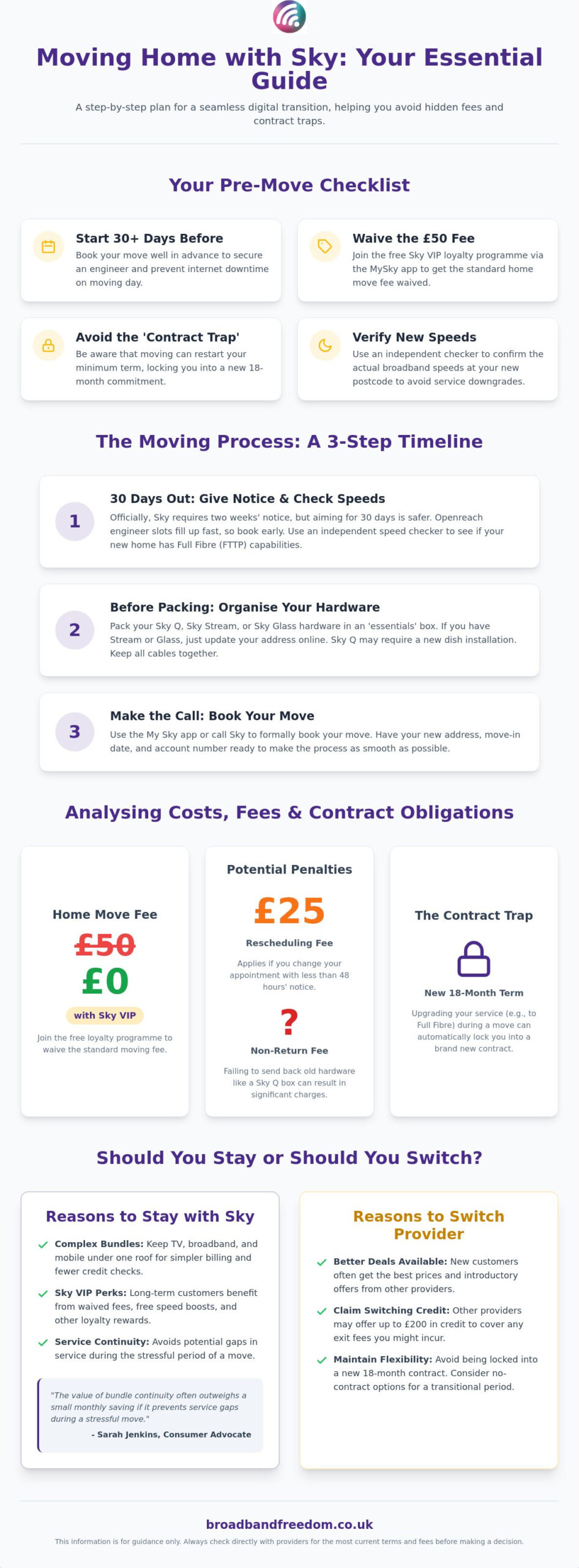
It’s time to take control of your transition. This guide reveals how to master the Sky moving process, from bypassing the standard £50 moving fee via the Sky VIP programme to navigating the notice period for a seamless switch. You’ll learn how to avoid £25 late-cancellation charges whilst determining if switching providers could save you money based on Ofcom switching data and official Sky moving documentation. Whether you’re transferring Full Fibre or Sky Glass, we’ll ensure your move is completely frictionless.
Key Takeaways
- Start your sky moving home request at least 30 days before your move date to secure engineer availability and prevent internet downtime.
- Learn how to waive the standard £50 home move fee by joining the free Sky VIP loyalty programme via the MySky app.
- Identify the “contract trap” where moving house can inadvertently restart your minimum term, locking you into a new 18-month commitment.
- Compare your current deal against new customer offers elsewhere to see if you could claim up to £200 in switching credit from a different provider.
- Verify the actual broadband speeds at your new postcode using an independent checker to ensure your service hasn’t been downgraded.
Sky Moving Home: A Comprehensive Step-by-Step Transition Guide
Moving house is stressful enough without losing your connection. To manage your sky moving home transition effectively, start by verifying what speeds are actually available at your new postcode. Don’t rely solely on provider promises; use an independent checker to see if you’re moving into a Full Fibre (FTTP) area. This ensures you won’t be disappointed by a sudden drop in bandwidth on move-in day. If the new property lacks the right infrastructure, you might need to compare broadband deals to find a better fit.
The 30-Day Countdown to Your Move
Whilst Sky officially requires two weeks’ notice, aiming for a 30-day window is far safer. Most UK broadband services rely on the Openreach network, and engineer slots for new installations or dish alignments fill up quickly. For a deeper Sky Broadband background, it’s useful to know they share infrastructure with other providers, meaning you’re competing for the same technician appointments. Have your new address, move-in date, and account number ready before calling or using the My Sky app.
Organising Your Hardware and Infrastructure
Pack your Sky Q or Sky Stream hardware into a dedicated “essentials” box. If you’re a Sky Stream or Sky Glass user, you don’t need a formal sky moving home booking; just update your address and plug it in. Sky Q customers usually require a satellite dish installation. Check if your new home has an existing dish or an Optical Network Terminal (ONT) box. If you find an ONT, you’ve hit the jackpot for speed. Keep all cables together to avoid a frantic search whilst unpacking.
Analysing Costs, Fees, and Contractual Obligations for Your Move
Moving house often reveals costs you didn’t anticipate. While Sky aims for a smooth transition, a standard sky moving home request usually carries a £50 fee. This charge covers the administrative work and potential engineer visits required to set up your new connection. You can bypass this expense entirely by joining the Sky VIP loyalty programme through the My Sky app before you book. It’s a free service that rewards customers, making it a savvy move for any budget-conscious household. For those looking to manage the broader financial aspects of their move, Dezrez Mortgages & Protection provides expert guidance on mortgages and insurance for home buyers and investors.
Sky Moving Fees and Potential Savings
Beyond the initial setup, watch out for the £25 penalty if you reschedule your appointment with less than 48 hours’ notice. Understanding your contract cancellation rights is vital if you discover that Sky cannot provide the same service level at your new property. Ofcom reports suggest that many UK consumers lose out by not auditing their contracts during a move. Always check if you’re being charged for an engineer visit when a simple self-installation would suffice.
Impact on Your Existing Contract and Bundle
The biggest risk during a sky moving home process is the “contract trap”. Generally, your existing agreement carries over to the new address with the same end date. However, if you choose to upgrade to Full Fibre or switch from a satellite dish to Sky Stream, Sky will likely require a brand new 18-month minimum term. If you aren’t ready for a long-term commitment, it might be better to compare the latest broadband deals before signing anything new. Don’t forget to return any old hardware; failing to send back a Sky Q box can result in significant non-return fees.
The Essential Stay vs Switch Comparison for Sky Customers
Moving house provides a natural audit point for your digital services. While a sky moving home request is the path of least resistance, it isn’t always the most cost-effective choice. If your move-in date is fluid, consider no contract broadband to maintain flexibility without long-term lock-ins during your transition.
When Staying with Sky Makes Most Sense
Staying with Sky is often the most pragmatic choice if you have a complex bundle. Maintaining your TV, broadband, and mobile services under one roof simplifies billing and avoids multiple credit checks. For long-term customers, the Sky VIP programme offers genuine value in 2026, such as free speed boosts or waived moving fees. As consumer advocate Sarah Jenkins explains, “The value of bundle continuity often outweighs a small monthly saving if it prevents service gaps during a stressful move.” However, you should still compare broadband deals to ensure your loyalty isn’t costing you a hidden premium.
When Switching Could Save You Hundreds
The UK market is built on the “New Customer Discount” phenomenon. By switching, you can often slash your monthly bill by 30% or more compared to out-of-contract Sky rates. According to Ofcom’s guidance on switching, the process is now simpler than ever for most providers. If your new home has Full Fibre (FTTP) from an alternative network provider, you could secure significantly faster speeds for a lower price than your current Sky package.
Leveraging Switching Credit and Market Benchmarks
Many competitors now offer up to £200 in “switching credit” to cover any early termination charges Sky might levy. Use our Sky broadband deals 2026 guide to benchmark your current costs against market averages. Data from Which? regarding annual price rises confirms that switching remains the most effective way to combat inflation. Compare the latest broadband deals today to find a package that fits your new home and your budget.
Finalising Your Connection and Optimising Post-Move Performance
Once your hardware is unpacked, the real work of digital optimisation begins. Perform a broadband speed test immediately upon activation. This establishes a vital baseline to ensure you’re receiving the specific rates promised during your sky moving home transition. Establishing this baseline is critical for holding your provider accountable to their speed guarantees and ensuring your line is performing as expected from day one.
Strategic Router Placement and Billing Updates
Position your router in a central, unobstructed location to maximise WiFi coverage amongst thick walls. Avoid placing it behind the TV or inside a metal cabinet, as these materials significantly degrade signal strength. Finally, update your billing address for Sky Mobile and associated services. Check your first post-move bill carefully for any unexpected one-off charges related to your sky moving home request to ensure your VIP waivers have been applied correctly.
Troubleshooting Common Activation Issues
Don’t worry if speeds aren’t perfect on day one. Sky uses Dynamic Line Management (DLM) to stabilise your connection. During this 10-day period, speeds fluctuate whilst the system tests line profiles. Network technician Mark Thompson advises, “Most post-move complaints stem from this stabilisation period rather than a faulty line.” If your Sky Glass puck refuses to connect, perform a manual factory reset. Official Sky setup guides confirm a wired Ethernet connection is best for the initial handshake.
Future-Proofing Your New Home Connection
A house move is the perfect moment to audit your digital infrastructure. If your new postcode has recently gained access to the Openreach FTTP network, upgrading is a savvy choice. Use our full fibre broadband checker for a quick availability scan. According to Ofcom’s infrastructure reports, Full Fibre provides significantly higher reliability than copper-based alternatives. This ensures your home is ready for 4K streaming and intensive remote working without future service interruptions.
Take Control of Your Digital Transition
Your sky moving home journey doesn’t have to be a source of stress or hidden expenses. By auditing your current contract and checking for Full Fibre availability at your new postcode, you can ensure your digital life is upgraded alongside your physical move. The most successful movers are those who treat their relocation as a natural break to reassess their service requirements rather than just a simple transfer of old habits.
Don’t let the convenience of a standard transfer blind you to potential savings elsewhere. You can compare the latest broadband deals to see if you can save before your move in just seconds. Our platform allows you to search over 30 UK providers and offers expert advice on avoiding mid-contract price hikes. With daily updated 2026 broadband offers, you’ll have the transparency needed to make an informed choice that suits your new lifestyle and budget.
Moving is a fresh start, so make sure your internet connection reflects that. Whether you stay with Sky or find a better deal elsewhere, you now have the tools to avoid downtime and unnecessary fees. You’ve got this, and we’re here to help you find the perfect connection for your new front door.
Frequently Asked Questions
How much does Sky charge for moving home in 2026?
Sky typically charges a standard £50 fee for a home move. This cost covers the administrative work and engineer appointments required to get your new property connected. You can bypass this charge entirely by joining the free Sky VIP loyalty programme via the MySky app before booking your move. Be careful with your schedule; cancelling or changing your appointment with less than 48 hours’ notice results in a £25 penalty fee.
Can I take my Sky dish with me to my new house?
You should leave your existing satellite dish at your old property when you move. Sky provides a new dish installation as part of the sky moving home service if your package requires one. If you have transitioned to Sky Stream or Sky Glass, you won’t need a dish at all, as these services function entirely over your broadband connection. Simply pack your puck or TV and plug it into the router at your new address.
What happens if I move to a house that cannot get Sky?
You can usually cancel your contract without paying early termination fees if Sky is unable to provide service at your new postcode. While the Openreach network covers the vast majority of the UK, some specific buildings or remote locations may lack the necessary infrastructure. You will need to provide proof of your new address to Sky’s moving team to trigger this “no-service” cancellation clause and avoid being penalised for ending your term early.
Will I get a new contract if I move my Sky services?
Your existing contract usually carries over to your new home with the same end date. A new 18-month minimum term is typically only required if you choose to upgrade your broadband speed or switch to a different hardware platform, such as moving from Sky Q to Sky Stream. If you keep your current bundle exactly as it is, your contractual obligations shouldn’t change. Always ask the representative to confirm your contract status during the booking process.
How long does it take for Sky to be installed at a new property?
Sky requires a minimum of two weeks’ notice to organise a sky moving home transition. This timeframe allows for the coordination of Openreach engineer slots and the administrative activation of your new line. During peak moving seasons, these appointments can fill up quickly, so it’s safer to provide 30 days’ notice where possible. If your new home already has an active Sky connection from a previous tenant, you might be eligible for a faster self-installation option.

Article by
Elaine Lang
Elaine has over 20 years across Marketing, Communications and Public Relations in the UK. She has worked across large UK corporations, including Commercial Banks and Airports, to online consumer finance and technology solutions. Elaine has post graduate qualifications in Marketing from the Chartered Institute of Marketing (CIM) and the Industry of Direct Marketing (IDM). She is a lifelong feline fan, sharing her home with around 4-6 cats for many years. This of course can be a challenge when trying to work at home, as they like to try to help!