The Ultimate First Time Broadband User Guide for 2026

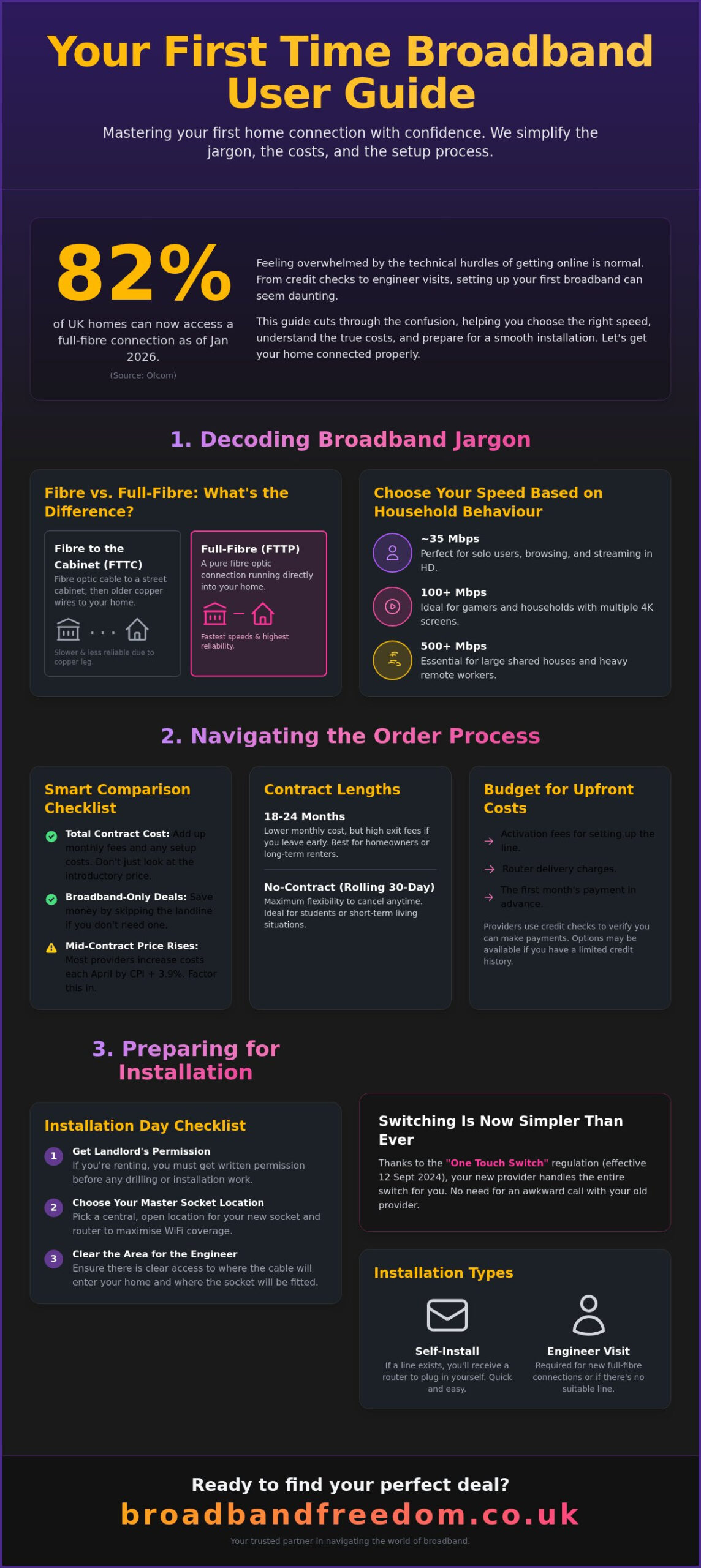
82% of UK homes now have access to full-fibre broadband as of January 2026, yet millions of people still feel overwhelmed by the technical hurdles of getting online for the first time. It’s completely normal to feel anxious about credit checks or the thought of an engineer drilling holes in your walls. You want a connection that just works without hidden costs or confusing contracts. This first time broadband user guide helps you master the transition to your first home connection with total confidence.
According to Ofcom’s May 2026 report, gigabit-capable broadband now reaches 89% of UK households, offering more choice than ever before. As industry analysts at Ofcom note, “The transition to full fibre is a critical step in modernising UK infrastructure,” and we’re here to help you take that step. We’ll show you how to pick the right speed for your lifestyle and optimise your WiFi network effectively. Since the “One Touch Switch” regulation came into effect on 12 September 2024, as detailed in official Ofcom guidance, moving between providers is simpler than it’s ever been. You’ll learn how to manage this process, avoid equipment return fees, and secure a deal that fits your budget. Let’s get your home connected properly.
Key Takeaways
- Learn to distinguish between different connection types and find out why full-fibre is now available to the vast majority of UK premises.
- Use our first time broadband user guide to calculate the true cost of your contract and explore the benefits of landline-free, broadband-only deals.
- Organise your installation day with a practical checklist covering landlord permissions, socket placement, and the difference between self-install and engineer visits.
- Optimise your digital security and speed by mastering router settings and managing household bandwidth for a lag-free experience.
Decoding Broadband Jargon: Finding Your Perfect Connection
Broadband acts as the digital foundation for your home. It’s essentially a permanent, high-speed connection that lets you access the internet without tying up a phone line. If you’re asking what is broadband?, think of it as the invisible pipeline delivering everything from Netflix to work emails. This first time broadband user guide is here to simplify the jargon so you can make an informed choice. According to Ofcom data from January 2026, full-fibre broadband is now available to 82% of UK homes. This means most people can access the fastest and most reliable speeds available.
You’ll often see Mbps and GB mentioned in contracts. Think of Mbps (megabits per second) as the width of your kitchen tap; a wider tap lets more water out at once, making downloads faster. GB (gigabytes) is the bucket you’re filling. Whilst most modern plans offer “unlimited” data, some legacy ADSL broadband deals might still have caps. Always check for unlimited data to avoid unexpected charges.
Fibre vs Full Fibre: What Do You Actually Need?
The difference lies in the cables. Fibre to the Cabinet (FTTC) uses fibre to your street, then old copper wires to your door. Full Fibre (FTTP) runs fibre directly into your house. Connectivity consultant Sarah Jenkins notes: “Full fibre is significantly more reliable because it removes the interference often found in ageing copper networks.” Choose your speed based on your household behaviour:
- 35Mbps: Perfect for solo users who browse and stream in HD.
- 100Mbps+: Ideal for gamers and households with multiple 4K screens.
- 500Mbps+: Necessary for large shared houses or heavy remote workers.
Understanding Download and Upload Speeds
Navigating the Order Process: From Comparison to Contract
Compare deals by looking at the total cost over the whole term, not just the monthly teaser rate. This first time broadband user guide suggests adding up activation fees and monthly payments to see the true value. Broadband Freedom acts as your savvy facilitator here; we do the heavy lifting by filtering options so you don’t have to. When learning how to choose a broadband provider, remember that many modern households no longer need a landline. Choosing a “Broadband Only” deal can save you money and simplify your setup. Be wary of mid-contract price hikes; most UK providers increase costs every April by the Consumer Price Index (CPI) plus 3.9%.
Choosing the Right Contract Length and Terms
Many providers offer 18 or 24-month terms. These usually have lower monthly costs but less flexibility. If you’re a student or renting on a short lease, no contract broadband deals might be a better fit. These rolling monthly plans let you move house without the sting of exit fees. Exit fees are the most common frustration for new users. They apply if you cancel before your term ends, often costing significant sums. Before you sign, compare broadband deals to ensure the term length matches your living situation.
Credit Checks and Upfront Costs for New Users
Don’t let credit checks cause anxiety. Providers use them to ensure you can manage monthly payments, but options exist even if you have a “thin” credit file as a young person. If a standard check fails, some providers may ask for a larger upfront deposit instead of a flat rejection. You should also budget for initial costs. These typically include:
- Activation fees for setting up the line.
- Router delivery charges.
- The first month’s payment in advance.
Knowing your rights is vital. Check the Ofcom guidance on consumer rights and contracts to understand how price rises and switching work in 2026. This transparency ensures you aren’t caught out by hidden fees whilst trying to get connected.
Preparing for Your Broadband Installation Day
Different broadband providers handle setup in two ways: self-install or engineer visits. If you’re moving into a property that already has a working line, you might just receive a box in the post. However, for most people following this first time broadband user guide, a professional visit is necessary to ensure everything is wired correctly. Before the day arrives, make sure your power sockets are accessible. If you’re renting, you must get written permission from your landlord for any drilling. Installation day is about preparation. Remember that your service might not go live the moment the engineer leaves. Most providers have an “activation window” that lasts until midnight.
FTTP vs Standard Installation: What to Expect
The physical work varies depending on the technology. Full Fibre (FTTP) requires a small hole in an external wall to bring the fibre optic cable inside. This cable connects to a small box called an Optical Network Terminal (ONT). Standard fibre usually uses existing telephone sockets, making it less invasive. Use our Full Fibre Broadband Checker to see which installation type applies to your home. Knowing the tech beforehand helps you determine your internet speed needs and prepare the space accordingly.
Essential Hardware and Router Placement Tips
Your router is the central hub that organises your home data traffic. To get the best signal, follow the “Golden Rule” and keep it in the open. Don’t hide it in a cupboard or behind the TV. One installation engineer we spoke with suggests: “Always aim for the geometric centre of the home to minimise signal drop-outs in distant rooms.” Avoid placing it near microwaves or large fish tanks, as these can block the signal. If you haven’t picked a provider yet, compare broadband deals now to find one that includes high-quality hardware. This ensures your home network stays fast and reliable from day one.
With your router correctly placed and your connection live, you can turn your attention to the aesthetics of your home; read more about First4Frames Gallery and how they can help you display fine art or personal photos with professional bespoke framing.
Optimising Your Connection and Staying Safe Online
Your first task is simple: change the default WiFi password and admin login immediately. Most routers come with generic credentials that are easy for others to guess. Creating a unique, strong password ensures your new connection remains private. This first time broadband user guide recommends using a mix of letters, numbers, and symbols to keep your data secure. Managing your bandwidth is the next step. Every device you connect, from your smartphone to your smart TV, takes a slice of your speed. If too many devices are active at once, your connection will feel sluggish.
ONS reports indicate that over 40% of the UK workforce continues to work remotely at least part-time in 2026, significantly increasing the demand for reliable home bandwidth. If you live in a larger property, you might find that the signal doesn’t reach every corner. Consider using WiFi Extenders or a Mesh System to eliminate dead zones. These devices work together to blanket your home in a consistent signal. This ensures you can work or stream from any room without frustrating interruptions or signal drops.
Securing Your Network and Managing Devices
Set up a “Guest Network” for visitors. This allows friends to get online without you having to share your primary password. It also keeps their devices isolated from your main home network and personal data. For stationary devices like games consoles or home office PCs, use a wired Ethernet connection. This provides a more stable and faster link than WiFi. You can find more expert advice in the National Cyber Security Centre (NCSC) guide on securing home routers. Wired connections are particularly useful for data-heavy tasks whilst others are using the WiFi.
Troubleshooting Common First-Time Connection Issues
If your internet drops out, follow the “turn it off and on again” rule. Power-cycling your router solves 90% of initial connection issues by clearing the device’s temporary memory. Simply unplug it for thirty seconds and plug it back in. If the problem persists, check if the issue lies with your provider or your specific device. You can check your current internet speed to see if you are receiving the service you paid for. Remember that UK law mandates a 14-day “cooling-off period” for new contracts. If the service doesn’t meet your expectations, you can compare broadband deals again and switch without penalty within this window.
Take Control of Your Home Connection
You now have the tools to navigate the UK’s digital landscape with total confidence. By understanding the difference between standard and full-fibre technology, you’ve already cleared the biggest technical hurdle. This first time broadband user guide has shown you how to decode industry jargon, prepare for a smooth installation day, and secure your network against common threats. Focus on your specific lifestyle requirements, whether that’s a high-speed package for 4K streaming or a flexible, no-contract option for a temporary rental.
Broadband Freedom acts as your expert facilitator by providing a transparent comparison of over 50 UK providers. We specialise in identifying flexible plans and uncovering hidden costs so you don’t have to perform the heavy lifting yourself. Don’t let the perceived complexity of the industry delay your digital independence. Take the final step toward a faster home network and find your perfect first-time broadband deal with Broadband Freedom today. Your ideal connection is ready when you are.
Frequently Asked Questions
Do I need a landline to get broadband for the first time?
No, you don’t need a traditional landline to get connected in 2026. Most modern connections, particularly Full Fibre (FTTP), operate entirely independently of the old copper telephone network. This first time broadband user guide recommends looking for “Broadband Only” deals if you don’t plan on using a home phone. Choosing these packages often reduces your monthly costs and simplifies the installation process since there’s no need to activate a voice service.
How long does it typically take to get broadband installed?
Most providers aim to get you online within 10 to 14 days of your order. This period allows time for the provider to ship your router and schedule an engineer visit if your property requires a new physical connection. If your home has been connected to the same network recently, you might be able to use a self-install kit. This can sometimes reduce the waiting time to less than a week, depending on hardware delivery speeds.
Can I get broadband if I have a bad credit score or no history?
You can certainly secure a connection even if you have a “thin” credit file or a low score. Many providers offer specialised deals or no-contract options that don’t require a traditional hard credit check. Some companies may ask for a small upfront payment or a deposit to offset the risk, but this ensures you aren’t excluded from essential internet services. Focus on providers that advertise flexible terms to find the best fit for your situation.
What is the difference between a router and a modem?
A modem brings the internet signal into your home from your provider, whilst a router shares that signal amongst your various devices. In 2026, almost all UK providers supply a single “hub” that performs both tasks in one box. This integrated hardware makes your initial setup much easier. Understanding this helps when you’re following a first time broadband user guide, as it simplifies the cabling required to get your WiFi network running.
Will I have to pay an installation fee as a new customer?
Installation fees vary significantly between providers and depend on the existing technology at your address. Many companies offer “free activation” to attract new users, but you might still face a small charge for router delivery. If your property has never had fibre or full-fibre installed, an engineer fee might apply to cover the cost of the physical work. Always check the key facts sheet of your contract to see these initial costs before you commit.

Article by
Elaine Lang
Elaine has over 20 years’ experience across Marketing, Communications and Public Relations in the UK. She has worked for large UK corporations, including commercial banks and airports, as well as online consumer finance and technology solutions. Elaine holds postgraduate qualifications in Marketing from the Chartered Institute of Marketing (CIM) and the Institute of Direct Marketing (IDM). She is a lifelong feline enthusiast, having shared her home with around 4-6 cats for many years. This, of course, can be a challenge when trying to work from home, as they do like to try and help!