What Broadband Speed Do You Need? A Simple Guide

What if the “ultrafast” gigabit package you are paying for is actually just a monthly donation to your provider? It’s easy to feel pressured into expensive plans because you’re terrified of a buffering wheel during a vital work call or a family movie night. You want a connection that works, not a technical headache or a mid-contract price hike that drains your bank account. Figuring out what broadband size do you actually need shouldn’t require a degree in engineering or a tolerance for confusing technical jargon.
Stop Overpaying for Bandwidth
We’re here to help you regain control of your home connectivity and your monthly outgoings. This guide shows you how to calculate your ideal megabit requirements so you can stop overpaying for unnecessary bandwidth whilst ensuring a seamless connection for every device. We’ll examine current 2026 usage standards, including the 100 Mbps download benchmark set by regulators for modern households. You’ll finish with a clear figure to use when comparing deals, giving you the confidence to choose a plan that fits your lifestyle and budget perfectly.
Key Takeaways
- Understand how to measure your connection’s capacity using the “digital pipe” analogy to ensure your home handles peak-time demand without buffering.
- Identify your household’s specific digital habits to determine exactly what broadband size do you actually need for activities like 4K streaming and remote working.
- Avoid the common “gigabit trap” by matching your speed tier to your hardware’s actual capabilities and your family’s concurrent usage patterns.
- Use professional comparison strategies to filter through over 30 UK providers and find the most cost-effective deal for your property.
Understanding Broadband ‘Size’: Mbps, Bandwidth, and Connection Types
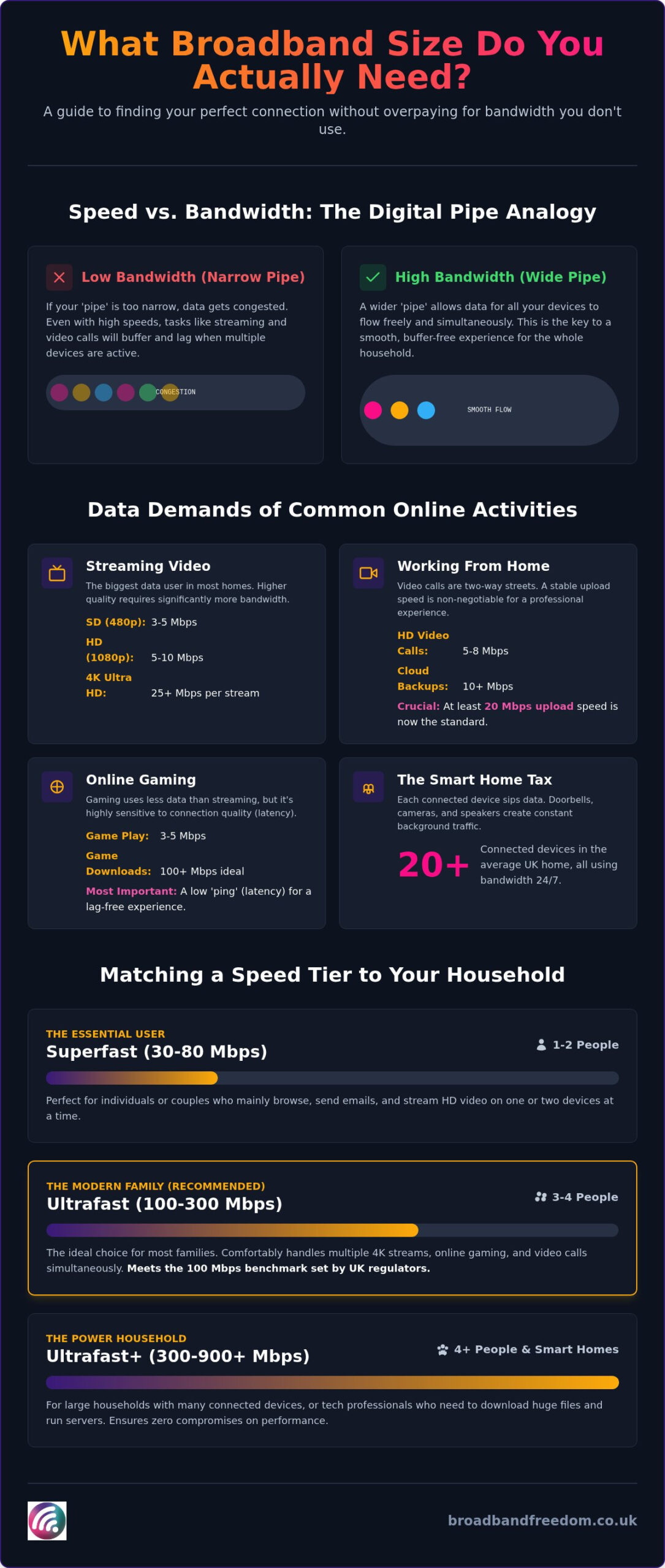
Think of your broadband as a digital pipe. The “size” represents how much data can flow through it at once. Whilst most providers market “speed,” they are actually selling capacity measured in Megabits per second (Mbps). Imagine a motorway. Speed is how fast the cars drive, but bandwidth is the number of lanes available. If ten cars squeeze into one lane, everything slows down, regardless of their individual top speeds.
Defining Bandwidth Capacity
Bandwidth is the maximum capacity of an internet connection to transmit data over a network in a given timeframe. It determines how much information can be sent and received simultaneously across all your connected devices without performance drops. Understanding Broadband means looking past marketing hype to see the actual volume your home can handle during peak hours.
The Difference Between Speed and Bandwidth
A high-speed connection can still suffer from buffering if the bandwidth is too narrow for your household. Full Fibre (FTTP) connections generally offer a more consistent size than older copper-based lines because they aren’t as prone to interference or distance-related degradation. Before you commit to a new plan, check their current internet speed to establish a baseline. This helps you determine what broadband size do you actually need.
Why Upload Size Matters in 2026
In 2026, your upload capacity is just as vital as your download speed. As remote working and cloud backups become standard, a weak upload link causes frozen video calls. Regulators like the FCC now define modern broadband as having at least 20 Mbps upload capacity to handle these two-way demands. Some Full Fibre providers now offer “symmetrical” speeds, where your upload size matches your download size, providing a truly balanced and professional digital experience. This high-performance connectivity is vital for creative businesses like Dark Falcon Productions, who require significant bandwidth for handling large-scale media assets.
Assessing Your Household Demand: From Streaming to Remote Working
Data Requirements for Common Online Activities
Online tasks have different appetites for data. Referencing the FCC’s Broadband Speed Guide helps set realistic expectations for your household. Consider these minimums for a single user:
- SD Streaming: 3-5 Mbps
- HD Streaming: 5-10 Mbps
- 4K Ultra HD: 25 Mbps per stream
Beyond standard video streaming, interactive services like ROXi also rely on your home’s bandwidth to deliver free music videos directly to your television, adding to the overall demand on your digital pipe.
Gamers should note that “size” isn’t everything. Stability and low latency (ping) matter more for a smooth experience. Multi-user homes often find the benefits of full fibre broadband provide the necessary headroom for these activities without lag.
The Smart Home Tax and Background Devices
Don’t forget the “Smart Home Tax.” Your router isn’t just serving laptops and phones; background devices like smart doorbells, security cameras, and smart speakers constantly sip data. Industry reports indicate the average UK home now manages over 20 connected devices. These small drains add up quickly. Knowing what broadband size do you actually need allows you to account for these “hidden” users that run in the background 24/7.
Calculating Your Household Buffer
Always add a “buffer” of 10-20 Mbps to your total calculation to account for these background devices. You can also manage device priority in your router’s “Quality of Service” (QoS) settings to ensure work laptops get first dibs on bandwidth. Once you have your total figure, you can compare the latest deals to find a plan that matches your actual lifestyle requirements.
Matching Speed Tiers to Your Lifestyle: Which Mbps is Right?
Providers often use confusing marketing labels like Superfast, Ultrafast, and Gigabit to describe their plans. In the UK, Superfast typically refers to speeds between 30 Mbps and 80 Mbps, whilst Ultrafast covers anything from 100 Mbps to 900 Mbps. Standard ADSL connections, which rely on old copper wires, rarely exceed 11 Mbps on average. These are now insufficient for modern life. Deciding what broadband size do you actually need starts with identifying which household archetype fits your daily digital habits. The FCC Broadband Speed Guide provides a solid baseline for these requirements.
Broadband Sizes for Individuals and Couples
If you live alone or as a couple with light habits, 30-70 Mbps is a reliable starting point. This capacity easily handles general browsing and HD streaming. If both of you work from home or enjoy 4K cinema nights, 100 Mbps provides the necessary headroom to prevent lag. Renters should look for no-contract broadband to maintain flexibility if they move. This ensures you don’t pay for speed you don’t use whilst keeping your monthly outgoings predictable. Knowing what broadband size do you actually need prevents overpaying for dormant capacity.
Requirements for Busy Families and Large Households
Large households or students in shared housing demand significantly more bandwidth. We recommend tiers between 250 Mbps and 500 Mbps for homes with multiple gamers and heavy streamers. A helpful rule of thumb is to aim for 50 Mbps per active high-intensity user. Gigabit (1,000 Mbps) plans are only worth the extra cost if you frequently download massive files or manage over 20 active devices simultaneously. Ready to find your perfect match? You can compare broadband deals today to filter for the exact size that suits your property.
How to Secure the Best Value Without Overpaying for Speed
Securing the best value means avoiding the “Gigabit Trap.” Many providers push 1,000 Mbps plans that households simply don’t need. If you pay for massive capacity but your router can’t distribute it, you’re wasting money. To find the sweet spot, compare broadband deals based on your actual usage profile. Check your contract end date now. Switching just before your term ends prevents the sharp out-of-contract price hikes common amongst major UK providers. Official Ofcom guidance confirms that out-of-contract customers often pay significantly more than those on active deals.
Hardware Limitations: Is Your Wi-Fi the Bottleneck?
Your hardware must match your plan. A gigabit plan is useless if your router uses older Wi-Fi standards. Whilst Wi-Fi 6 handles high speeds well, the emerging Wi-Fi 7 standard offers even greater throughput and lower latency. For high-demand tasks like gaming, use an Ethernet cable to bypass wireless interference. This ensures you get the full “size” you pay for. Technical reports from the IEEE suggest that physical obstructions can reduce wireless speeds by over 50%. Aligning your hardware with what broadband size do you actually need ensures peak performance.
The Final Checklist Before You Switch
Before committing, run a speed test and count your active devices. This gives you a data-driven view of your requirements. Use a Full Fibre comparison tool to see which providers offer the most stable connections at your property. Remember, the goal is finding a plan that fits your lifestyle, not your provider’s sales targets. By calculating what broadband size do you actually need, you gain the autonomy to choose a fair, transparent deal. This approach provides true broadband freedom and long-term financial relief.
Take Control of Your Home Connectivity
Finding the right connection is about matching your household’s peak-time behaviour to the correct capacity. You now understand that “speed” is really about the width of your digital pipe and how concurrent usage from streaming or background smart devices impacts performance. By identifying your specific archetype and avoiding the gigabit trap, you can stop overpaying for dormant bandwidth whilst ensuring your work calls and gaming sessions remain lag-free. Determining what broadband size do you actually need is the first step toward long-term savings and reliable performance.
Finding Your Perfect Match
We’ve done the heavy lifting by comparing deals from over 30 UK providers to help you find the best value. Our experts provide guidance on avoiding mid-contract price hikes and identify specialist flexible plans for students and renters. Don’t let technical jargon or provider targets dictate your monthly bills. Find the perfectly sized broadband deal for your home today and enjoy a connection that finally works on your terms. You’re now equipped to make a savvy, confident choice for your household.
Frequently Asked Questions
Is 100Mbps fast enough for a family of 4 in 2026?
Yes, it meets the current regulatory floor for modern connectivity. As FCC Chairwoman Jessica Rosenworcel stated during the 2024 standard update, “The move to 100/20 Mbps is about ensuring no one is left behind in a digital world.” For a family of four, this capacity provides enough headroom for simultaneous HD browsing and office tasks, though high-level gaming might require an upgrade to a larger tier.
What is the difference between Mbps and MBps?
Mbps (Megabits) measures the transfer rate of your connection, whilst MBps (Megabytes) measures file size. There are eight bits in one byte. Tech analyst James Sanders explains that “Confusing bits and bytes is the most common reason users miscalculate download times.” If you download a 1GB file on an 80Mbps line, it will take roughly 100 seconds to complete, rather than the 12.5 seconds users often expect.
Do I actually need Gigabit broadband for 4K streaming?
Gigabit is often overkill for streaming alone. Whilst 4K content is data-intensive, it rarely exceeds 30Mbps per stream. Industry expert Andrew Ferguson of thinkbroadband suggests that “Most households are better off with a stable 100-300Mbps connection than an inconsistent gigabit one.” Unless you are a professional content creator or manage a large student house, gigabit capacity is usually more about future-proofing than current daily necessity.
Can I change my broadband size mid-contract if it is too slow?
Most UK providers allow mid-term upgrades to larger packages without penalty. However, consumer advocates at Citizens Advice warn that “Upgrading mid-contract often resets your term, locking you in for a new 18 or 24-month period.” Always verify if the change impacts your contract length. If you are unsure what broadband size do you actually need long-term, flexible no-contract deals are a much safer choice for your household.
Why does my broadband feel slower than the speed I pay for?
This often stems from “contention ratios,” where you share local bandwidth with neighbours. Ofcom reports that “Actual speeds can vary significantly during peak evening hours when network demand is highest.” Additionally, your router’s placement is critical. If your signal must pass through thick walls or near heavy electronics, your effective speed will drop. Regularly testing your line helps verify if the issue is the provider or your home environment.

Article by
Elaine Lang
Elaine has over 20 years across Marketing, Communications and Public Relations in the UK. She has worked across large UK corporations, including Commercial Banks and Airports, to online consumer finance and technology solutions. Elaine has post graduate qualifications in Marketing from the Chartered Institute of Marketing (CIM) and the Industry of Direct Marketing (IDM). She is a lifelong feline fan, sharing her home with around 4-6 cats for many years. This of course can be a challenge when trying to work at home, as they like to try to help!